
Stage an SD-WAN Edge to Bastion Orchestrator
Before you stage a SD-WAN Edge to Bastion Orchestrator, you must first stage an Enterprise associated with the Edge to the Bastion Orchestrator.
- Ensure you have configured two Orchestrators as a Bastion pair. For steps, see Configure Bastion Orchestrator.
- Ensure you have set up the Production Orchestrator to support Bastion configurations. For steps, see Set up Production Orchestrator.
- Ensure you have created a Bastion profile with a minimum configuration in the Production Orchestrator, for the purpose of staging an Enterprise customer to Bastion Orchestrator.
To stage a SD-WAN Edge to Bastion Orchestrator, perform the following steps.
- In a Web browser, launch the Production Orchestrator and login as an Operator user.
- In the Operator portal, select .
Figure 1. Managing Customers 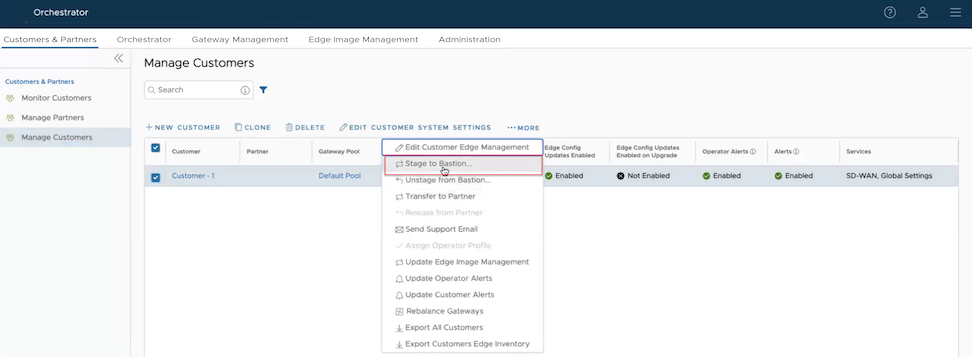
- Select an Enterprise customer to stage to Bastion Orchestrator and select . The Select Customer Profile pop-up window appears.
Figure 2. Configuring a Customer Profile 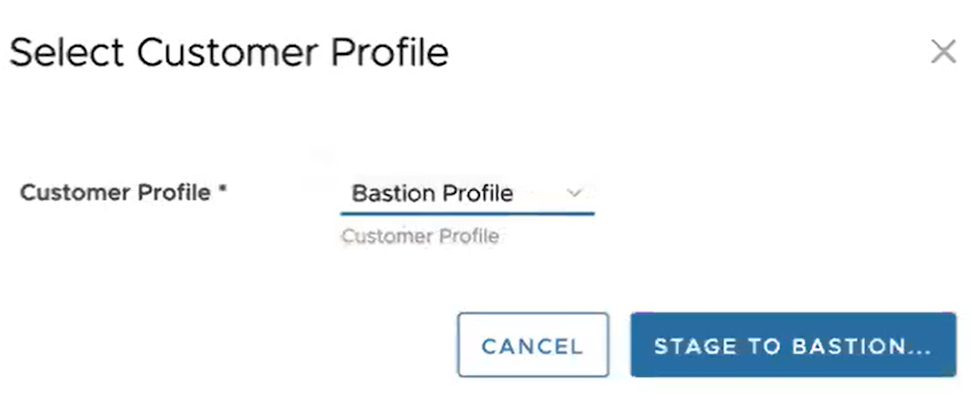
- From the Customer Profile drop-down menu, select a Bastion profile (minimum configuration profile created for staging purpose) to stage along with the customer and select Stage to Bastion. The selected Enterprise customer is staged along with the Bastion profile to the Bastion Orchestrator. Now, you can stage a SD-WAN Edge configured within the Enterprise customer to the Bastion Orchestrator
- To stage a SD-WAN Edge to the Bastion Orchestrator, select the Edge and click .
Figure 3. Staging an Edge to Bastion 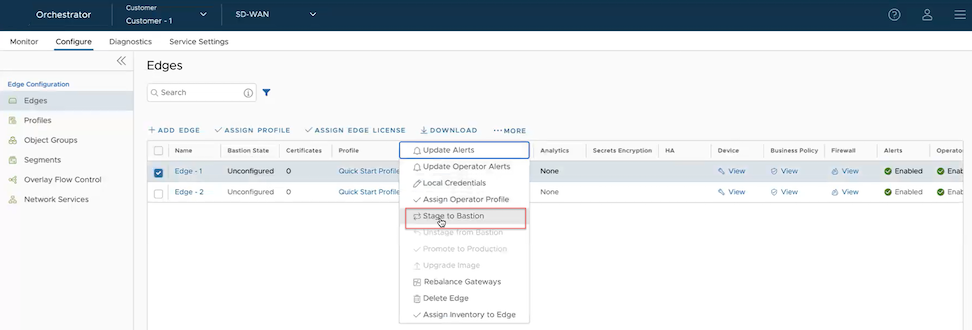
Only SD-WAN Edge that are not activated can be staged to the Bastion Orchestrator.
The selected Edge is staged to the Bastion Orchestrator. You can view the Bastion state and status of the Edge from the page. For additional information, see Monitor Bastion Orchestrator Configuration and Events.
- To remove a staged Edge from the Bastion Orchestrator, select .
The selected Edge is staged to the Bastion Orchestrator. You can view the staged Edges under Activity Monitor in the Bastion Orchestrator Configuration screen.