
Front Panel
This section displays the front panel of all switches covered by this guide.
Note: All devices are designed to fit into a 19” rack. The appearance may be different than those shown based on PSU and fan modules used.
The port speed groups support breakout configurations which could be EOS version dependent.
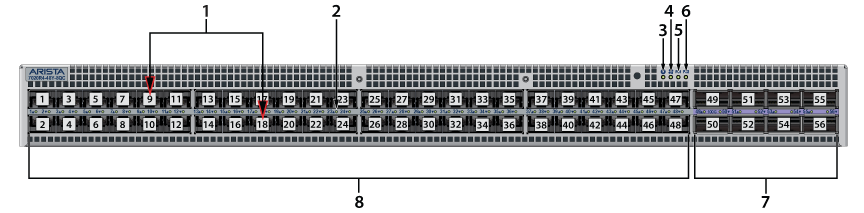
| 1 | Port numbers | 4 | Fan status LED | 7 | Ports (100G) - 49 to 56 |
| 2 | Port LED | 5 | Power supply 1 status LED | 8 | Ports (25G) - 1 to 48 |
| 3 | System status LED | 6 | Power supply 2 status LED |
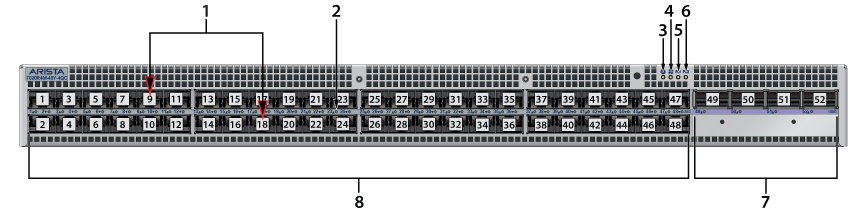
| 1 | Port numbers | 4 | Fan status LED | 7 | Ports (100G) - 49 to 52 |
| 2 | Port LED | 5 | Power supply 1 status LED | 8 | Ports (25G) - 1 to 48 |
| 3 | System status LED | 6 | Power supply 2 status LED |
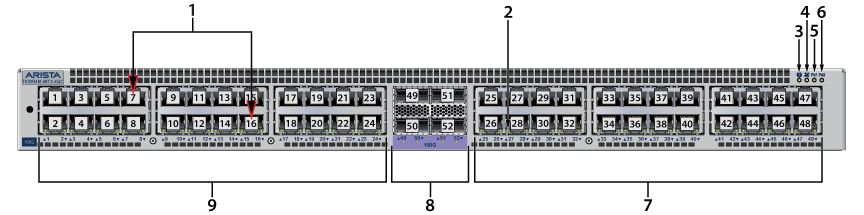
| 1 | Port numbers | 4 | Fan status LED | 7 | Ports (10G) - 25 to 48 |
| 2 | Port LED | 5 | Power supply 1 status LED | 8 | Ports (100G) - 49 to 52 |
| 3 | System status LED | 6 | Power supply 2 status LED | 9 | Ports (10G) - 1 to 24 |