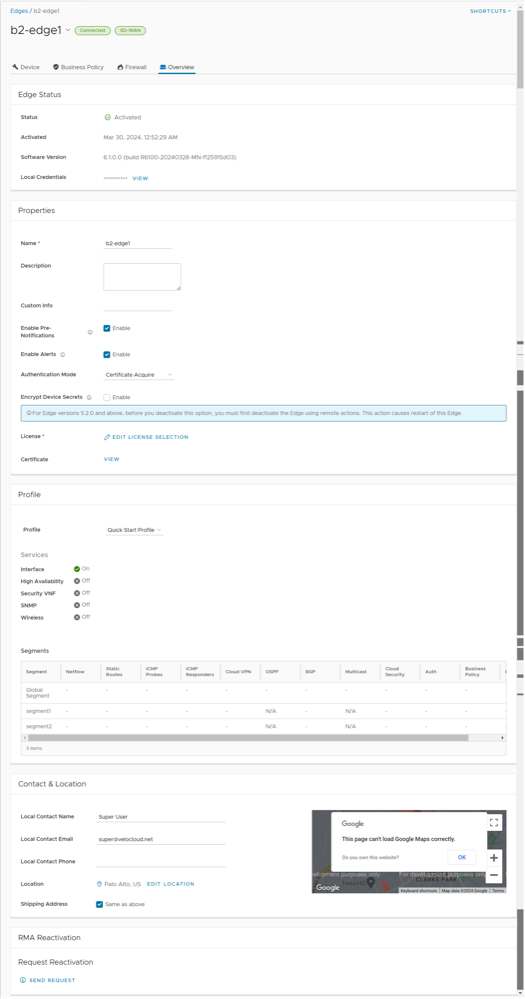
The Edge Overview tab displays Edge-specific information. You can update the information like name, description, contact information, associated Profile, and other details. In addition, you can perform other activities like sending Email to activate the Edge, requesting RMA Reactivation, and so on.
To access the Edge Overview page, perform the following steps:
In the SD-WAN service of the Enterprise portal, go to Configure > Edges.
The Edges page displays the existing Edges.
Select the link to an Edge or select the View link in the Device column of the Edge.
Select the Overview tab to view and modify properties of the selected Edge.
The existing details of the selected Edge are displayed. If required, you can modify the information.
Figure 1. Edge Overview Page
Note: The following details are displayed for an already activated Edge. If the Edge has not been activated yet, the Properties section displays an option to send Edge Activation Email. For additional information, see Send Edge Activation Email.
The Edge Overview tab allows you to view and modify the following fields:
Table 1. Edge Overview Option Descriptions
Option
Description
Edge Status
Status
Displays the status of the Edge:
Pending: The Edge has not been activated.
Activated: The Edge has been activated.
Reactivation Pending: A new or replaced Edge can be activated with the existing configuration. This status does not affect the functionality of the Edge.
Activated
Displays the date and time of Edge activation.
Software Version
Displays the software version and build number of the Edge.
Local Credentials
Displays the credentials for the local UI. These credentials are used to browse the Edge locally in a web-based session to access one of its active LAN interfaces. The local credentials include a default username, 'admin' and a randomly generated password.
Select Modify to update the credentials at the Edge level. The local credential is the username/randomly generated password that is required to browse the Edge locally in a web-based session to one of its active LAN interfaces.
Properties
Name
Displays the name of the Edge.
Description
Displays the description of the Edge.
Custom Info
Displays the custom information associated with the Edge.
Enable Pre-Notifications
By default, this option is enabled. This allows sending alert notifications for the Edge to the Operators. Operators can receive the alerts through Email, SMS, or SNMP traps. To configure the alerts, see Configure Alerts. You can also view the alerts by selecting Monitor > Alerts.
Enable Alerts
By default, this option is enabled. This allows sending alert notifications for the Edge to the Customers. Customers can receive the alerts through Email, SMS, or SNMP traps. To configure the alerts, see Configure Alerts. You can also view the alerts by selecting Monitor > Alerts.
Authentication Mode
Choose the mode of authentication from the drop-down menu:
Certificate Deactivated: Edge uses a pre-shared key mode of authentication.
Warning: This mode is not recommended for any customer deployments.
Certificate Acquire: This mode is selected by default and is recommended for all customer deployments. With Certificate Acquire mode, certificates are issued at the time of Edge activation and renewed automatically. The Orchestrator instructs the Edge to acquire a certificate from the certificate authority of the Orchestrator by generating a key pair and sending a certificate signing request to the Orchestrator. Once acquired, the Edge uses the certificate for authentication to the Orchestrator and for establishment of VCMP tunnels.
Note: After acquiring the certificate, the option can be updated to Certificate Required, if needed.
Certificate Required: This mode is only appropriate for customer enterprises that are "static". A static enterprise is defined as one where no more than a few new Edges are likely to be deployed and no new PKI oriented changes are anticipated.
Important:Certificate Required has no security advantages over Certificate Acquire. Both modes are equally secure and a customer using Certificate Required should do so only for the reasons outlined in this section.
Certificate Required mode means that no Edge heartbeats are accepted without a valid certificate.
CAUTION: Using this mode can cause Edge failures in cases where a customer is unaware of this strict enforcement.
With this mode, the Edge uses the PKI certificate. Operators can change the certificate renewal time window for Edges by editing the Orchestrator's System Properties. For additional information, contact your Operator.
Note: When an Edge certificate is revoked, the Edge is deactivated and needs to go through the activation process. The current QuickSec design checks certificate revocation list (CRL) time validity. The CRL time validity must match the current time of Edges for the CRL to have impact on new established connection. To implement this, ensure the Orchestrator time is updated properly to match with the date and time of the Edges.
Encrypt Device Secrets
Select the Enable check box to allow the Edge to encrypt the sensitive data across all platforms.
Note: For Edge versions 5.2.0 and above, before you deactivate this option, you must first deactivate the Edge using remote actions. This causes restart of the Edge.
License
Choose an Edge License from the available list. The list displays the licenses assigned to the Enterprise, by the Operator.
Certificates
Select View to display the certificate details. A pop-up window appears. You can also access this window from the Configure > Edges screen. For additional information, see the section Certificates in the same topic.
Profile
Profile
Displays the Profile assigned to the Edge, along with the Services and Segments configuration details.
You can modify the assigned profile by selecting a profile from the drop-down menu.
Note:
When switching to a different Profile, the Edge override configurations are not modified.
Due to push activation, an Edge staging Profile might be displayed. This is a new Edge which is not configured by a production Profile. In such cases, the Enterprise Admin must manually assign a profile from the drop-down menu.
While switching the Profiles, check the compatibility between a Customer-assigned Operator Profile and an Edge-assigned Enterprise Profile. For additional details, see the section Compatibility Matrix in the same topic.
Contact & Location
Local Contact Name
Displays the local contact's name associated with the Edge.
Local Contact Email
Displays the local contact's email address associated with the Edge.
Local Contact Phone
Displays the local contact's phone number associated with the Edge.
Location
Displays the existing location of the Edge. To update the location details, select Edit Location. A pop-up window appears. Enter the new location details and select Update.
Shipping Address
Select the check box Same as above if your shipping address is same as your Edge location. Otherwise, type the shipping contact name and set a location.
RMA Reactivation
You can initiate an RMA reactivation request to:
Replace an Edge due to a malfunction
Upgrade an Edge hardware model
Note: This option is only for activated Edges.
Request Reactivation
Select Send Request to generate a new activation key. The status of the Edge changes to Reactivation Pending mode.
Note: The reactivation key is valid for one month only.
Cancel Request
Select to cancel the RMA reactivation request. When you cancel the request, the status of the Edge changes to Activated mode.
Send Activation Email
Select to send an email with activation instructions to the Site Contact. This option does not activate the Edge, but initiates the activation process. A pop-up window appears with the Email details. You can modify the instructions and send the Email.
RMA Serial Number
Displays the serial number of the Edge to be activated. Optionally, you can enter the serial number of the Edge to be activated. This Edge replaces your current Edge for which you have requested the RMA reactivation.
Note: If the Serial Number and the Edge model do not match the Edge to be activated, then the activation fails.
RMA Model
Displays the model number of the Edge to be activated. This Edge replaces your current Edge for which you have requested the RMA reactivation.
Note:
In an event when the RMA reactivation request contains the serial number of the replacement device (optional), then this serial number must match to the current Edge, otherwise the activation fails.
If the Serial Number and the Edge model do not match the Edge to be activated, then the activation fails.
A warning message is displayed if the selected RMA model is not the same as the current Edge model. The Edge specific configuration settings and Profile overrides are removed on reactivation, but the statistics are still retained. It is advised to take a note of the Edge specific configuration settings, and then re-add those to the newly replaced Edge, once it is re-activated.
Update
Select to update the RMA Edge Attributes details.
Note: For detailed instruction on how to initiate a RMA Reactivation request to the Site Contact, see Send Edge Activation Email.
Certificates
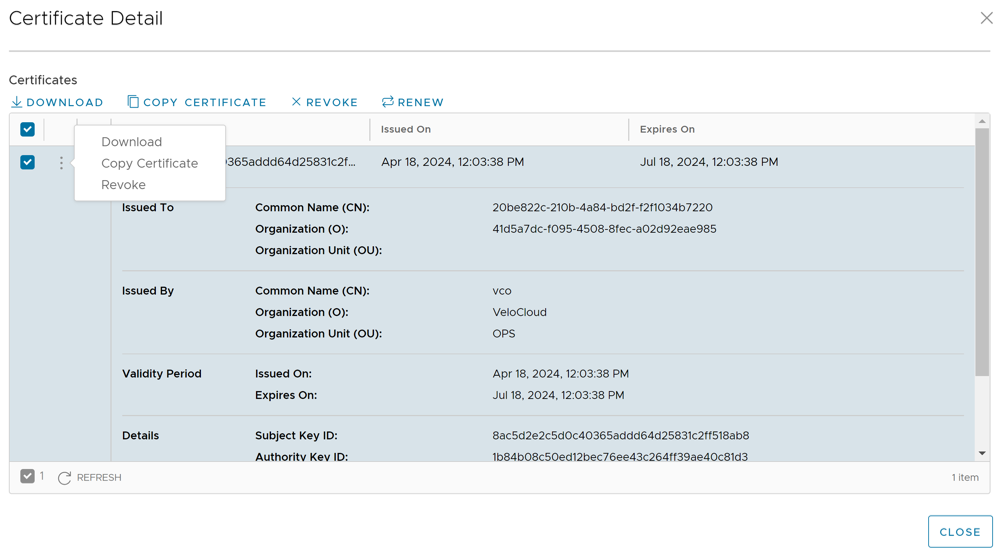
Selecting View displays a pop-up window as follows:
Figure 2. Certificate Detail
You can expand the certificate to view additional details. The following options are available on the screen:
Table 2. Certificate Details Option Descriptions
Option
Description
Download
Select to download the certificate in a CSV format.
Copy Certificate
Select and select this option to copy the certificate details on a clipboard for later use.
Revoke
Select to revoke the selected certificate. The Edge is deactivated when its certificate is revoked.
Renew
Select to renew the expired certificate. The Edge may experience some disruption when its certificate is renewed.
Note: For an HA pair, this action renews both active and standby Edge certificates.
Refresh
Select to reload the screen.
Close
Select to close the pop-up window.
Note: You can also access the Download, Copy Certificate, and Revoke options by selecting the vertical ellipsis next to the certificate check box.
After modifying the required settings, select Save Changes.
Select the Shortcuts option, available at the top right corner, to perform the following activities:
Table 3. Shortcuts Option Descriptions
Option
Description
Monitor
Navigates to the Monitoring tab of the selected Edge. For additional information, see Monitor Edges.
View Events
Displays the Events related to the selected Edge.
Remote Diagnostics
Enables to run the Remote Diagnostics tests for the selected Edge. For additional information, see Run Remote Diagnostics.
Generate Diagnostic Bundle
Allows to generate Diagnostic Bundle for the selected Edge. For additional information, see Diagnostic Bundles for Edges.
Remote Actions
Allows to perform remote actions for the selected Edge. For additional information, see Remote Actions.
View Profile
Navigates to the Profile page, that is associated with the selected Edge.
View Gateways
Displays the Gateways connected to the selected Edge.
Note: Only Operator users can view the Gateways. Enterprise Admin users cannot view the Gateways when they select this option.
Identifying a Device Model
Select the down arrow next to the device name to identify a model. A pop-up window will appear, which will show Edge and device model.
Note: The 5.1.0 release supports functionality to update Firmware as follows:
Firmware Platform images for 6X0 Edge device models and 3X00 Edge device models (3400/3800/3810)
Firmware Modem images for 510-LTE (Edge 510LTE-AE, Edge 510LTE-AP) and 610-LTE (Edge 610LTE-AM, Edge 61LTE-RW)
Factory images for all physical VeloCloud SD-WAN Edge devices
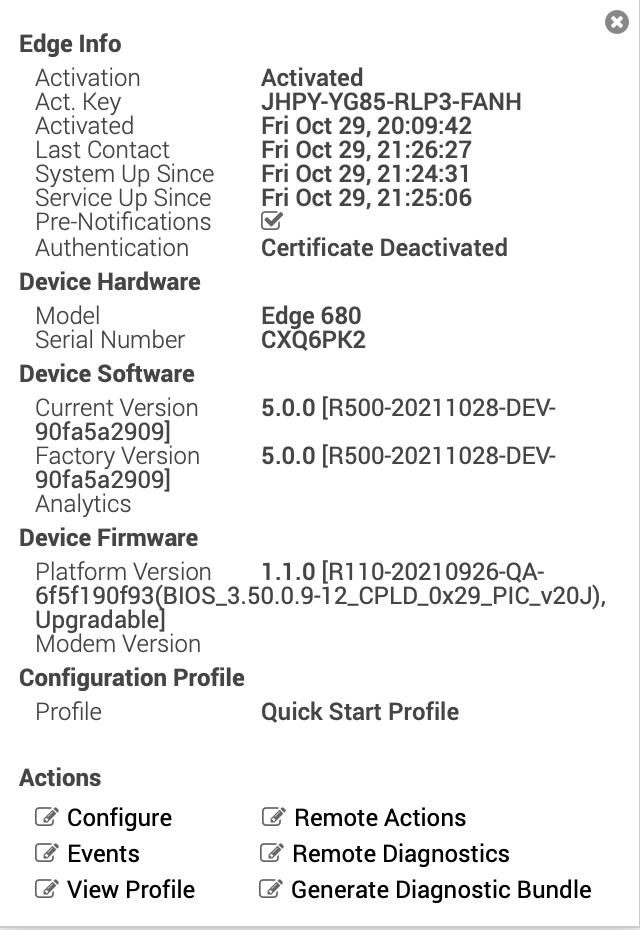
When you update Platform and/or Modem Firmware, it will show in the Edge Info details screen as follows. To access the Edge Info details screen, select an Edge. It will display the selected Edge. Then select the down arrow icon next to Edge's name.
Figure 3. Edge Information
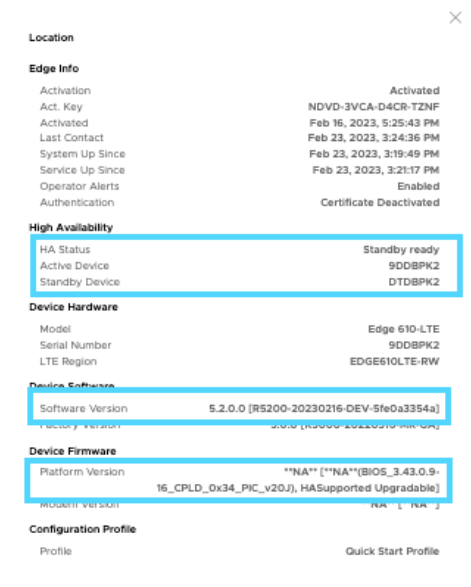
For the 5.2 release, updating the Factory image and Platform Firmware on HA (High-availability) SD-WAN Edges is supported. If the Factory image and/or Platform Firmware on HA was updated, it will show in the Edge Info details screen as shown below. To access the Edge Info details screen, select the down arrow icon next to the Edge's name.
Figure 4. Edge Information Detail
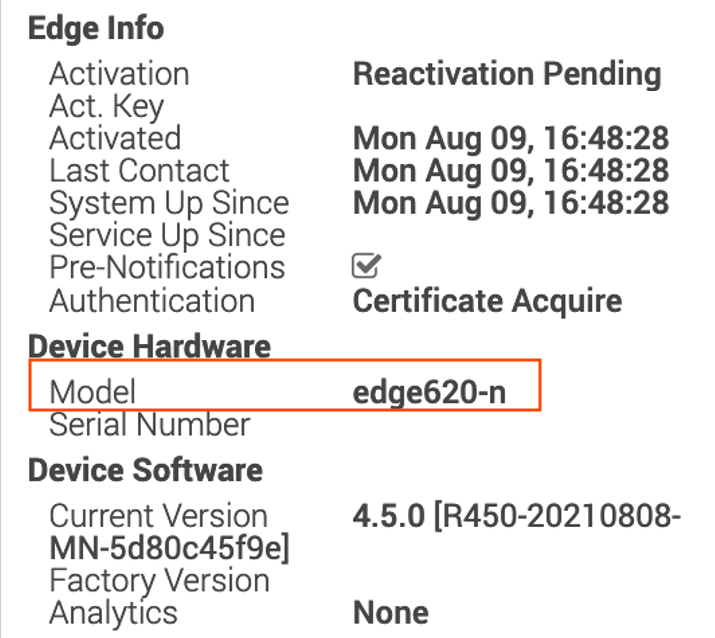
Note: A non-WiFi Edge model will contain a "-n" at the end of the model name.
Figure 5. Non-Wi-Fi Edge Model
You can modify the assigned profile by selecting a profile from the drop-down menu. For additional information, see the notes below.
Note:
Edge overrides are the changes to the inherited profile configurations at the Edge level. Edge additions are configurations that are not included in the profile, but are added to the selected Edge.
When switching to a different profile, the Edge override configurations are not modified.
Due to push activation, an Edge staging profile might be displayed. This is a new Edge which is not configured by a production profile. In such cases, the Enterprise admin must manually assign a profile from the drop-down menu.
While switching the profiles, check the compatibility between a customer-assigned Operator Profile and an Edge-assigned Enterprise Profile. See the table in the section below for the compatibility matrix.
Table 4. Compatibility Matrix
Customer Operator
Profile Type
Current Edge
Enterprise Profile
Selected Edge
Enterprise Profile
Result
Segment-based
Segment-based
Segment-based
No Change
Network-based
Network-based
Network-based
No Change
Segment-based
Network-based
Segment-based
The Edge configuration is converted to a Segment-based configuration. However, it is not delivered to the Edge until the Edge software image is updated to version 3.0 or later.
Network-based
Network-based
Segment-based
The Edge configuration is converted to a Segment-based configuration. However, it is not delivered to the Edge until the Edge software image is updated to version 3.0 or later.

 Note: The following details are displayed for an already activated Edge. If the Edge has not been activated yet, the Properties section displays an option to send Edge Activation Email. For additional information, see Send Edge Activation Email.