
Rear Panel
This section displays the rear panel of all switches this guide covers.
Note: Depending on the components used to populate the chassis, the appearance of a specific switch could be different.
Note: The illustrations show DCS-7800R4 switches. For earlier switches, the Fabric Cooling Module slot (FM6) is populated with a Fabric Module.
.png) |
Num | Description |
| 1 | ESD attachment point | |
| 2 | Chassis ground | |
| 3 | Fabric modules | |
| 4 | Fabric module screw | |
| 5 | Fabric module ejector lever | |
| 6 | Fabric cooling module (R4 switches) | |
| 7 | Orange Slots Fabric Modules |
.png) |
Num | Description |
| 1 | ESD attachment point | |
| 2 | Chassis ground | |
| 3 | Fabric modules Screw | |
| 4 | Fabric module ejector lever | |
| 5 | Frame ESD Attachment Point | |
| 6 | Ejector Release Latches | |
| 7 | Fabric Module Slot Numbers | |
| 8 | Fabric Module Screw |
.png) |
Num | Description |
| 1 | Fabric module Ejector Lever | |
| 2 | Ejector Release Latches | |
| 3 | Fabric Module Screws | |
| 4 | Chassis Grounding Pad / ESD Port | |
| 5 | Fabric Module Slot Numbers | |
| 6 | Fabric Module Screw |
Note: The DCS-7816 chassis does not support DCS-7800R4 switches.
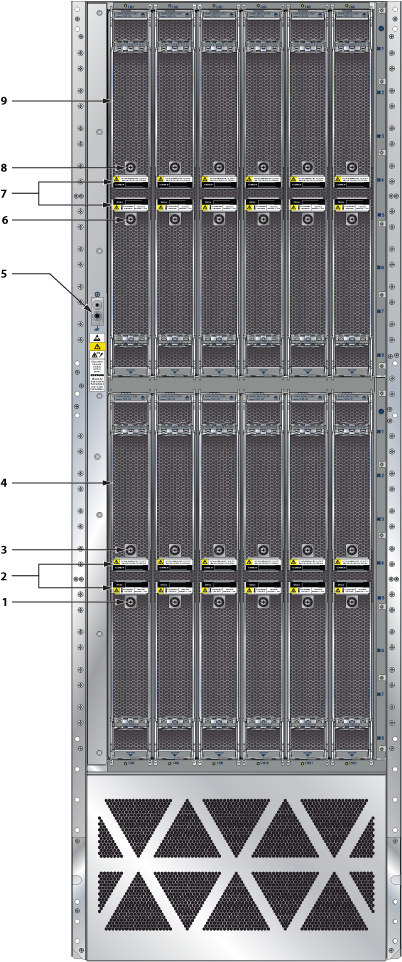 |
Num | Description |
| 1 | Fabric module | |
| 2 | Fabric module slot numbers | |
| 3 | Fabric module screw | |
| 4 | Fabric module handle | |
| 5 | Fabric module screw | |
| 6 | ESD attachment point | |
| 7 | Fabric module | |
| 8 | Fabric module screw | |
| 9 | Fabric module handle | |
| 10 | Fabric module screw |
.png) |
Num | Description |
| 1 | Fabric module | |
| 2 | Fabric module release button | |
| 3 | Fabric module ejector lever | |
| 4 | Fabric module slot numbers | |
| 5 | Fabric module ejector lever | |
| 6 | Fabric module release button | |
| 7 | Cover release |