Partner-level UI Changes in the New VeloCloud Orchestrator
The VeloCloud Orchestrator has moved and redesigned some features to fit the wider scope of the product and user interface (UI). The new UI has changed from a single product portal (only for SD-WAN) to a common management system that lets customers access multiple services in one place. The new UI navigation has adapted to allow access to multiple services within one shared header. The primary global header now has an Enterprise Applications (Services) drop-down menu that lists the various supported services. You can select and navigate to each service from this menu. Enterprise Global Settings is now located in the Enterprise Applications (Services) drop-down because it has features that are shared across services. These features include User Management, Authentication, Role Customization (now Roles and Service Permissions), Customer Configuration, and more.
This document discusses the changes in the Partner UI for some features. It also gives the reasons for these changes.
Monitor Partner Customers
The New UI has a Customers tab for Partners to easily monitor and manage their Customer views, including Monitor Partner Customers. This helps to organize the navigation better for Partners.
Table 1. Monitor Partner Customers
Classic Orchestrator Location
New Orchestrator Location
Partner > Monitor Partner Customers
Partner > Customers > Monitor Partner Customers
Figure 1. Monitor Partner Customers
Figure 2. Monitor Partner Customers
Manage Partner Customers
The New UI has a Customers tab for Partners to easily monitor and manage their Customer views, including Manage Partner Customers. This helps to organize the navigation better for Partners.
Table 2. Manage Partner Customers
Classic Orchestrator Location
New Orchestrator Location
Partner > Manage Partner Customers
Partner > Customers > Manage Partner Customers
Figure 3. Manage Partner Customers
Figure 4. Manage Partner Customers
Zero Touch Provisioning (ZTP)
We have improved the way you activate your Edges in the New UI. You no longer need to configure Zero Touch Provisioning (ZTP) in the Partner Settings. You can access the ZTP feature directly from the Edge Auto-Activation page. We have also renamed the Zero Touch Provisioning feature to Edge Auto-Activation, because it includes both the new automatic activation method and the original email activation method. You can choose either method from the Edge Configuration page.
Table 3. Zero Touch Provisioning (ZTP)
Classic Orchestrator Location
New Orchestrator Location
Partner > Zero Touch ProvisioningFigure 5. Zero Touch Provisioning
For 5.3.0 and earlier versions: Partner > Edge Management > Edge Auto-activationFigure 6. Edge Auto-activation
For 5.4.0 and later versions: Partner > Services > Edge Auto-activationFigure 7. Edge Auto-activation
Partner Events
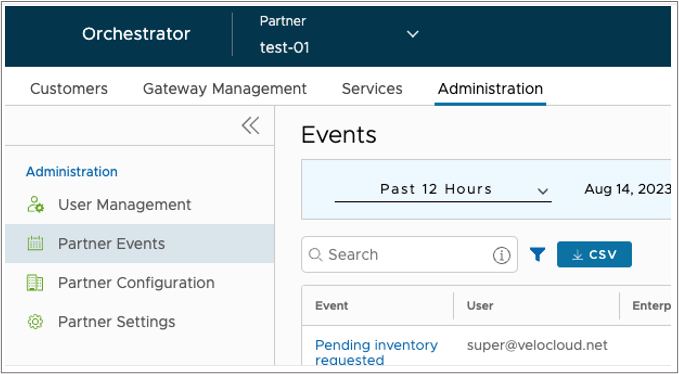
This feature has moved to a new location because the Classic Orchestrator UI did not have clear navigation and organization of pages. The New Orchestrator puts all the Partner administration-related features under the Administration tab.
Table 4. Partner Events
Classic Orchestrator Location
New Orchestrator Location
Partner > Partner Events
Partner > Administration > Partner Events
Figure 8. Partner Events
Figure 9. Partner Events
Partner Admins
This feature has moved to a new location because the Classic Orchestrator UI did not have clear navigation and organization of pages. The New Orchestrator puts all the Partner administration-related features under the Administration tab.
Table 5. Partner Administration
Classic Orchestrator Location
New Orchestrator Location
Partner > Partner Admins
Partner > Administration > User Management > Users
Figure 10. Partner Administration
Figure 11. Users
Role Customization (Now: Service Permissions)
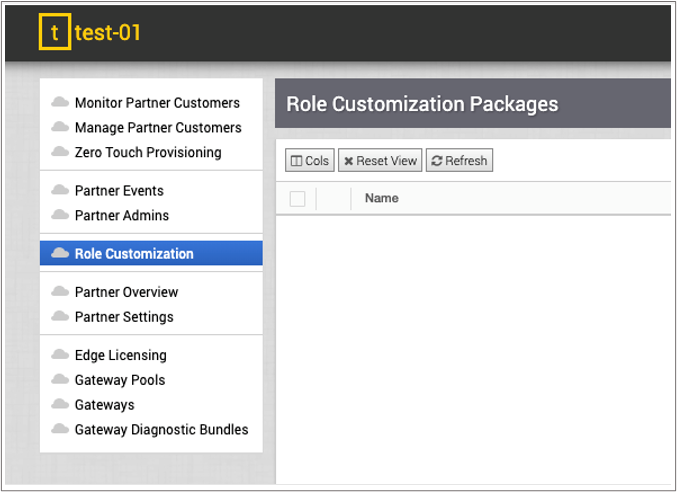
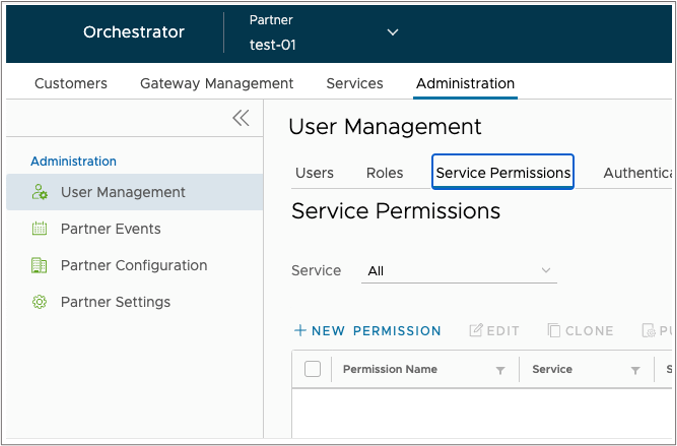
We have changed the name of the "Role Customization" feature to "Service Permissions". This is to make room for the new Role Builder feature that lets you create custom roles by combining different service permissions. Service Permissions is a more accurate name for the feature, as it allows you to adjust the access levels for each service.
Table 6. Role Customization
Classic Orchestrator Location
New Orchestrator Location
Partner > Role Customization
Partner > Administration > User Management > Service Permissions
Figure 12. Role Customization
Figure 13. Service Permissions
Partner Overview (Now: Partner Configuration)
We have changed the name of the Partner Overview feature to Partner Configuration. This is to make it consistent with the Customer Configuration page at the Enterprise level. Both features are similar, as they allow you to manage the settings and preferences for your Partners and Customers.
Table 7. Partner Overview
Classic Orchestrator Location
New Orchestrator Location
Partner > Partner Overview
Partner > Administration > Partner Configuration
Figure 14. Partner Overview
Figure 15. Partner Configuration
Partner Settings
We have moved the Partner Settings feature from the Classic Orchestrator UI to the Administration tab in the New Orchestrator UI. This is because the Partner Settings feature is related to the other Administration settings like User Management, Partner Events, and Partner Configuration.
Table 8. Partner Settings
Classic Orchestrator Location
New Orchestrator Location
Partner > Partner Settings
Partner > Administration > Partner Settings
Figure 16. Partner Settings
Figure 17. Partner Settings
Edge Licensing
We have moved the Edge Licensing feature from the Classic Orchestrator UI to the Edge Management tab (for Release 5.3.0 and earlier), and the Services tab (for Release 5.4.0 and later) in the New Orchestrator UI. This is because the Classic Orchestrator UI could not handle multiple services that need configuration at the Partner level. The Services tab allows you to manage different service settings, such as SD-WAN features. Edge Licensing and Edge Auto-activation are two examples of SD-WAN features that you can find under the Services tab.
Table 9. Edge Licensing
Classic Orchestrator Location
New Orchestrator Location
Partner > Edge LicensingFigure 18. Edge Licensing
For 5.3.0 and earlier versions: Partner > Edge Management > Edge LicensingFigure 19. Edge Licensing
For 5.4.0 and later versions: Partner > Services > Edge LicensingFigure 20. Edge Licensing
Gateway Pools
We have moved the Gateway Pools feature because the Classic Orchestrator UI had poor navigation and page layout. The New Orchestrator UI has an improved design that groups all Gateway related features under the Gateway Management tab.
Table 10. Gateway Pools
Classic Orchestrator Location
New Orchestrator Location
Partner > Gateway Pools
Partner > Gateway Management > Gateway Pools
Figure 21. Gateway Pools
Figure 22. Gateway Pools
Gateways
We have moved the Gateways feature because the Classic Orchestrator UI had poor navigation and page layout. The New Orchestrator UI has an improved design that groups all Gateway related features under the Gateway Management tab.
Table 11. Gateways
Classic Orchestrator Location
New Orchestrator Location
Partner > Gateways
Partner > Gateway Management > Gateways
Figure 23. Gateways
Figure 24. Gateways
Gateway Diagnostic Bundles
We have moved the Gateway Diagnostic Bundles feature because the Classic Orchestrator UI had poor navigation and page layout. The New Orchestrator UI has an improved design that groups all Gateway related features under the Gateway Management tab.