
Security Advisory 0136
Date: May 1, 2026
| Revision | Date | Changes |
|---|---|---|
| 1.0 | May 1, 2026 | Initial release |
| 1.1 | May 7, 2026 | Additional required configuration for exploitation information added |
| 1.2 | May 11, 2026 | Advisory updated with additional mitigations. |
The CVE-ID tracking this issue: CVE-2026-31431
CVSSv3.1 Base Score: 7.8 (CVSS:3.1/CVSS:3.1/AV:L/AC:L/PR:L/UI:N/S:U/C:H/I:H/A:H)
Common Weakness Enumeration: CWE-1288: Improper Validation of Consistency within Input
This vulnerability is being tracked by the following bugs:
BUG 1640641 (CloudVision Portal), BUG 1657079 (Velocloud Orchestrator), BUG 1657148 (Velocloud Gateway), BUG 1644638 (VeloCloud Edge), BUG 1656945 (CloudVision AGNI appliance), BUG PN47666 (Netvisor software)
Description
Arista Networks is providing this security update in response to a recent, publicly disclosed security vulnerability widely known as “Copy Fail”. Exploitation of this issue allows for an unprivileged local user to gain root access to a device by running a script or executable binary. Access to an environment where arbitrary code can be executed is required for this vulnerability to be exploitable.
This issue was reported externally and is also known as Copy Fail.
The external researchers website for this issue is https://copy.fail/.
Vulnerability Assessment
Affected Software
- 2024.2.0 and later releases in the 2024.x train
- 2025.1.0 and later releases in the 2025.x train
- 2026.1.0
- Release 6.4.x
- Release 6.1.x
- Release 5.2.x
- Release 6.4.X
- Release 6.2.0
- Release 6.1.x
- Release 5.2.x
- Release 6.4.0 and 6.4.1
- Release 6.2.0
- Release 6.1.x
- Release 5.2.x
- Release 5.0.x
- Release 4.5.x
- AGNI Physical Appliance DCA-AGNI-100
- Release P-2025.2.X
- Release P-2024.4.X
- All versions of Netvisor software 7.1.0HF7 and below
Affected Platforms
- CloudVision Portal, virtual appliance or physical appliance
- VeloCloud Orchestrator (Formerly VeloCloud Orchestrator by Broadcom)
- VeloCloud Gateway (Formerly VeloCloud Gateway by Broadcom)
- VeloCloud Edge (Formerly VeloCloud Edge by Broadcom)
- CloudVision AGNI - Virtual or physical appliance
- Arista NetVisor OS, Arista NetVisor UNUM, and Insight Analytics (Formerly Pluribus)
- Arista EOS-based products:
- 710 Series
- 720D Series
- 720XP/722XPM Series
- 750X Series
- 7010 Series
- 7010X Series
- 7020R Series
- 7130 Series running EOS
- 7150 Series
- 7160 Series
- 7170 Series
- 7050X/X2/X3/X4 Series
- 7060X/X2/X4/X5/X6 Series
- 7250X Series
- 7260X/X3 Series
- 7280E/R/R2/R3/R4 Series
- 7300X/X3 Series
- 7320X Series
- 7358X4 Series
- 7368X4 Series
- 7388X5 Series
- 7500E/R/R2/R3 Series
- 7800R3/R4 Series
- 7700R4 Series
- AWE 5000 Series
- AWE 7200R Series
- CloudEOS
- cEOS-lab
- vEOS-lab
- CloudVision eXchange, virtual or physical appliance
- Arista Wireless Access Points
- CloudVision CUE, virtual appliance or physical appliance
- CloudVision CUE cloud service delivery
- CloudVision as-a-Service
- Arista Network Detection and Response (NDR) Security Platform (Formerly Awake NDR)
- Arista 7130 Systems running MOS
- Arista Converged Cloud Fabric (formerly Big Switch BCF)
- Arista DANZ Monitoring Fabric (formerly Big Switch BMF)
- CloudVision AGNI - Cloud service delivery
- Arista Edge Threat Management - Arista NG Firewall and Arista Micro Edge (Formerly Untangle)
Required Configuration for Exploitation
CloudVision Portal
This vulnerability requires the ability to execute python scripts via the Change Control Management, Studios Configuration Management features within CloudVision. CloudVision Web GUI users possessing specific permissions may be capable of doing so which would allow them to exploit this vulnerability. This includes users assigned the "Network Admin" role or any custom roles configured with write permissions for executing change controls, studios, or custom actions.
- Go to Settings → Access Control → Roles.
- Review each role individually, specifically examining the Provisioning, and Studios categories.
- Identify roles that grant both Read and Write access to any of these categories - Action Execution, Change Control Management/Execution, Configlet Management (under Provisioning), Studios Configuration, Workspace Permissions (under Studios).
- Proceed to Settings → Access Control → Users.
- Use the filter or sort functions by role to determine which users are currently assigned to the identified roles.
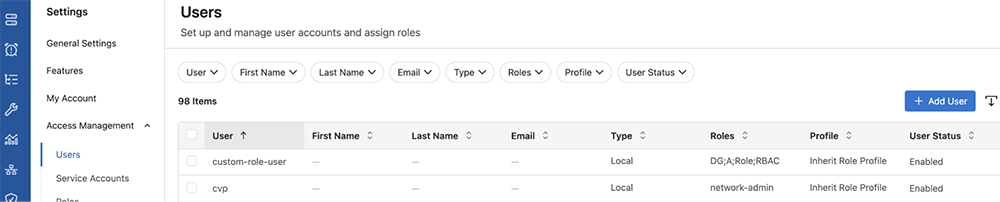
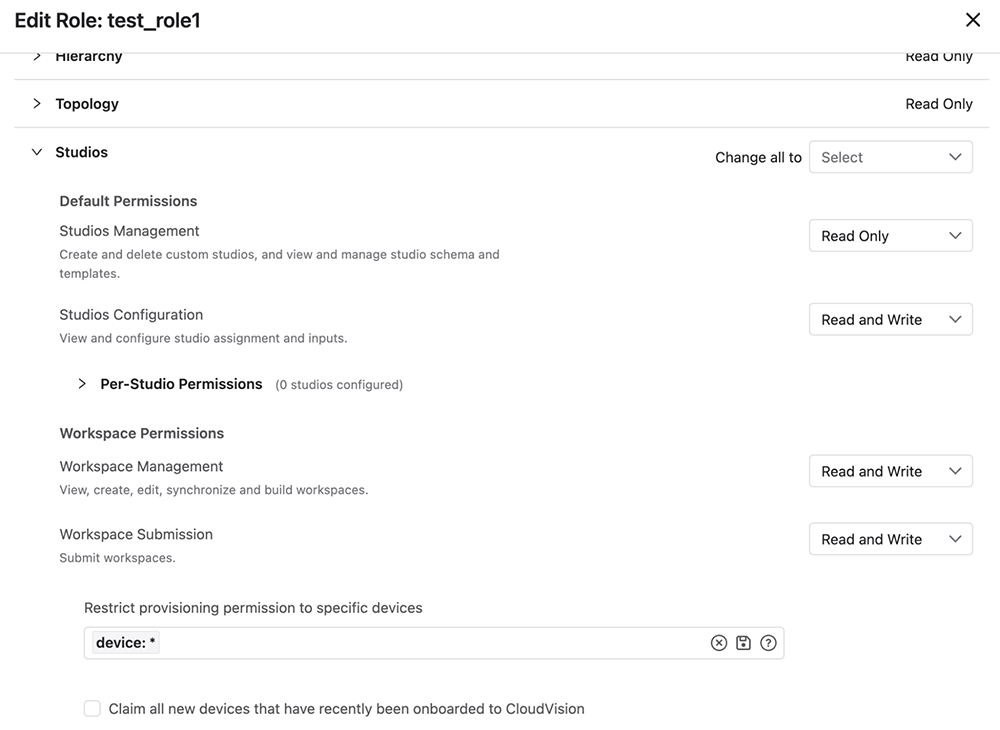
The above pictures show a role, test_role1, which has Read and Write access to Action Execution, Change Control Management, Configlet Management, Studios Configuration, Workspace Management, and Workspace Submission. Any one of those would give a user associated with the role the ability to exploit this vulnerability.
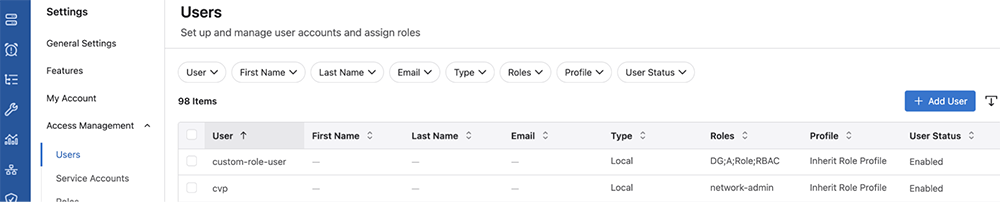
The above picture shows two users: “custom-role-user”, and “cvp” user. Custom-role-user has the following roles assigned to it: “DG”, “A”, “Role”, and “RBAC”. None of these roles are the “test_role1” shown above to be vulnerable so these roles would need to be examined in the same manner. The “cvp” user is able to exploit this issue because they have the “network-admin” role which is able to access vulnerable components.
Netvisor Software
- The attacker must be able to open an AF_ALG (Linux User-space Crypto API) socket. This permission is typically granted to unprivileged users by default.
Indicators of Compromise
Netvisor Software
The algif_aead module is not loaded by default on Netvisor. However, the exploitation can succeed because the kernel automatically loads the module when an attacker requests an AEAD cipher type via a socket.
Run the command to find out if the module has been loaded.
grep -qE '^algif_aead ' /proc/modules && echo "Affected module is loaded" || echo "Affected module is NOT loaded"
If it is loaded, then the system has been compromised.
Mitigation
CloudVision Portal
This issue can be mitigated on CloudVision by updating the kernel to denylist algif_aead_init. This requires stopping CloudVision components, applying the fix, rebooting the system and then bringing up CloudVision. For CloudVision releases 2025.x and 2026.x trains:
# Determine if the system is unpatched
[cvp@<hostname> ~]$ cat /proc/cmdline | grep algif_aead
[cvp@<hostname ~]$ <blank response>
# A Blank response, as shown above, indicates the node is unpatched

# Run the following command on any one node.
cvpi stop all
# run the next 2 commands on each node
grubby --update-kernel=ALL --args="initcall_blacklist=algif_aead_init"
systemctl reboot

# Post reboot of all nodes, login to any one node and start all components
cvpi start all
# Check all component status with
cvpi status all

# On each node verify patch state
[root@<hostname> ~]# cat /proc/cmdline | grep algif_aead
BOOT_IMAGE=(hd0,msdos1)/vmlinuz-5.14.0-427.37.1.el9_4.x86_64 root=UUID=4612c867-60cc-4ac3-9113-39edf3a876c7 ro crashkernel=1G-4G:192M,4G-64G:256M,64G-:512M selinux=0 cgroup.memory=nokmem spectre_v2=off edd=off console=tty0 console=ttyS0,115200n8 net.ifnames=0 quiet initcall_blacklist=algif_aead_init
# `initcall_blacklist=algif_aead_init` being present indicates the patch was successfully applied
For CloudVision release train 2024.2.x and earlier:
# verify system is unpatched
[root@<hostname> ~]# modprobe -n -v algif_aead
insmod/lib/modules/6.2.2-1.el7.elrepo.x86_64/kernel/crypto/algif_aead.ko
[root@<hostname> ~]# grep -r algif_aead /etc/modprobe.d/
# no output from grep command ^
[root@<hostname> ~]#

# Unload if currently loaded
rmmod algif_aead

# Prevent it from loading again
echo "install algif_aead /bin/false" > /etc/modprobe.d/disable-algif.conf
Upon running the rmmod command the mitigation will be applied. To confirm the mitigation is in place after rebotting the mitigation for 2024.2.X and earlier can be verified via running the following and check that “/bin/false” appears in the output:
[root@<hostname> ~]# modprobe -n -v algif_aead
install /bin/false
[root@<hostname> ~]# grep -r algif_aead /etc/modprobe.d/
/etc/modprobe.d/disable-algif.conf:install algif_aead /bin/false
Note: These mitigations do not persist across upgrades and have to be applied again until the system is upgraded to a CloudVision release with the fixes.
Velocloud Gateway and Orchestrator
This issue can be mitigated on the Velocloud Gateway and Orchestrator without a software upgrade by blocking the algif_aead kernel module from loading. This prevents the exploit from reaching the vulnerable code path while leaving all other VCO/VCG functions (IPsec, TLS, encryption) unaffected.
# Step 1: Check current module status (before)
# Note the output. The module may or may not be loaded.
$ lsmod | grep algif_aead

# Step 2: Block the module
$ echo "install algif_aead /bin/false" >> /etc/modprobe.d/cis.conf

# Step 3: Unload the module if currently loaded
$ rmmod algif_aead 2>/dev/null

# Step 4: Verify the mitigation
# Expected output: empty (no output). The module is not loaded.
$ lsmod | grep algif_aead

# Step 5: Confirm the block is in the configuration:
# Expected output: install algif_aead /bin/false
$ grep algif_aead /etc/modprobe.d/cis.conf

# Step 6: Confirm the module cannot be loaded:
# Expected output: modprobe: ERROR: could not insert
# 'algif_aead':= Invalid argument'

$ modprobe algif_aead
# Step 7: verify in a second location. Expected output: empty (no output)
$ lsmod | grep algif_aead

# If the module did load, manually remove the
# module by doing `modprobe -r algif_aead` and restart from Step 1
Netvisor software
Block the module by creating a manual-disable-algif_aead.conf file.
echo "install algif_aead /bin/false" | sudo tee /etc/modprobe.d/manual-disable-algif_aead.conf
Unload the module, in case it is already loaded:
sudo rmmod algif_aead 2>/dev/null
Check whether the module is still loaded:
grep -qE '^algif_aead ' /proc/modules && echo "Affected module is loaded" || echo "Affected module is NOT loaded"
Reboot the switch for the work around to take effect.
Resolution
The recommended resolution is to upgrade to a remediated software version at your earliest convenience. Remediated software versions are being developed and this advisory will be updated as they are published.
Netvisor
The Netvisor software 7.1.0 HF8 will have the necessary kernel packages which have the fix for this vulnerability. This advisory will be updated when released.
Hotfix
There are no hotfixes planned for this issue at this point in time.
For More Information
If you require further assistance, or if you have any further questions regarding this security notice, please contact the Arista Networks Technical Assistance Center (TAC) by one of the following methods:
Open a Service Request
Contact information needed to open a new service request may be found at:
https://www.arista.com/en/support/customer-support