
Security Advisory 0147
Date: August 25, 2026
| Revision | Date | Changes |
|---|---|---|
| 1.0 | August 25, 2026 | Initial release |
| 1.1 | August 31, 2026 | Updated the EOS versions affected and resolved |
| 1.2 | October 16, 2026 | Updated the EOS and CVP versions resolved |
The CVE-IDs tracking these issues:
CVE-2026-59995
CVSSv3.1 Base Score: 5.4 (CVSS:3.1/AV:N/AC:L/PR:N/UI:R/S:U/C:N/I:L/A:L)
Common Weakness Enumeration: CWE-23 Relative Path Traversal
This vulnerability is being tracked by BUG 1895932(EOS), MONAPP-52603(NDR)
CVE-2026-59996
CVSSv3.1 Base Score: 5.4 (CVSS:3.1/AV:N/AC:L/PR:N/UI:R/S:U/C:N/I:L/A:L)
Common Weakness Enumeration: CWE-23 Relative Path Traversal
This vulnerability is being tracked by BUG 1895933(EOS)
CVE-2026-60001
CVSSv3.1 Base Score: 6.5 (CVSS:3.1/AV:N/AC:L/PR:N/UI:N/S:U/C:N/I:L/A:L)
Common Weakness Enumeration: CWE-770 Allocation of Resources Without Limits or Throttling
This vulnerability is being tracked by BUG 1895938(EOS), MONAPP-52602(NDR), 1947356 (DMF/MCD/CCF/CVA)
CVE-2026-60002
CVSSv3.1 Base Score: 9.4 (CVSS:3.1/AV:N/AC:L/PR:N/UI:N/S:U/C:H/I:H/A:L)
Common Weakness Enumeration: CWE-416 Use After Free
This vulnerability is being tracked by BUG 1895939(EOS), 1895511 (WiFi AP), 1918053 (CVP), 1947353 (DMF/MCD/CCF/CVA)
Description
These vulnerabilities were discovered in Open Source Software by external security researchers and disclosed in the OpenSSH 10.4 release announcement. Arista is not aware of any malicious exploitation of these vulnerabilities in customer networks.
Multiple vulnerabilities have been discovered in OpenSSH before version 10.4, which is shipped with multiple Arista products. One vulnerability (CVE-2026-60001) affects the server-side SSH daemon (sshd). The remaining three vulnerabilities (CVE-2026-60002, CVE-2026-59995, CVE-2026-59996) affect the client-side SSH, Secure File Transfer Protocol (SFTP), and Secure Copy Protocol (SCP) utilities, respectively.
CVE-2026-59995
The SFTP client (sftp) in OpenSSH before 10.4 does not properly constrain the location of downloaded files when used with an attacker-controlled server. A malicious server could cause files to be downloaded to an unexpected location on the local filesystem. Exploitation requires user interaction as a user must initiate an SFTP download from a malicious or compromised server.
CVE-2026-59996
The SCP client (scp) in OpenSSH before 10.4 may place a file in the parent directory of the intended target directory when the copy occurs between two remote destinations. A malicious server could exploit this to write files outside the intended directory. Exploitation requires user interaction, as a user must initiate an SCP operation involving a malicious or compromised server.
CVE-2026-60001
The SSH daemon (sshd) in OpenSSH before 10.4 does not always enforce the minimum authentication delay. This delay is a defense-in-depth mechanism designed to slow down brute-force password attacks and timing-based user enumeration. By bypassing this delay, an unauthenticated remote attacker could conduct accelerated brute-force attempts or enumerate valid usernames. The bypass alone does not grant authentication.
CVE-2026-60002
The SSH client (ssh) in OpenSSH before 10.4 contains a use-after-free vulnerability that can be triggered when a server changes its host key during a key re-exchange. This issue affects only the client side of the connection, and requires the operator to actively initiate an outbound SSH connection from the device. Successful exploitation could allow a malicious server to crash the SSH client process or potentially achieve code execution on the client.
Vulnerability Assessment
Platform and Software Applicability Note
To determine actual exposure, operators should first check their software versions against the "Affected Software" list below. If your software release is not listed, your deployment is not vulnerable, regardless of the hardware platform in use.
Affected Software
EOS Versions
- 4.36.2F and below releases in the 4.36.x train
- 4.35.6M and below releases in the 4.35.x train
- 4.34.8M and below releases in the 4.34.x train
- 4.33.10M and below releases in the 4.33.x train
- All prior releases
- 4.36.2F and below releases in the 4.36.x train
- 4.35.5M and below releases in the 4.35.x train
- 4.34.7.1M and below releases in the 4.34.x train
- 4.33.10M and below releases in the 4.33.x train
- All prior releases
Impact on DANZ Monitoring Fabric (DMF)
DANZ Monitoring Fabric (DMF) deploys a fixed version of Arista EOS on certain managed fabric switches. If the EOS version bundled with a DMF release falls within the affected version range of this advisory, DMF deployments using EOS-based switch platforms may be impacted.
Customers running DMF should run the following command on the controller to identify the EOS version bundled with their deployment.
DMF-CONTROLLER> show version details
...
~~~~~~~~~~~~~~~~~~~~~~~~~~~~~~~~~~~~~~~~~~~~~~~~~~~~~~~~~ Platform files ~~~~~~~~~~~~~~~~~~~~~~~~~~~~~~~~~~~~~~~~~~~~~~~~~~~~~~~~~
File
Hcl supported Platform
---------------------------------------------------------------------------------|-----------|-----------------------------------|
...
EOS-4.36.2F-49446791.volgarel.1-x86_64.swi                                            True          x86_64-7289-eos
EOS-4.36.2F-49446791.volgarel.1-x86_64.swi                                            True          i686-7289-eos
EOS-4.36.2F-49446791.volgarel.1-x86_64.swi                                            False         x86_64-ccs-720df-48y-eos
Wi-Fi Access Points Versions
- 21.4.0M-12 and below releases in 21.x train
- 22.1.0F-45 and below releases in 22.x train
- All prior release trains
CloudVision Appliance Software (CVA) Versions
- 7.0.x, 7.1.x, 7.2.x release trains
DANZ Monitoring Fabric (DMF) Versions
Affected DANZ Monitoring Fabric (DMF) versions, including Controller Appliance, Service Node Appliance, Recorder Node Appliance, and Analytics Node Appliance, are listed below. Please note that even with an unaffected DMF version, if the EOS version bundled with a DMF release falls within the affected version range of this advisory, DMF deployments using EOS-based switch platforms may be impacted. See Impact on DANZ Monitoring Fabric (DMF) section for more information.
- 8.10.0
- 8.9.0
- 8.8.0
- 8.7.2 and earlier versions in the 8.7.x release train
- 8.10.0 and all prior DMF release trains
Arista Multi Cloud Director (MCD) Versions
- 8.10.0
- 8.9.0
- 8.10.0 and all prior MCD release trains
Arista Converged Cloud Fabric (CCF) Versions
- 6.2.5 and earlier versions in the 6.2.x release train
Arista Network Detection and Response (NDR) Versions
- 5.4.10 and below releases
CloudVision Portal (CVP) Versions
- 2026.2.0 and earlier versions are affected.
Affected Platforms
Note: the affected product list below is broken down by CVE groupings.
- 710 Series
- 720D Series
- 720XP/722XPM Series
- 750X Series
- 7010TX Series
- 7020R/R4 Series
- 7130 Series running EOS
- 7170 Series
- 7050X3/X4 Series
- 7060X/X2/X4/X5/X6 Series
- 7260X/X3 Series
- 7280R/R2/R3/R4 Series
- 7300X/X3 Series
- 7320X Series
- 7358X4 Series
- 7368X4 Series
- 7388X5 Series
- 7500R/R2/R3 Series
- 7800R3/R4 Series
- 7700R4 Series
- AWE 5000 Series
- AWE 7200R Series
- CloudEOS
- cEOS-lab
- vEOS-lab
- CloudVision eXchange, virtual or physical appliance
- Arista Converged Cloud Fabric (formerly Big Switch BCF)
- DANZ Monitoring Fabric (DMF) - Controller Appliance
- DANZ Monitoring Fabric (DMF) - Analytics Node Appliance
- DANZ Monitoring Fabric (DMF) - Recorder Node Appliance
- DANZ Monitoring Fabric (DMF) - Service Node Appliance
- Arista Multi Cloud Director (formerly Big Switch MCD)
- Arista Network Detection and Response (NDR) Security Platform (Formerly Awake NDR)
- CloudVision Portal, virtual appliance or physical appliance
- CloudVision Appliance Software
- Wi-Fi Access Points
- Arista Converged Cloud Fabric (formerly Big Switch BCF)
- DANZ Monitoring Fabric (DMF) - Controller Appliance
- DANZ Monitoring Fabric (DMF) - Analytics Node Appliance
- DANZ Monitoring Fabric (DMF) - Recorder Node Appliance
- DANZ Monitoring Fabric (DMF) - Service Node Appliance
- Arista Multi Cloud Director (formerly Big Switch MCD)
- Arista Network Detection and Response (NDR) Security Platform (Formerly Awake NDR)
- CloudVision Appliance Software
- CloudVision CUE, virtual appliance or physical appliance
- CloudVision CUE cloud service delivery
- CloudVision as-a-Service
- CloudVision AGNI - Cloud service delivery
- CloudVision AGNI - Virtual or physical appliance
- Arista 7130 Systems running MOS
- Arista NetVisor OS, Arista NetVisor UNUM, and Insight Analytics (Formerly Pluribus)
- VeloCloud Orchestrator (Formerly VeloCloud Orchestrator by Broadcom)
- VeloCloud Gateway (Formerly VeloCloud Gateway by Broadcom)
- VeloCloud Edge (Formerly VeloCloud Edge by Broadcom)
Required Configuration for Exploitation
Arista EOS-based Products
The vulnerability is triggered when an operator uses the SFTP client from the EOS command line to download files from a malicious or compromised server using the copy command to actively initiate a file transfer:
switch# copy sftp://user@<malicious-server>/path/to/file flash:
The vulnerability is triggered when an operator uses the SCP client from the EOS command line to download files from a malicious or compromised server using the copy command to actively initiate a file transfer:
switch# copy scp://user@<malicious-server>/path/to/file flash:
The SSH daemon (sshd) is enabled by default on EOS for management access. Any device accepting SSH connections is potentially affected.
To confirm that SSH management access is configured for the default VRF or any other VRF check the running config:
Here is a config snippet showing the “management ssh” submode under “configure” mode. The “no shutdown” values show that the default VRF (outermost ‘no shutdown’) and vrf v1 are both enabled because they have “no shutdown” configured:
switch> show run section ssh
   …
   no shutdown
   !
   vrf v1
      no shutdown
   !
   …
The SSHD status for any particular VRF can also be checked:
switch> show management ssh vrf default
…
SSHD status for Default VRF: enabled
…
If SSH management access is disabled entirely, the device is not exposed to this issue.
The vulnerability is triggered when an operator on an affected device uses the SSH client to connect to a malicious or compromised server that changes its host key during key re-exchange. The SSH client is available by default on all EOS-based platforms. Operator initiation of the outbound transfer is required.
CloudVision Appliance Software (CVA), DANZ Monitoring Fabric (DMF), Arista Converged Cloud Fabric (CCF), and Arista Multi Cloud Director (MCD)
No specific configuration is required beyond the default. The SSH daemon (sshd) is enabled by default. Any device accepting SSH connections is potentially affected.
The vulnerability can be triggered when a user connects to a malicious or compromised SSH server that changes its host key during key re-exchange. Operator initiation of the outbound transfer is required.
Wi-Fi Access Points
No specific configuration is required beyond the default. The SSH daemon (sshd) is enabled by default. Any device accepting SSH connections is potentially affected.
Arista Network Detection and Response (NDR)
No specific configuration is required beyond the default. The SSH daemon (sshd) is enabled by default. Any device accepting SSH connections is potentially affected.
No specific configuration is required. The SSH client is used for internal cluster connections, in online use cases to connect to bastion hosts, and in offline use cases for fetching upgrades and content. Preconditions for compromise are a compromised bastion or faulty/malicious dns server. Operator initiation of the outbound transfer is required.
CloudVision Portal (CVP)
No specific configuration is required. The vulnerability is triggered when the OpenSSH client on an affected CVP node connects to a malicious or compromised SSH server that changes its host key during key re-exchange. Operator initiation of the outbound transfer is required.
Indicators of Compromise
Arista EOS-based products
Exploitation may result in files being placed in unexpected locations on the filesystem after an SFTP download. There are no specific log messages generated by this issue. Operators should verify that downloaded files appear only in the intended directory after using the SFTP client.
Exploitation may result in files being placed in the parent directory of the intended target after an SCP remote-to-remote copy. There are no specific log messages generated by this issue. Operators should verify file locations after performing SCP operations.
There are no direct indicators of compromise for this issue. An abnormally high rate of failed password-based authentication attempts in a short time period may suggest that the minimum authentication delay is being bypassed. Review the authentication logs for unusual patterns. This can be accomplished from bash:
$ sudo grep -e "Authentication failure" -e "User not known to the underlying authentication module" /var/log/secure
Alternatively, syslogging of failed SSH password authentication attempts can be enabled with:
switch# aaa authentication policy on-failure log
After which future authentication attempts can be checked with:
switch# show logging | include LOGIN_FAILED
Aug 12 10:04:07 <switch> Aaa: %AAA-4-LOGIN_FAILED: user <user> failed to login [from: <source IP>] [service: sshd] [reason: Authentication failed - Bad secret]
Additionally authentication counters can be viewed:
switch# show aaa counters
Authentication
Successful: 24
Failed: 569
Service unavailable: 9

Authorization
Allowed: 14
Denied: 0
Service unavailable: 0
Aborted: 0

Accounting
Successful: 0
Error: 0
Pending: 0

Session
Opened: 14
Closed: 12

Last time counters were cleared: never
An unexpected termination of the SSH client process may indicate exploitation. Core dump files may be generated under /var/core/.
CloudVision Appliance Software (CVA), DANZ Monitoring Fabric (DMF), Arista Converged Cloud Fabric (CCF), and Arista Multi Cloud Director (MCD)
There are no direct indicators of compromise for this issue. An abnormally high rate of failed authentication attempts in a short time period may suggest that the minimum authentication delay is being bypassed. Review the audit logs for unusual patterns.
> show logging audit <duration> | grep -E "SESSION_FAIL|UNAUTHORIZED"
Default logs do not record client-side rekey details. Audit logs may identify the initiating command, but cannot confirm that the server changed its host key or exploited the vulnerability. If the SSH client crashes and generates a core dump, it can be viewed with the following commands:
> show dump
> show dump core-dump <name>
Wi-Fi Access Points
There are no direct indicators of compromise for this issue. An abnormally high rate of failed authentication attempts in a short time period may indicate compromise. Please audit the log with the “show syslog” command to identify suspicious patterns. Here is an example log entry for an authentication failure:
2026-08-12T15:37:50.757613+00:00 local0.notice sshd-session: 'root' login from '10.225.69.78' Failed
2026-08-12T15:37:52.717563+00:00 local0.notice sshd-auth: 'root' login from '10.225.69.78' Failed
Log file snippet showing two failed logins from the “10.225.69.78” IP to the “root” user account.
Arista Network Detection and Response (NDR)
There is no direct indicator of compromise in the customer accessible configurations or logs. Please contact support if service failure occurs or if you suspect malicious activities.
CloudVision Portal (CVP)
An unexpected termination of the OpenSSH client during an outbound SSH connection may indicate attempted exploitation. A crash record may identify /usr/bin/ssh as the executable and SIGSEGV or SIGABRT as the terminating signal.
coredumpctl --no-pager list /usr/bin/ssh
Mitigation
Arista EOS-based Products
The recommended mitigation is to only use the SFTP client to connect to known, trusted servers. Operators should verify that downloaded files appear in the expected location after each transfer. If the switch does not need to initiate outbound SFTP connections, this functionality does not need to be used and can be disallowed via Role-Based Access Control (RBAC), see the RBAC section of the EOS user manual for full documentation.
The recommended mitigation is to only use SCP with known, trusted servers. Operators should verify file locations after performing remote-to-remote copy operations. If the switch does not need to perform SCP remote-to-remote copies, this functionality does not need to be used and can be disallowed via Role-Based Access Control (RBAC), see the RBAC section of the EOS user manual for full documentation.
The recommended mitigation is to restrict SSH management access to trusted IP addresses using management ACLs. This limits the ability of an unauthenticated remote attacker to reach the SSH daemon. Please see the EOS User Manual, Chapter 14: Layer 3 Configuration, Section 14.4 "ACLs and Route Maps" for full Service ACL documentation. Additionally, consider using key-based authentication instead of password-based authentication to reduce the impact of brute-force attempts.
The recommended mitigation is to only use the SSH client to connect to known, trusted servers. Operators should verify server host key fingerprints before accepting connections. It is recommended to enable “Strict Host Key Checking” with the command “hostkey client strict-checking”:
switch(config)# management ssh
switch(config-mgmt-ssh)# hostkey client strict-checking
To verify:
switch# show running-config section management ssh
management ssh
   hostkey client strict-checking
See the Service ACLs in the EOS user manual for the instruction of configuring allowed hosts. Additionally, access to bash and to the SSH command can be restricted using Role-Based Access Control (RBAC) to prevent users from initiating an SSH connection. See the RBAC section of the EOS user manual for full documentation. Also, see the EOS hardening guide for more details on restricting access to certain commands.
CloudVision Appliance Software (CVA)
The recommended mitigation is to restrict inbound SSH access to trusted source IP addresses. By default, CVA permits SSH connections from all IPv4 and IPv6 addresses. Verify the current configuration with:
cva# show running-config cluster access-control access-list ssh

! cluster
cluster
  access-control
    !
    access-list ssh
      1 permit from ::/0
      2 permit from 0.0.0.0/0
Add permit rules for all trusted source addresses before removing the default rules:
cva(config)# cluster
cva(config-cluster)# access-control
cva(config-cluster-access)# access-list ssh
cva(config-cluster-access-list)# <id number> permit from <Source IP Address CIDR>
cva(config-cluster-access-list)# <id number> permit from <Source IP Address CIDR>
Verify access from a permitted host using show running-config cluster access-control access-list ssh before removing rules 1 and 2 to avoid being locked out.
Here is a config example showing the removal of the default rules from above for ipv6 access (Rule 1) and ipv4 access (Rule 2):
cva(config)# cluster
cva(config-cluster)# access-control
cva(config-cluster-access)# access-list ssh
cva(config-cluster-access-list)# no 1
cva(config-cluster-access-list)# no 2
The recommended mitigation is to only use the SSH client to connect to known, trusted servers.
Wi-Fi Access Points
The recommended mitigation is to restrict SSH management access to trusted IP addresses using management ACLs. This limits the ability of an unauthenticated remote attacker to reach the SSH daemon. "Enable SSH IP Allow List" on the CV-CUE.
Configure -> Device -> Access Points -> General -> Network
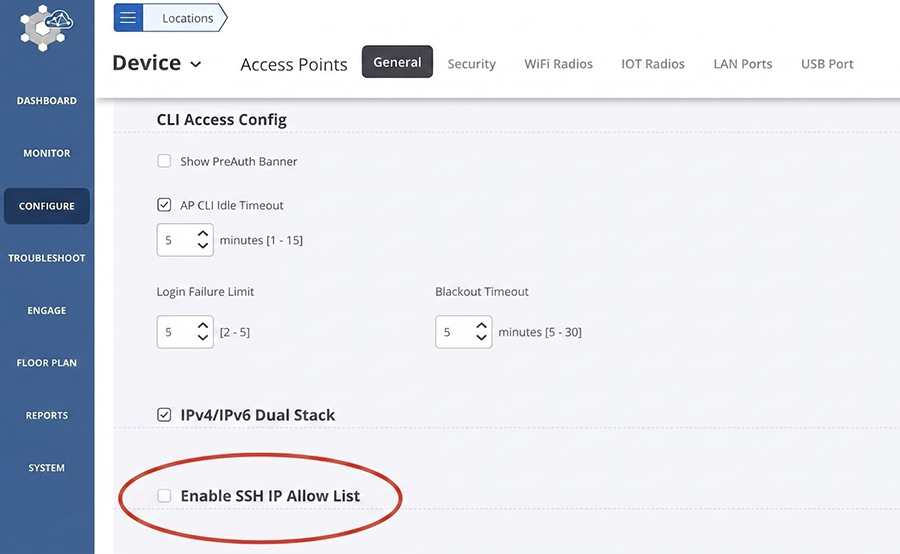
DANZ Monitoring Fabric (DMF), Arista Converged Cloud Fabric (CCF), and Arista Multi Cloud Director (MCD)
The recommended mitigation is to restrict SSH access to trusted IP addresses. This can be done on each device in the fabric using management ACLs.
Verify the current configuration with:
> show running-config controller access-control access-list ssh

! controller
controller
  access-control
    !
    access-list ssh
      1 permit from ::/0
      2 permit from 0.0.0.0/0
Add permit rules for all trusted source addresses before removing the default rules:
> enable
# configure
(config)# controller
(config-controller)# access-control
(config-controller-access)# access-list ssh
(config-controller-access-list)# <id number> permit from <Source IP Address CIDR>
Verify access from a permitted host using show running-config controller access-control access-list ssh before removing rules 1 and 2 to avoid being locked out.
> enable
# configure
(config)# controller
(config-controller)# access-control
(config-controller-access)# access-list ssh
(config-controller-access-list)# no 1
(config-controller-access-list)# no 2
For DMF, as a convenience, intra-fabric-only access can also be configured to allow SSH only between fabric devices.
> enable
# configure
(config)# managed-devices
(config-managed-devices)# access-control
(config-managed-devices-access)# service ssh
(config-managed-devices-access-service)# intra-fabric-only-access
Arista Network Detection and Response (NDR)
No on-appliance mitigation is recommended. The recommended external mitigation is to limit new TCP connection rates to the SSH port at the firewall.
No on-appliance mitigation is recommended. The recommended external mitigation is to ensure reliable DNS service and routing on the management link so that outbound SSH reaches a trusted server. The nucleus interconnect links should always be directly connected or on a private switch.
CloudVision Portal (CVP)
There is no complete configuration-based mitigation for this vulnerability. Avoid initiating SSH connections from CVP nodes to untrusted systems. Where feasible, use surrounding network controls to limit SSH connectivity to required destinations. Upgrading to a remediated release is recommended for full resolution.
Resolution
The recommended resolution is to upgrade to a remediated software version at your earliest convenience. Arista recommends customers move to the latest version of each release that contains all the fixes listed below. For more information about upgrading see the Product Documentation for each product respectively.
The list of remediated products and versions for each vulnerability will be updated as more releases become available.
- 4.37.0F and later releases
- 4.36.3M and later releases in the 4.36.x train
- 4.35.7M and later releases in the 4.35.x train
- 4.34.9M and later releases in the 4.34.x train
- 4.33.11M and later releases in the 4.33.x train
- 4.37.0F and later releases
- 4.36.3M and later releases in the 4.36.x train
- 4.35.6M and later releases in the 4.35.x train
- 4.34.8M and later releases in the 4.34.x train
- 4.33.11M and later releases in the 4.33.x train
CloudVision Portal (CVP)
- 2026.3.0 and later releases
- 2026.2.2 and later releases in the 2026.2.x train
For More Information
If you require further assistance, or if you have any further questions regarding this security notice, please contact the Arista Networks Technical Assistance Center (TAC) by one of the following methods:
Open a Service Request
Contact information needed to open a new service request may be found at:
https://www.arista.com/en/support/customer-support