Azure Accelerated Networking Support for Virtual Edges
Azure provides Accelerated Networking as an implementation of single root I/O virtualization (SR-IOV), a standard that allows a physical PCIE device to appear as multiple virtual devices (virtual functions). When enabling Accelerated Networking on an interface of a VeloCloud Edge on Azure, SR-IOV support for Mellanox ConnectX-4 and ConnectX-5 Network Interface Cards (NICs) also automatically enables in the Edge Virtual Machine (VM).
Azure Instance Support
The following table lists instance types that support the Accelerated Networking functionality.
| Software Version | Instance Types |
|---|---|
| Edge Software 5.4 or later | Standard_D3_v2 |
| Standard_D4_v2 | |
| Standard_D5_v2 | |
| Standard_D4_v5 | |
| Standard_D8_v5 | |
| Standard_D16_v5 |
Enabling or Disabling Azure Accelerated Networking
This section provides links for detailed instructions on the different ways to enable and disable Azure Accelerated Networking.
- Azure portal
- Azure CLI or Azure PowerShell
Enabling Accelerated Networking
Enable Accelerated Networking using the Azure portal or the Azure CLI.
Azure requires that an existing Virtual Machine (VM) be stopped or deallocated before enabling Accelerated Networking on any Network Interface Card (NIC). For more information, see:
Enabling Accelerated Networking Using the Azure Portal
To enable Accelerated Networking on an interface of an existing VM, use the following the steps and refer to the image below for more information.
- Restart the VM.
Figure 1. Enabling Accelerated Networking Through an Azure Portal 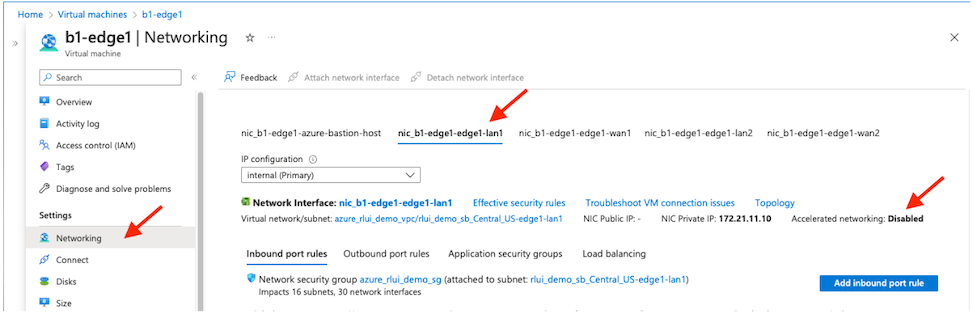 Note: To fully benefit from the Accelerated Networking feature, enable it on all interfaces of the VM.After the VM restarts, if the NIC model type allotted to the interface does not use Mellanox ConnectX4 or ConnectX5, the Edge VM does not activate accelerated networking support for the interface. As a troubleshooting effort, change the NIC model, stop or deallocate the VM, and then restart the VM.Note: You must stop the VM before you enable the Accelerated Networking support.
Enable Accelerated Networking Using the Azure CLI
Follow these steps to enable Accelerated Networking using the Azure CLI. For more information, reference the following: Enabling Accelerated Networking on VMs.
Disabling Accelerated Networking
There are two options to disable Accelerated Networking using the Azure portal or the Azure CLI.
Disabling Accelerated Networking using the Azure Portal
- Stop/deallocate the VM.
- Change the setting of accelerated networking to disabled or false.
- Restart the VM.
Disabling Accelerated Networking Using the Azure CLI
Verifying Accelerated Networking
To verify Accelerated Networking enabled on the Edge, log into the Edge Virtual Machine (VM) and run lspci from the command line:
edge:b1-edge1:~# lspci
0000:00:00.0 Host bridge: Intel Corporation
440BX/ZX/DX - 82443BX/ZX/DX Host bridge (AGP disabled) (rev 03)
0000:00:07.0 ISA bridge: Intel Corporation
82371AB/EB/MB PIIX4 ISA (rev 01)
0000:00:07.1 IDE interface: Intel Corporation
82371AB/EB/MB PIIX4 IDE (rev 01)
0000:00:07.3 Bridge: Intel Corporation
82371AB/EB/MB PIIX4 ACPI (rev 02)
0000:00:08.0 VGA compatible controller:
Microsoft Corporation Hyper-V virtual VGA
0fcd:00:02.0 Ethernet controller: Mellanox
Technologies MT27710 Family [ConnectX-4 Lx Virtual Function] (rev 80)
8f67:00:02.0 Ethernet controller: Mellanox
Technologies MT27710 Family [ConnectX-4 Lx Virtual Function] (rev 80)
9b19:00:02.0 Ethernet controller: Mellanox
Technologies MT27710 Family [ConnectX-4 Lx Virtual Function] (rev 80)
9b46:00:02.0 Ethernet controller: Mellanox
Technologies MT27710 Family [ConnectX-4 Lx Virtual Function] (rev 80)
This feature does not support the Mellanox ConnectX-3 as it is not managed by the mlx5_core driver . If the Edge VM is assigned the ConnectX-3 Network Interface Cards (NICs) by Azure, the Edge will behave as it behaves today without the Accelerated Networking support.
Azure Host Servicing
The Azure Accelerated Networking support for Virtual Edges on Azure adds the DPDK failsafe/TAP/MLX PMD model. When Azure host maintenance is performed, the SR-IOV VFs might be temporarily removed and added back later.
Reference the following for more information: Microsoft Azure Host Servicing
The events are logged by the kernel and can be viewed in the output of dmesg. They can also be viewed in /var/log/messages:
edge:b3-edge1:~# egrep 'VF registering|VF unregistering' /var/log/messages
2023-07-25T22:06:11.903 INFO kern kernel:[ 11.091250] hv_netvsc 000d3a92-2dba-000d-3a92-2dba000d3a92 eth1: VF registering: eth5
2023-07-25T22:06:12.049 INFO kern kernel:[ 11.237233] hv_netvsc 000d3a92-245f-000d-3a92-245f000d3a92 eth2: VF registering: eth6
2023-07-25T22:06:12.208 INFO kern kernel:[ 11.396127] hv_netvsc 000d3a92-2178-000d-3a92-2178000d3a92 eth3: VF registering: eth7
2023-07-25T22:06:12.362 INFO kern kernel:[ 11.549624] hv_netvsc 000d3a92-218a-000d-3a92-218a000d3a92 eth4: VF registering: eth8
2023-07-25T22:30:09.188 INFO kern kernel:[ 1448.376507] hv_netvsc 000d3a92-2178-000d-3a92-2178000d3a92 eth3-hv: VF unregistering: eth7
2023-07-25T22:30:14.390 INFO kern kernel:[ 1453.577954] hv_netvsc 000d3a92-218a-000d-3a92-218a000d3a92 eth4-hv: VF unregistering: eth8
2023-07-25T22:30:19.380 INFO kern kernel:[ 1458.568168] hv_netvsc 000d3a92-2dba-000d-3a92-2dba000d3a92 eth1-hv: VF unregistering: eth5
2023-07-25T22:30:26.555 INFO kern kernel:[ 1465.742626] hv_netvsc 000d3a92-245f-000d-3a92-245f000d3a92 eth2-hv: VF unregistering: eth6
The HOTPLUG OUT events are reported on the VeloCloud Orchestrator.
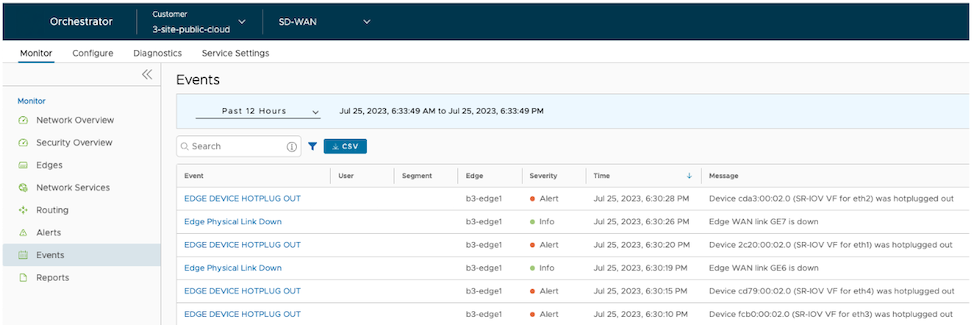
The Edge continues running during the Azure Host maintenance and the Paths remain active.
When you add the SR-IOV VFs back after Azure host maintenance completes, the events can be viewed in the output of dmesg or in /var/log/messages.
edge:b3-edge1:~# egrep 'VF registering|VF unregistering' /var/log/messages
...
2023-07-25T22:31:23.137 INFO kern kernel:[ 1522.324791] hv_netvsc 000d3a92-2dba-000d-3a92-2dba000d3a92 eth1-hv: VF registering: eth5
2023-07-25T22:31:28.381 INFO kern kernel:[ 1527.568576] hv_netvsc 000d3a92-2178-000d-3a92-2178000d3a92 eth3-hv: VF registering: eth6
2023-07-25T22:31:33.416 INFO kern kernel:[ 1532.604181] hv_netvsc 000d3a92-245f-000d-3a92-245f000d3a92 eth2-hv: VF registering: eth7
2023-07-25T22:31:38.468 INFO kern kernel:[ 1537.656531] hv_netvsc 000d3a92-218a-000d-3a92-218a000d3a92 eth4-hv: VF registering: eth8