
Security Service Edge (SSE)
Starting from the 5.4.0 release, VeloCloud SD-WAN supports the Security Service Edge (SSE) feature. This feature allows VeloCloud SD-WAN to easily integrate with a third party SSE vendor using seamless automation through the Orchestrator. You can configure multiple SSE integrations with the same vendor.
To access the SSE feature, navigate to . By default, the SSE Integrations tab is displayed. Before creating an SSE Integration, you must first create an SSE Subscription.
For an Enterprise user, the Security Service Edge (SSE) feature is activated by default. This feature currently supports PAN Prisma and Symantec configurations.
- SSE for Pan Prisma Configuration Guide
- Configure SSE for Symantec
If you wish to edit the existing SSE integration, select the SSE integration from the list on the Security Service Edge (SSE) screen, and then click Edit. You can also click the SSE integration name link to edit it.
To monitor the automation status, click the View link in the Tunnel Deployment Status column. The following screen appears:
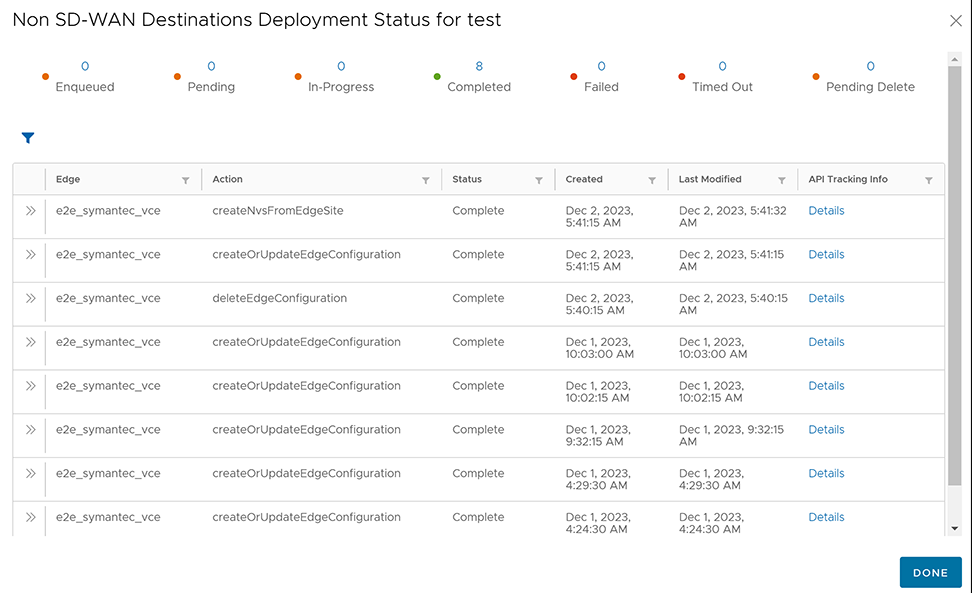
createOrUpdateEdgeConfiguration and deleteEdgeConfiguration indicate the SSE automation to update the Orchestrator Edge Device settings. The other actions are for third party automations.
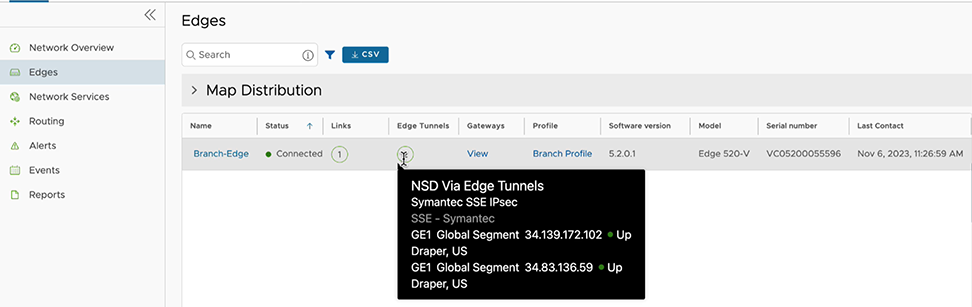
- Associate the Security Service Edge Subscription to an Edge. For more information, see the VeloCloud SD-WAN Administration Guide.
- Direct the network traffic to a specific Enterprise Cloud. Navigate to . Click + Add to add a new rule. For more information, see the VeloCloud SD-WAN Administration Guide - Create Business Policy Rule.