VeloCloud Orchestrator hosts Edge Threat Management (ETM) within a dedicated Enterprise application. This enables security operations administrators to focus on building security-specific profiles and monitoring the network's overall security health.
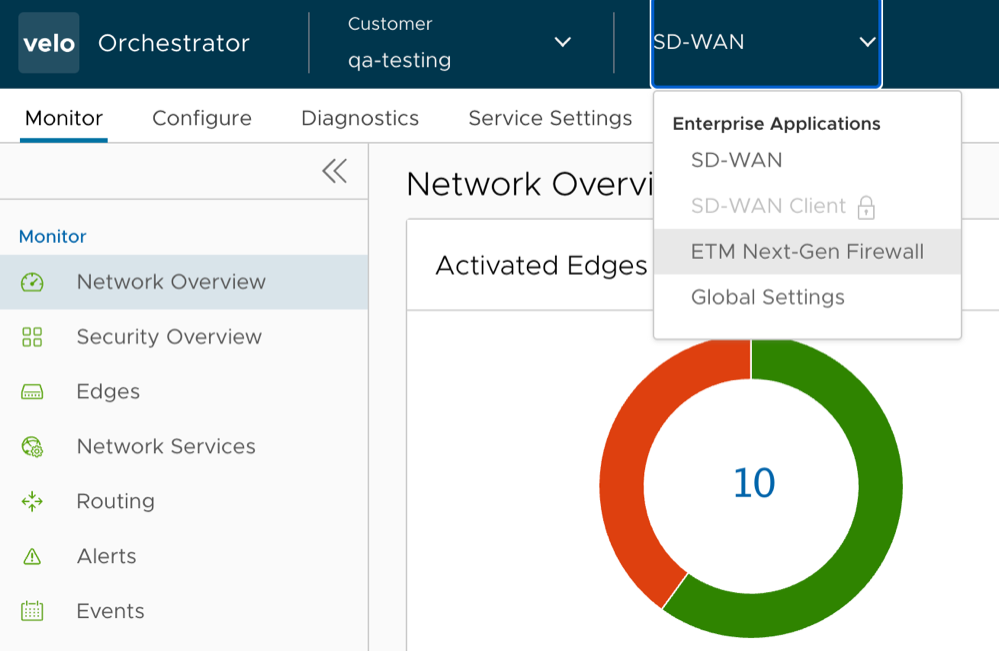
To access the ETM application from the VeloCloud Orchestrator, go to the Enterprise Applications drop-down menu and select ETM Nex-Gen Firewall.
Figure 1. ETM Nex-Gen Firewall
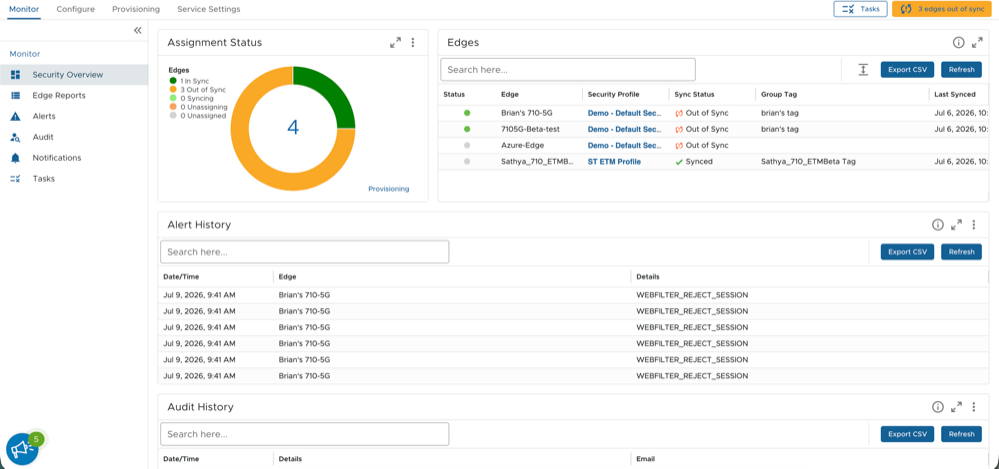
The ETM dashboard appears:
Figure 2. ETM Dashboard
The following are some of the common features across all of the ETM Dashboard screens:
Export CSV: Click this button to export the data into a CSV file.
Refresh: Click this button to refresh the data.
Search: Enter a text to locate a specific item.
Tasks: Click this button to review all the active tasks.
Column Options: Each column in a data grid includes a three-line menu that allows users to refine the data in the columns.
Table 1. Column Options
Option
Description
Filter
Apply filters to the list of entries as required.
Pin
Pin/unpin a column to either the left or the right.
Columns
Select/clear columns to be displayed on the screen.
Toolbar
Move or hide the toolbar.
Refresh
Refresh the data.
Export CSV
Export data to a CSV file.
Note: The Refresh and Export CSV options are also located at the top right of all ETM screens.
The various configuration options available on the ETM dashboard are explained in the following sections.