
MSS Overview
CloudVision provides support for microperimeter segmentation and enforcement as part of Arista’s Multi-Domain Segmentation Service (MSS) for Zero Trust Networking (ZTN). ZTN works to reduce lateral movement into increasingly smaller areas where workloads are granularly identified and only approved connections are permitted.
MSS allows you to implement fine-grained security policies based on microperimeters defined around the identity of endpoints or applications. This enhances network security beyond what is possible when relying on traditional network boundaries like subnets and VRFs. Microperimeters minimize the overall attack surface available at any endpoint, providing a better defense against lateral attacks.
For guidance on using MSS to build a zero trust network, see Create a Zero Trust Network with MSS.
Microperimeter segmentation and enforcement are possible through the use of CloudVision features like the MSS Studio, Policy Manager, Policy Builder, Policy Monitor, and MSS Dashboard. Use these features in the following way:
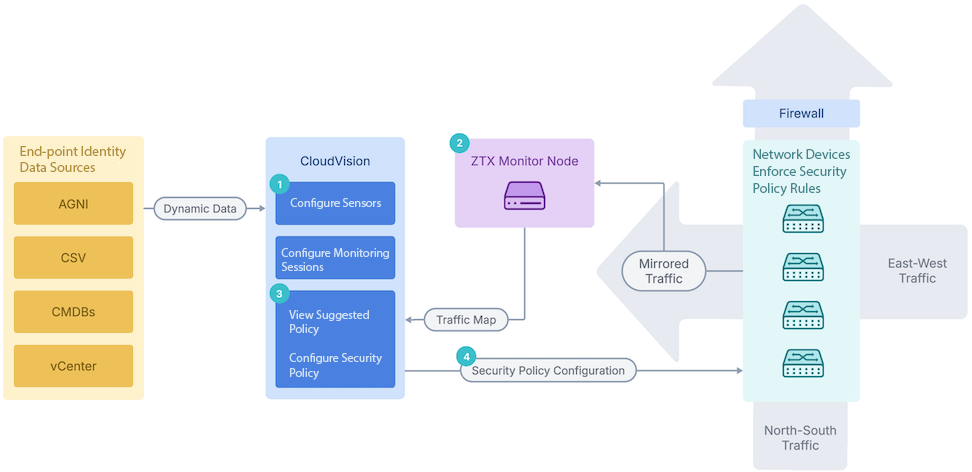
- Use MSS Studio to define static groups and policy rules for a security domain or domain, create sensors, monitoring sessions, and security policies in CloudVision, and dynamically discover groups using the Policy Manager to define microperimeters. CloudVision discovers dynamic groups using various endpoint identity data sources, including Arista’s network identity service (AGNI), Cisco Identity Services Engine (ISE), Aruba ClearPass Policy Manager, Forescout, VMware vCenter, configuration management databases (CMDBs) like ServiceNow, Infoblox, and CSV files. CloudVision learns about endpoints through these integrations and builds them into group member mappings stored in the CloudVision database. Configure traffic monitoring that allows CloudVision to generate security policy recommendations in the MSS Policy Builder and push the policy configuration to all devices in the domain VRF.
- View suggested policies and configure security policies to view traffic sessions collected by the ZTX Traffic Mapper monitor node and define those security policies to explicitly allow only trusted traffic. CloudVision pushes the mirroring policies to Arista’s network devices while Arista’s network devices mirror the network traffic to Arista’s ZTX Traffic Mapper appliances. The ZTX Traffic Mapper node performs stateful traffic analysis and sends session data back to CloudVision, where group member mappings are stored. Sessions are then mapped into group-to-group communication to produce a set of policy recommendations for users to review and audit. Alternatively, policies can also be imported from Cisco ISE and Forescout and accepted in CloudVision Portal to be used in security domains.
- Push the security policy configuration to network devices to distribute enforcement in the network or redirect to a firewall. The network devices enforce those security policies.
- Continue to monitor traffic and update policies.
- CVP: The built-in default sensor is sufficient to learn dynamic group information from all MSS data sources (e.g., AGNI, Cisco ISE, Aruba ClearPass Policy Manager, vCenter, ServiceNow, Infoblox, CSV). No additional standalone sensor is required.
- CVaaS: The default sensor can learn dynamic group information only from AGNI. A standalone sensor must be created and configured to support other MSS data sources (vCenter, Cisco ISE, Aruba ClearPass Policy Manager, vCenter, ServiceNow, CSV, etc.).
See Getting Started with MSS for an end-to-end guide to the MSS workflow, from onboarding the ZTX Traffic Mapper monitor node to configuring and implementing network security policy rules.