
Access Point Overview
C-230E is a tri-radio 802.11ax access point.
This chapter provides an overview of the C-230E access point (AP) and describes:
Front Panel
The front panel of the C-230E has 6 LEDs that indicate the status of various device functions.
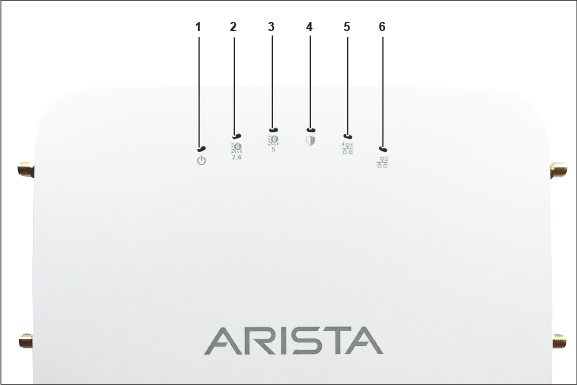
| 1 | Power | 2 | 2.4 GHz Radio | 3 | 5 GHz Radio |
| 4 | Third Radio | 5 | LAN1 | 6 | LAN2 |
Power LED - The following table describes the Power LED states.
| Green | Orange | |
|---|---|---|
| Solid | Running at full capability | Running at reduced capability |
| Blinking | Received IP address, but not connected to the server | Did not receive an IP address |
Reduced capability indicates that the AP receives lower than the required maximum power from the PoE switch, for example, 802.3af instead of 802.3at.
LAN1 LED - ON when the corresponding interface is up.
LAN2 LED - ON when the corresponding interface is up and wired guest or link aggregation is configured.
Radio LEDs - ON when the corresponding radio is operational.
Rear Panel
The rear panel of the AP has the DC power port and 802.3at compliant PoE LAN port (LAN 1) to power the device and connect it to a wired LAN.
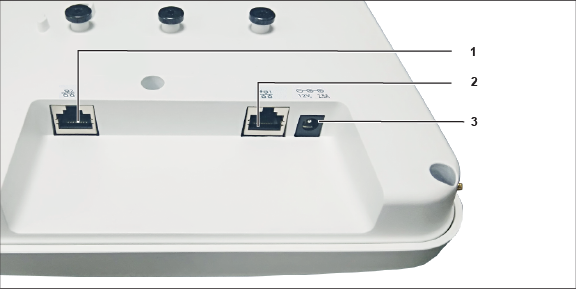
| 1 | LAN2 | 2 | LAN1 | 3 | Power |
| Port | Description | Connector Type | Speed/Protocol |
|---|---|---|---|
| Power | 12V DC | 5.5 mm overall diameter / 2.1 mm center pinhole | N/A |
| LAN 1 | 5 Gigabit Ethernet with 802.3at compliant PoE | RJ-45 | 100/1000 Mbps / 2.5/5 Gbps Ethernet |
| LAN 2 | 1 Gigabit Ethernet | RJ-45 | 100/1000 Mbps Ethernet |
Side Panel
The side panel of the C-230E has a reset pin, USB, and console port.
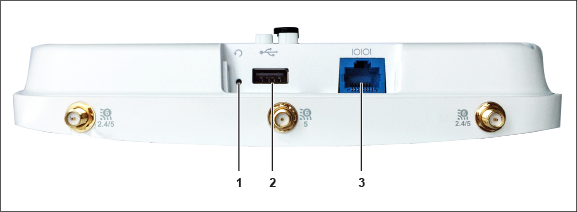
| 1 | Reset | 2 | USB | 3 | Console |
| Port | Description | Connector Type | Speed/Protocol |
|---|---|---|---|
| Console | Establish ‘config shell’ terminal session via serial connection | RJ-45 |
|
| USB | USB 2.0 port | USB | Future Use |
| Reset | Reset to factory default settings port. Hold down and power cycle the device to reset. | Pinhole push button | N/A |
When you reset the AP, it affects the following settings:
- The Config shell password resets to config.
- Erases the server discovery value and changesto the default redirector.online.spectraguard.net (primary) and wifi-security-server (secondary).
- Loses all the VLAN configurations.
- Erases a static IP address on the AP and sets it to DHCP mode. The factory default IP address of the AP is 169.254.11.74.