
Configuring EVPN
Configuring BGP-EVPN and VCS on CVX
Configuring BGP-EVPN
Configuring VNI Bundle
A VNI-aware-bundle represents a MAC-VRF that contains Layer 2 route entries from all VXLAN Network Identifiers (VNI) available across multiple DCs. Use the vni-aware-bundle command available on CVX to create a MAC-VRF.
Example
cvx(config)# router bgp 100
cvx(config-router-bgp)# vni-aware-bundle bundle1
cvx(config-macvrf-bundle1)#
Configuring RD and RT in VNI Bundle
Use the rd (Router-BGP VRF and VNI Configuration Modes) command to add a Route Distinguisher (RD) for uniquely identifying Layer 2 routes for the VNI bundle. Use the route-target command to configure a well-known extended community that is attached to the routes exported by BGP-EVPN; and to import routes with the specified well-known extended community into the MAC-VRF that corresponds to the VNI bundle.
Example
cvx(config)# router bgp 100
cvx(config-router-bgp)# vni-aware-bundle bundle1
cvx(config-macvrf-bundle1)# rd 530:12
cvx(config-macvrf-bundle1)# route-target both 530:12
Enabling Redistribution of Bridging Information
After the VNI aware bundle is created, use the redistribute service VXLAN command to redistribute the Layer 2 bridging information received from VCS.
Example
cvx(config)# router bgp 100
cvx(config-router-bgp)# vni-aware-bundle bundle1
cvx(config-macvrf-bundle1)# redistribute service VXLAN
Disabling Next-Hop Resolution in BGP-EVPN
When BGP-EVPN module receives a route from its BGP peer, it generally tries to resolve the next-hop indicated in the route. However, in the DCI topology, the routes coming from a CVX in another DC contains next-hops (VTEP addresses) that may not be reachable from the CVX receiving the route. Use the next-hop resolution disabled command to disable the next-hop resolution on routes received from BGP-EVPN peers.
Example
cvx(config)# router bgp 100
cvx(config-router-bgp)# address-family evpn
cvx(config-router-bgp-af)# next-hop resolution disabled
Configuring VCS
Enabling Redistribution of BGP-EVPN Routes
Use the redistribute bgp evpn VXLAN command to redistribute BGP-EVPN routes to VCS, which, in turn advertises them to all VTEPs within the DC.
Example
switch(config)# cvx
switch(config-cvx)# no shutdown
switch(config-cvx)# service VXLAN
switch(config-cvx-VXLAN)# no shutdown
switch(config-cvx-VXLAN)# redistribute bgp evpn VXLAN
EVPN MPLS Virtual Private Wire Service (VPWS)
Traffic to/from a given Attachment Circuit (AC) without any MAC lookup/learning can be forwarded using EVPN MPLS VPWS, which uses BGP for signalling. Port-based and VLAN-based services are supported.
Configuring EVPN MPLS VPWS
Configure the patch panel to specify the AC connection to the VPWS service instances and then the VPWS service instance, which is part of BGP. Finally, configure the individual participating ACs.
Patch Panel Configuration
switch(config)# patch panel
switch(config-patch)# patch port
switch(config-patch-port)# connector 1 interface ethernet 2/1
switch(config-patch-port)# connector 2 pseudowire bgp vpws evi-1 pseudowire pw1
switch(config-patch-port-pw-pw1-vpws-evi-1)#switch(config)# patch panel
switch(config-patch)# patch subintf
switch(config-patch-subintf)# connector 1 interface ethernet 3/1
switch(config-patch-subintf)# connector 2 pseudowire bgp vpws evi-1 pseudowire pw2
switch(config-patch-subintf-pw-pw1-vpws-evi-1)#VPWS Service Instance Configuration
switch(config)# router bgp 200
switch(config-router-bgp)# neighbor 10.0.0.1 remote-as 1
switch(config-router-bgp)# neighbor 10.0.0.1 send-community extended
switch(config-router-bgp)# neighbor 10.0.0.1 maximum-routes 12000
!
switch(config-router-bgp)# vpws evi-1
switch(config-macvrf-evi-1)# rd 10.2.2.2:2
switch(config-macvrf-evi-1)# route-target import export evpn 0.0.0.0:1
switch(config-macvrf-evi-1)# mpls control-word
!
switch(config-macvrf-evi-1)# pseudowire pw1
switch(config-vpws-pw-pw1)# evpn vpws id local 2001 remote 1001
!
switch(config-macvrf-evi-1)# pseudowire pw2
switch(config-vpws-pw-pw2)# evpn vpws id local 2002 remote 1002
!
switch(config-macvrf-evi-1)# address-family evpn
switch(config-router-bgp-af)# neighbor default encapsulation mpls next-hop-self source-interface loopback 0
switch(config-router-bgp-af)#Attachment Circuit Configuration (double-tagged L3 subinterfaces)
switch(config)# interface ethernet 2/1
switch(config-if-Et2/1)# no switchportswitch(config)# interface ethernet 3/1
switch(config-if-Et3/1)# no switchport
switch(config)# interface ethernet 3/1
switch(config-if-Et3/1)# encapsulation dot1q vlan 1switch(config)# interface ethernet 3/1
switch(config-if-Et3/1)# no switchport
switch(config)# interface ethernet 3/1
switch(config-if-Et3/1)# encapsulation dot1q vlan
switch(config-if-Et3/1)# client dot1q 11 network clientFlexible Encapsulation EVPN MPLS VPWS
- Remove incoming encapsulation tag(s) and forward.
- Preserve incoming encapsulation tag(s) and forward.
- Replace one or two tags when forwarding in encapsulation and decapsulation directions.
The following table explains the encapsulation and decapsulation behaviors for the various FlexEncap options. Applying a Flexible Encapsulation with a network specification to a subinterface creates a bidirectional mapping table that is applied to the sub-interface. The mapping embodied in this table is applied from client to network in the encap direction, and network to client in the decap direction.
| Example | Behavior |
|---|---|
| client dot1q 10 |
From client: match VLAN ID 10, consume and forward To client: add VLAN ID 10 before transmit |
| client dot1q 10 inner 20 |
From client: match VLAN IDs 10, 20 consume and forward To client: add VLAN ID 10, 20 before transmit |
| client dot1q 10 network client |
From client: match VLAN ID 10 and retain it. From Network: match vlan=10, retain. |
| client dot1q outer 10 inner 20 network client |
From client: match VLAN IDs 10, 20 and retain both. From Network: match vlan=10,20, retain both. |
| client dot1q 10 network dot1q 100 | |
| client dot1q 10 network dot1q 100 |
From client: match VLAN ID 10, consume. Before forwarding, write vlan=100. From Network: match vlan=100, consume. Before transmit, write vlan=10. |
| client dot1q outer 10 inner 20 network dot1q outer 100 inner 200 |
From client: match VLAN IDs 10, 20, and consume them. Before forwarding, write vlan=100,200. From Network: match vlan=100, 200, consume. Before transmit, write vlan=10, 20. |
- Packets received on Ethernet3/1 with outermost 802.1q VLAN tag of 1000 get mapped to sub-interface Ethernet3/1.1000.
- The tag of 1000 is preserved and forwarded to pseudowire PW1.
- Packets terminating on PW1 get forwarded to Et3/1.1000 and get transmitted out with VLAN tag of 1000.
switch(config)# interface ethernet 3/1
switch(config-if-Et3/1)# encapsulation vlan
switch(config-if-Et3/1)# client dot1q 1000 network client
!
switch(config)# patch panel
switch(config-patch)# patch patch-1
switch(config-patch-patch-1)# connector 1 interface ethernet 3/1
switch(config-patch-patch-1)# connector 2 pseudowire ldp PW1
switch(config-patch-patch-1-pw-PW1)#
Displaying EVPN MPLS VPWS Configuration
switch(config-if-Et3/1.1003)# show interfaces encapsulation vlan
interface                 Status       client Encapsulation      Network Encapsulation
------------------------- ------------ ---------------------------------------------------
Ethernet3/1.1000       active       dot1q outer 1000
Ethernet3/1.1001       active       dot1q outer 1001             client
Ethernet3/1.1002       active       dot1q outer 1002 inner 102
Ethernet3/1.1003       active       dot1q outer 1003 inner 103   client
Ethernet3/1.1004       active       dot1q outer 1004             dot1q 2004
Ethernet3/1.1005 active dot1q outer 1005 inner 104 dot1q outer 2005 inner 204switch(config-if-Et3/1.1003)# show patch panel PP_1000
Patch Connector Status
------- ------------------------------------- ------
PP_1000 1: Ethernet3/1.1000 Up
2: BGP VPWS VPWS_1 Pseudowire PW_1000
tg481.12:19:52(s2)(config-if-Et3/1.1003)#show patch panel PP_1000 detail
PW Fault Legend:
ET-IN - Ethernet receive fault
ET-OUT - Ethernet transmit fault
TUN-IN - Tunnel receive fault
TUN-OUT - Tunnel transmit fault
NF - Pseudowire not forwarding (other reason)
Patch: PP_1000, Status: Up
Connector 1: Ethernet3/1.1000
Status: Up
Connector 2: BGP VPWS VPWS_1 Pseudowire PW_1000
Status: Up
Local MPLS label: 135363
MTU: 1600, Control word: Y
Neighbor 103.37.123.72, MPLS label: 136350
Tunnel type: SR-TE Policy, Tunnel index: 132
MTU: 1600, Control word: Y
EVPN VPWS type: VLAN-basedTag Matching Semantics
The matching rules are applied on a 'longest matching tag sequence' basis when rules are configured for multiple subinterfaces of a parent port. Considering the following rules on the same parent, the receive (encap) and transmit (decap) rule application is shown in the following tables.
switch(config)# interface ethernet 10/1
switch(config-if-Et10/1)# encapsulation vlan
switch(config-if-Et10/1)# client dot1q 11 network clientswitch(config)# interface ethernet 10/2
switch(config-if-Et10/2)# encapsulation vlan
switch(config-if-Et10/2)# client dot1q 11 inner 20 network clientThe receive (encap) matching behavior is as follows.
| Received Packet | Matching Rule |
| outer=11, inner=20 | Rule #2 |
| single tag with 11 | Rule #1 |
| double tag with 11, not 20 | Rule #1 |
The transmit (decap) matching behavior is as follows.
| Forwarded Packet | Matching Rule |
|---|---|
| outer=11, inner=20 | Rule #2 |
| single tag with 11 | Rule #1 |
| double tag with 11, not 20 | Rule #1 |
Configuring Multi-Homing on a Multi-Domain EVPN VXLAN-MPLS Gateway
Use the following steps to add Multi-Homing to your BGP configuration.
Configuring the Local Ethernet Segment Parameters
- Configure the EVPN address family Ethernet Segment parameters,
domain local, and enter the Ethernet Segment
configuration mode:
switch(config-router-bgp-af)# evpn ethernet-segment domain local switch(config-evpn-es-domain-local)# - Add the 10 octet identifier, 0011:1111:1111:1111 for the
local domain:
switch(config-evpn-es-domain-local)# identifier 0011:1111:1111:1111 - Add the low-order six (6) bytes of the ES-Import Route Target,
11:11:11:11:11:11:
switch(config-evpn-es-domain-local)# route-target import 11:11:11:11:11:11Exit the domain local configuration mode.
switch(config-router-bgp-af)#
Configuring the Remote Ethernet Segment Parameters
- Configure the Ethernet Segment remote domain parameters by entering the remote domain
configuration mode:
switch(config-router-bgp-af)# evpn ethernet-segment domain remote switch(config-evpn-es-domain-remote)# - Add the 10 octet identifier, 0022:2222:2222:2222 for
the remote domain:
switch(config-evpn-es-domain-remote)# identifier 0022:2222:2222:2222 - Add the low-order six (6) bytes of the ES-Import Route Target to the remote
domain:
Exit the remote domain configuration mode, and return to the Ethernet Segment configuration mode:switch(config-evpn-es-domain-remote)# route-target import 22:22:22:22:22:22switch(config-evpn-es-domain-remote)# exit switch(config-router-bgp-af)#
Adding the Layer 2 and BGP FEC Parameters
- Configure the Layer 2 and BGP FEC parameters for the Ethernet Segment configuration:
Exit to the global configuration mode:switch(config-router-bgp-af)# layer-2 fec in-place updateswitch(config)#
Adding the Routing Control Functions
- Enter the routing control functions configuration mode and then the control-functions
configuration mode:
switch(config)# router general switch(config-router-general)# control-functions switch(config-router-general-control-functions)# - Finally, add the JSON code to the configuration:
switch(config-router-general-control-functions)# code
Enter RCF code. Type 'EOF' on its own line to end.
                        function evpnDciMhBlockGwTx() {
                            if evpn.route_type is EVPN_IMET
                            {
                            community add {1:1};
                            }
                            return true;
                            }

                            function evpnDciMhBlockGwRx() {
                            return community has_none {1:1};
                            }

                            EOF
Displaying the Multihome EVPN Configuration
To display your configuration, use the show active command from the BGP configuration mode:
GW-A1(config-router-bgp)# show active
                router bgp 64512
                ...
                maximum-paths 4 ecmp 4
                bgp bestpath d-path
                ...
                !
                vlan 10
                rd evpn domain all 10.255.1.1:10
                route-target import export 64500:10
                route-target import export evpn domain remote 64501:10
                redistribute learned
                !
                vrf red
                rd 10.255.1.1:0
                route-target import evpn 64500:20000
                route-target export evpn 64500:20000
                router-id 10.255.1.1
                ...
                address-family evpn
                neighbor WAN-RR activate
                neighbor WAN-RR domain remote
                neighbor RR-A activate
                neighbor RR-A rcf in evpnDciMhBlockGwRx()
                    neighbor RR-A rcf out evpnDciMhBlockGwTx()
                    neighbor WAN-RR rcf in evpnDciMhBlockGwRx()
                    neighbor WAN-RR rcf out evpnDciMhBlockGwTx()
                    domain identifier 1:1
                    domain identifier 1:2 remote
                ...
                !
                evpn ethernet-segment domain local
                    identifier 0011:1111:1111:1111:1111
                    route-target import 11:11:11:11:11:11
                !
                evpn ethernet-segment domain remote
                    identifier 0022:2222:2222:2222:2222
                    route-target import 22:22:22:22:22:22
                !
                layer-2 fec in-place update
                !
                router general
                    control-functions
                    code
                    function evpnDciMhBlockGwTx() {
                    if evpn.route_type is EVPN_IMET
                    {
                    community add {1:1};
                    }
                    return true;
                    }

                    function evpnDciMhBlockGwRx() {
                    return community has_none {1:1};
                    }
- An interconnect Ethernet segment with an Ethernet Segment Identifier (ESI),
1111:1111:1111:1111:, configured for the hosts sourced from the local domain. - An interconnect Ethernet segment with an ESI,
2222:2222:2222:2222, configured for the hosts sourced for the remote domain. - The gateway, GW-A1, peers with a route reflector, the RR-A in the local domain, and peers with a route reflector, WAN-RR, in the remote domain.
For route loop detection, configure domain identifiers for the local and remote domain, and the domain path best path. Use the same identifier for the same domain on all gateways in one site, and configure RCF rules to reject the IMET routes from peer gateways in the same DC.
Configuring iBGP PE-CE Protocol for BGP/EVPN L3 VLANs
Before configuring iBGP, configure BGP EVPN VPN routing with the following commands:
switch(config)# router bgp 300
switch(config-router-bgp)# vrf vrf1
switch(config-router-bgp-vrf-vrf1)# local-as 1000
switch(config-router-bgp-vrf-vrf1)# neighbor 10.11.0.2 remote-as 1000
switch(config-router-bgp-vrf-vrf1)# neighbor 10.11.0.2 route-reflector-client
switch(config-router-bgp-vrf-vrf1)# address-family evpn
switch(config-router-bgp-af)# vpn client ibgp attribute tunneling
The command, local-as, configures the AS number, and if omitted, the VRF assumes the same AS number as the global BGP configuration. The command, neighbor 10.11.0.2 remote-as 1000 sets the remote AS to the same number as the local AS. The third command, neighbor 10.11.0.2 route-reflector-client, allows the CE to receive updates from the PE as the route reflector client. The last command, neighbor 10.11.0.2 route-reflector-client, must be included for each configured address family in order to save and restore CE attributes during export or import operations. This is disabled by default.
Displaying iBGP PE-CE Protocol Information
eos adds a new parameter in the output, evpn prefix detail to display the ATTR_SET, code 128 attributes.
switch#show bgp evpn
BGP routing table information for VRF default
Router identifier 10.11.0.1, local AS number 300
BGP routing table entry for ip-prefix 172.10.11.12/24, Route Distinguisher: 100:1
 Paths: 1 available
  Local
     - from - (0.0.0.0)
     Origin IGP, metric -, localpref -, weight 0, valid, internal, best
     Extended Community: Route-Target-AS:100:1 TunnelEncap:tunnelTypeMpls
     Rx path id: 0x0
     MPLS label: 100000
     Customer attributes (Origin ASN 1000)
     Origin IGP, metric -, localpref 150, internal
     Community: 47872:6 47872:6939
DCI Gateway with a Layer 3 EVPN Overlay and Multi-Domain VRF
In eos, a DCI Gateway (Data Center Interconnect Gateway) consists ofa specialized network node that sits at the edge of a data center pod or site. It primarily interconnects different EVPN domains while maintaining fault isolation and scalability. eos supports a Layer 3 EVPN gateway with Type 5 nexthop self-mechanism, and while simple to operate, the L3 lacks the support to rewrite the EVPN route distinguisher as well as the BGP route target.
Within a single VRF, you can configure independent Route Distinguishers (RD) and Route Targets (RT) for the local domain, the data center, and the remote domain, the WAN or another DC.
The gateway terminates EVPN Type-5 (IP Prefix) routes from one domain and re-originates them into the other, effectively connecting the L3 overlays together while keeping the internal topologies hidden from one another.
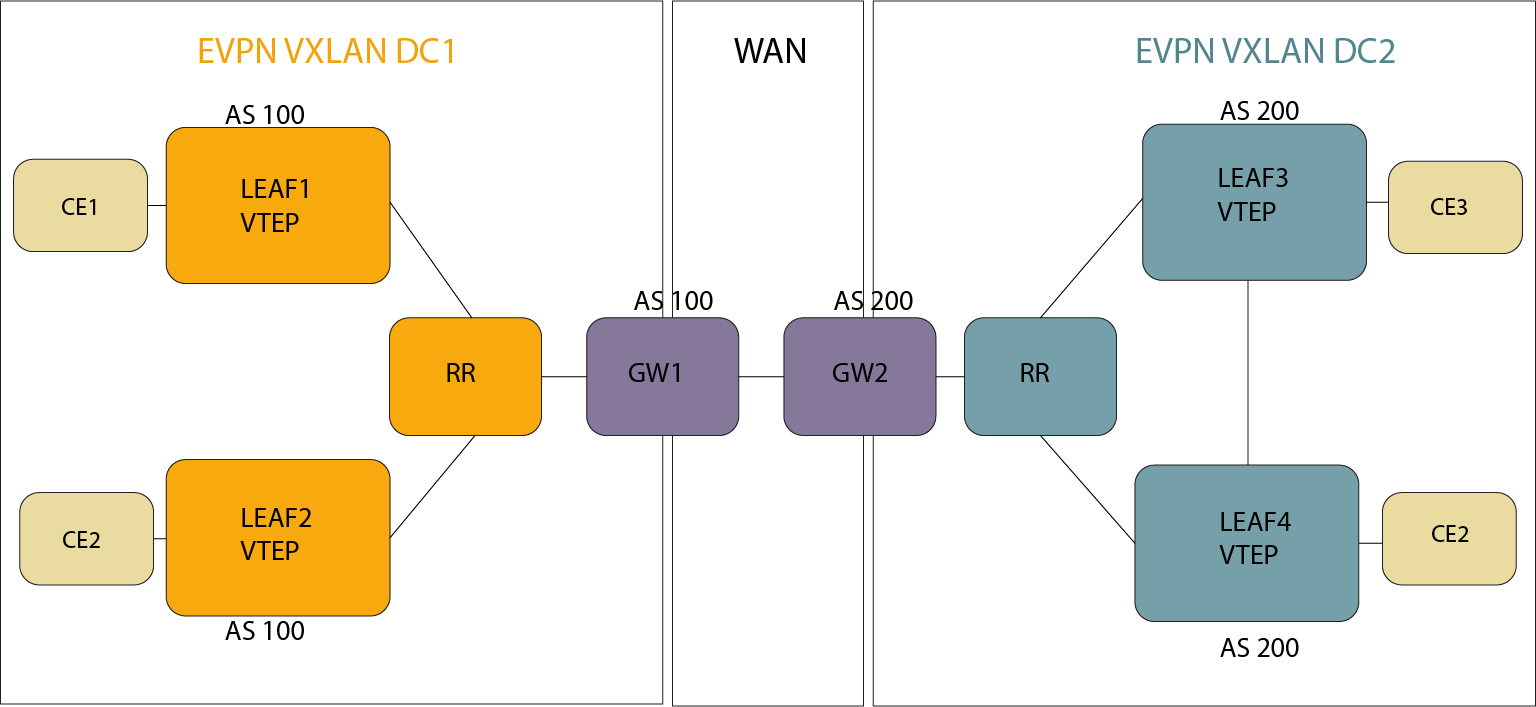
Configuring a DCI Gateway with Layer 3 EVPN Overlay and Multi-Domain VRF
Use the following sample configurations to create a multi-domain VRF on a DCI Gateway. In addition to the local domain RD and RTs, the remote domain RD and RTs have different values.
switch(config)# router bgp 65536
switch(config-router-bgp)# address-family evpn
switch(config-router-bgp-af)# neighbor DC_LEAF_PEER_Group activate
switch(config-router-bgp-af)# neighbor DC_REMOTE_GW_Group activate
switch(config-router-bgp-af)# neighbor DCI_REMOTE_GW_Group domain remote
switch(config-router-bgp-af)# domain identifier 1:1
switch(config-router-bgp-af)# domain identifier 2:2 remote
switch(config-router-bgp-af)# exit
switch(config-router-bgp)# vrf red
switch(config-router-bgp-vrf-red)# rd 10.255.1.1:10
switch(config-router-bgp-vrf-red)# rd evpn domain remote 10.255.1.1:1010
switch(config-router-bgp-vrf-red)# route-target import evpn domain all 10000:10000
switch(config-router-bgp-vrf-red)# route-target export evpn domain all 10000:10000
switch(config-router-bgp-vrf-red)# address-family ipv4
switch(config-router-bgp-vrf-red-af)# route-target import evpn 10000:10000
switch(config-router-bgp-vrf-red-af)# route-target export evpn 10000:10000
switch(config-router-bgp-vrf-red-af)# route-target import evpn domain remote 20000:20000
switch(config-router-bgp-vrf-red-af)# route-target export evpn domain remote 20000:20000
switch(config-router-bgp-vrf-red-af)# exit
switch(config-router-bgp-vrf-red)# address-family ipv6
switch(config-router-bgp-vrf-red-af)# route-target import evpn 3:1
switch(config-router-bgp-vrf-red-af)# route-target export evpn 3:1
switch(config-router-bgp-vrf-red-af)# route-target import evpn domain remote 30000:30000
switch(config-router-bgp-vrf-red-af)# route-target export evpn domain remote 30000:30000
Aggregate Path
eos supports an aggregate path for multi-domain VRF, and exports the summary prefix to both domains. eos suppresses the contributing prefixes. Use the following commands to add an aggregate path to the configuration:
switch(config)# router bgp
switch(config-router-bgp)# vrf-red
switch(config-router-bgp-vrf-red)# aggregate-address 10.0.0.0/8 summary-only
switch(config-router-bgp-vrf-red)#
Preventing Routing Loops with BGP D-path
The L3 EVPN Multi-domain Gateway adds the BGP DPATH loop avoidance and BGP Bestpath to EVPN type 5 IP Prefix routes. Use the following commands to add it to the configuration:
switch(config)# router bgp 65536
switch(config-router-bgp)# bgp bestpath d-path
switch(config-router-bgp)# address-family evpn
switch(config-router-bgp-af)# domain identifier 1:100
switch(config-router-bgp-af)# domain identifier 2:200 remote
Configuring EVPN VXLAN Single-Gateway Centralized Routing
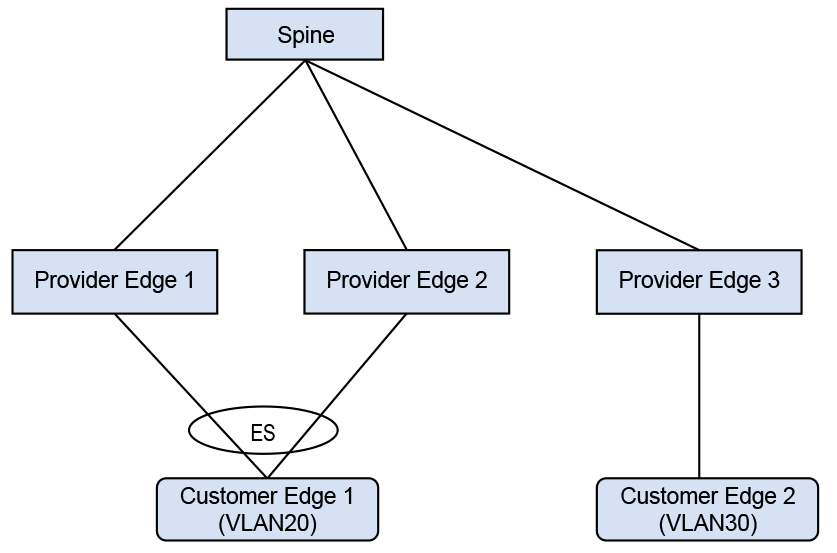
Configuring the Example Topology
In the example, CE1 is a multi-homed CE in VLAN20 with CE2 as a remote CE in VLAN30, and an asymmetric IRB configured for inter-VLAN traffic.
switch(config)# interface Port-Channel100
switch(config-if-Po100)# switchport access vlan 20
!
switch(config-if-Po100)# evpn ethernet-segment
switch(config-evpn-es)# identifier 0033:3333:3333:3333:3333
switch(config-evpn-es)# route-target import 00:03:00:03:00:03
switch(config-evpn-es)# lacp system-id 1234.5678.0123
!
switch(config)# interface Ethernet1
switch(config-if-Et1)# switchport mode trunk
switch(config-if-Et1)# channel-group 100 mode on
!
switch(config)# interface Loopback0
switch(config-if-Lo0)# ip address 10.255.0.0/32
!
switch(config)# interface Vlan20
switch(config-if-Vl20)# ip address virtual 20.0.20.1/24
!
switch(config)# interface Vlan30
switch(config-if-Vl30)# ip address virtual 20.0.30.1/24
!
switch(config)# interface VXLAN1
switch(config=if-Vx1)# VXLAN source-interface Loopback0
switch(config=if-Vx1)# VXLAN udp-port 4789
switch(config=if-Vx1)# VXLAN vlan 20 vni 10020
switch(config=if-Vx1)# VXLAN vlan 30 vni 10030
!
switch(config)# ip virtual-router mac-address 00:00:80:00:00:00
!
switch(config)# router bgp 300
switch(config-router-bgp)# router-id 0.0.0.1
switch(config-router-bgp)# neighbor 10.0.0.1 remote-as 303
switch(config-router-bgp)# neighbor 10.0.0.1 ebgp-multihop
switch(config-router-bgp)# neighbor 10.0.0.1 send-community extended
switch(config-router-bgp)# neighbor 10.0.0.1 maximum-routes 12000
switch(config-router-bgp)# redistribute static
   !
switch(config-router-bgp)# vlan 20
switch(config-macvrf-20)# rd 10.255.0.0:20
switch(config-macvrf-20)# route-target both 64500:10020
switch(config-macvrf-20)# redistribute learned
   !
switch(config-router-bgp)# vlan 30
switch(config-macvrf-30)# rd 10.255.0.0:30
switch(config-macvrf-30)# route-target both 64500:10030
switch(config-macvrf-30)# redistribute learned
   !
switch(config-macvrf-30)# address-family evpn
switch(config-router-bgp-af)# neighbor 10.0.0.1 activate
The Ethernet segment to the multi-homed CE is configured on the port channel interface Port-Channel 100. SVI 20 and SVI 30 along with VARP IP are configured for inter-subnet routing. PE1 has a VARP MAC configured globally. The configuration on PE2 is similar to the previous configuration. On PE3, configure SVI 20 and SVI 30 with the VARP IP and VARP MAC.
Configuring Symmetric IRB with IPv4
switch(config)# vrf instance red
switch(config-vrf-red)# rd 10.255.0.0:0
!
switch(config-vrf-red)# interface Port-Channel100
switch(config-if-Po100)# switchport access vlan 20
!
switch(config-if-Po100)# evpn ethernet-segment
switch(config-evpn-es)# identifier 0033:3333:3333:3333:3333
switch(config-evpn-es)# route-target import 00:03:00:03:00:03
switch(config-evpn-es)# lacp system-id 1234.5678.0123
!
switch(config-if-Po100)# interface Ethernet6/6/1
switch(config-if-Et6/6/1)# switchport mode trunk
switch(config-if-Et6/6/1)# channel-group 100 mode on
!
switch(config-if-Et6/6/1)# interface Loopback0
switch(config-if-Lo0)# ip address 10.255.0.0/32
!
switch(config-if-Lo0)# interface Vlan20
switch(config-if-Vl20)# vrf red
switch(config-if-Vl20)# ip address virtual 20.0.20.1/24
!
switch(config-if-Vl20)# interface VXLAN1
switch(config-if-Vx1)# VXLAN source-interface Loopback0
switch(config-if-Vx1)# VXLAN udp-port 4789
switch(config-if-Vx1)# VXLAN vlan 10 vni 10010
switch(config-if-Vx1)# VXLAN vlan 20 vni 10020
switch(config-if-Vx1)# VXLAN vrf red vni 20000
!
switch(config-if-Vx1)# ip virtual-router mac-address 00:00:80:00:00:00
!
switch(config)# router bgp 300
switch(config-router-bgp)# router-id 0.0.0.1
switch(config-router-bgp)# maximum-paths 2
switch(config-router-bgp)# neighbor 10.0.0.1 remote-as 303
switch(config-router-bgp)# neighbor 10.0.0.1 ebgp-multihop
switch(config-router-bgp)# neighbor 10.0.0.1 send-community extended
switch(config-router-bgp)# neighbor 10.0.0.1 maximum-routes 12000
switch(config-router-bgp)# redistribute static
!
switch(config-router-bgp)# vlan 20
switch(config-macvrf-20)# rd 10.255.0.0:20
switch(config-macvrf-20)# route-target both 64500:10020
switch(config-macvrf-20)# redistribute learned
!
switch(config-macvrf-20)# address-family evpn
switch(config-router-bgp-af)# neighbor 10.0.0.1 activate
!
switch(config-router-bgp-af)# vrf red
switch(config-router-bgp-vrf-red)# rd 10.255.0.0:0
switch(config-router-bgp-vrf-red)# route-target import evpn 64500:20000
switch(config-router-bgp-vrf-red)# route-target export evpn 64500:20000
switch(config-router-bgp-vrf-red)# router-id 10.255.0.0
!
Configure the Ethernet segment to the multi-homed CE1 on the port channel interface Port-Channel 100. Configure SVI 20 with the VARP IP and VARP MAC. Also, configure the IP VRF for symmetric IRB. PE2 has a similar configuration. On PE3, IP VRF and SVI 30 are configured for symmetric IRB.
Configuring the VXLAN
A network with two VRFs, red and blue has VLANs 10 and 20 in red and VLANs 30 and 40 in blue. The spines act as a route reflectors. Multicast groups encapsulate traffic arriving in a VRF and deliver it to VTEPs with VRF provisioned.
switch(config)# interface loopback 0
switch(config-if-Lo0)# ip address 10.0.0.20/32
!
switch(config)# vlan 10
switch(config)# vlan 20
switch(config)# vlan 30
switch(config)# vlan 40
!
switch(config)# interface ethernet 2/1
switch(config-if-Et2/1)# switchport access vlan 10
!
switch(config)# interface ethernet 2/2
switch(config-if-Et2/2)# switchport access vlan 20
!
switch(config-if-Et2/2)# interface ethernet 2/3
qzd496.01:05:52(config-if-Et2/3)# switchport access vlan 30
!
switch(config)# interface ethernet 2/4
switch(config-if-Et2/4)# switchport access vlan 40
!
switch(config)# interface vlan 10
switch(config-if-Vl10)# vrf red
switch(config-if-Vl10)# ip address virtual 192.168.1.1/24
switch(config-if-Vl10)# ip igmp
switch(config-if-Vl10)# pim ipv4 local-interface loopback 0
!
switch(config)# interface vlan 20
switch(config-if-Vl20)# vrf red
switch(config-if-Vl20)# ip address virtual 192.168.2.1/24
switch(config-if-Vl20)# ip igmp
!
switch(config)# interface vlan 30
switch(config-if-Vl30)# vrf blue
switch(config-if-Vl30)# ip address virtual 192.168.1.1/24
switch(config-if-Vl30)# ip igmp
!
switch(config)# interface vlan 40
switch(config-if-Vl40)# vrf blue
switch(config-if-Vl40)# ip address virtual 192.168.1.2/24
switch(config-if-Vl40)# ip igmp
!
switch(config)# interface vxlan 1
switch(config-if-Vx1)# vxlan source-interface loopback 0
switch(config-if-Vx1)# vxlan vlan 10 vni 10
switch(config-if-Vx1)# vxlan vlan 20 vni 20
switch(config-if-Vx1)# vxlan vlan 30 vni 30
switch(config-if-Vx1)# vxlan vlan 40 vni 40
switch(config-if-Vx1)# vxlan vrf red vni 100
switch(config-if-Vx1)# vxlan vrf blue vni 200
switch(config-if-Vx1)# vxlan vlan 10 flood group 225.1.1.2
switch(config-if-Vx1)# vxlan vlan 20 flood group 225.1.1.3
switch(config-if-Vx1)# vxlan vlan 30 flood group 226.1.1.2
switch(config-if-Vx1)# vxlan vlan 40 flood group 226.1.1.3
switch(config-if-Vx1)# vxlan vrf red multicast group 225.1.1.1
switch(config-if-Vx1)# vxlan vrf blue multicast group 226.1.1.1
            !
Displaying ECPN VXLAN Information
The following examples are based on the sample topology and configuration in the previous sections.
switch# show bgp evpn route-type mac-ip 20.0.20.2
BGP routing table information for VRF default
Router identifier 0.0.3.1, local AS number 302
Route status codes: s - suppressed, * - valid, > - active, # - not installed, E - ECMP head,
                    e - ECMP S - Stale, c - Contributing to ECMP, b - backup
                    % - Pending BGP convergence
Origin codes: i - IGP, e - EGP, ? - incomplete
AS Path Attributes: Or-ID - Originator ID, C-LST - Cluster List, LL Nexthop - Link Local Nexthop

          Network                Next Hop              Metric  LocPref Weight  Path
 * >     RD: 10.255.0.0:20 mac-ip 0000.0101.0000 20.0.20.2
                                10.255.0.0            -       100     0       303 300 i
 * >     RD: 10.255.0.1:20 mac-ip 0000.0101.0000 20.0.20.2
                                10.255.0.1            -       100     0       303 301 i
As shown above, there are two EVPN MAC-IP routes for the multi-homed CE.
switch# show ip route vrf red 20.0.20.2/32

VRF: red
Codes: C - connected, S - static, K - kernel,
       O - OSPF, IA - OSPF inter area, E1 - OSPF external type 1,
       E2 - OSPF external type 2, N1 - OSPF NSSA external type 1,
       N2 - OSPF NSSA external type2, B - BGP, B I - iBGP, B E - eBGP,
       R - RIP, I L1 - IS-IS level 1, I L2 - IS-IS level 2,
       O3 - OSPFv3, A B - BGP Aggregate, A O - OSPF Summary,
       NG - Nexthop Group Static Route, V - VXLAN Control Service,
       DH - DHCP client installed default route, M - Martian,
       DP - Dynamic Policy Route, L - VRF Leaked

 B E      20.0.20.2/32 [200/0] via VTEP 10.255.0.0 VNI 20000 router-mac 00:00:78:01:00:00
                               via VTEP 10.255.0.1 VNI 20000 router-mac 00:00:78:04:00:00
Two routes to the multi-homed CE install from the two EVPN MAC-IP routes and form the L3 ECMP.
switch# show ip bgp 20.0.20.2/32 vrf red
BGP routing table information for VRF red
Router identifier 10.255.0.2, local AS number 302
BGP routing table entry for 20.0.20.2/32
 Paths: 2 available
  303 300
    10.255.0.0 from 10.0.2.1 (0.0.1.1), imported EVPN route, RD 10.255.0.0:20
      Origin IGP, metric 0, localpref 100, IGP metric 0, weight 0, received 00:14:43 ago,
      valid, external, ECMP head, ECMP, best, ECMP contributor
      Extended Community: Route-Target-AS:64500:10020 Route-Target-AS:64500:20000
      TunnelEncap:tunnelTypeVXLAN EvpnMacMobility:1 EvpnRouterMac:00:00:78:01:00:00
      Remote VNI: 20000
      Rx SAFI: Unicast
  303 301
    10.255.0.1 from 10.0.2.1 (0.0.1.1), imported EVPN route, RD 10.255.0.1:20
      Origin IGP, metric 0, localpref 100, IGP metric 0, weight 0, received 00:14:43 ago,
      valid, external, ECMP, ECMP contributor
      Extended Community: Route-Target-AS:64500:10020 Route-Target-AS:64500:20000
      TunnelEncap:tunnelTypeVXLAN EvpnMacMobility:1 EvpnRouterMac:00:00:78:04:00:00
      EvpnNdFlags:pflag
      Remote VNI: 20000
      Rx SAFI: Unicast
The second route has EvpnNdFlags:pflag and indicates a proxy MAC-IP route.
switch# show bgp evpn instance sbd red
EVPN instance: SBD red
  Route distinguisher: 100:1
  Service interface: VLAN-based
  Local IP address: 10.0.0.20
  Encapsulation type: VXLAN
vtep2#show bgp evpn instance sbd blue
EVPN instance: SBD red
  Route distinguisher: 200:1
  Service interface: VLAN-based
  Local IP address: 10.0.0.20
Encapsulation type: VXLANswitch# show bgp evpn route-type imet next-hop 10.0.0.10 detail
BGP routing table information for VRF default
Router identifier 0.0.0.1, local AS number 300
BGP routing table entry for imet 10.0.0.10, Route Distinguisher: 10:1
Paths: 1 available
Local
10.0.0.10 from 10.0.0.1 (0.0.1.1)
Origin IGP, metric -, localpref 100, weight 0, valid, internal, best
Extended Community: Route-Target-AS:10:1 TunnelEncap:tunnelTypeVXLAN
VNI: 10
PMSI Tunnel: PIM-SSM Tree, MPLS Label: 10, Leaf Information Required: false,
Tunnel ID: 10.0.0.10, 225.1.1.2
BGP routing table information for VRF default
Router identifier 0.0.0.1, local AS number 300
BGP routing table entry for imet 10.0.0.10, Route Distinguisher: 100:1
Paths: 1 available
Local
10.0.0.10 from 10.0.0.1 (0.0.1.1)
Origin IGP, metric -, localpref 100, weight 0, valid, internal, best
Extended Community: Route-Target-AS:100:1 TunnelEncap:tunnelTypeVXLAN Multicast
Flags: IGMP proxy, OISM-supported, SBD
VNI: 100
PMSI Tunnel: Ingress Replication, MPLS Label: 100, Leaf Information Required: false,
Tunnel ID: 10.0.0.10switch# show bgp evpn route-type smet multicast 228.1.1.1
BGP routing table information for VRF default
Router identifier 0.0.1.1, local AS number 300
Route status codes: s - suppressed, * - valid, > - active, E - ECMP head, e - ECMP
S - Stale, c - Contributing to ECMP, b - backup
% - Pending BGP convergence
Origin codes: i - IGP, e - EGP, ? - incomplete
AS Path Attributes: Or-ID - Originator ID, C-LST - Cluster List, LL Nexthop - Link Local Nexthop
Network Next Hop Metric LocPref Weight Path
* > RD: 100:1 smet (S, G): (*, 228.1.1.1) originating IP: 10.0.0.10
10.0.0.10 - 100 0 i
* > RD: 100:1 smet (S, G): (*, 228.1.1.1) originating IP: 10.0.0.20
- - - 0 i
* > RD: 100:1 smet (S, G): (*, 228.1.1.1) originating IP: 10.0.0.30
10.0.0.30 - 100 0 i
* > RD: 200:1 smet (S, G): (*, 228.1.1.1) originating IP: 10.0.0.20
- - - 0 i
* > RD: 200:1 smet (S, G): (*, 228.1.1.1) originating IP: 10.0.0.40
10.0.0.40 - 100 0 iswitch# show bgp evpn route-type spmsi
BGP routing table information for VRF defaultRouter identifier 0.0.0.1, local AS number 300
Route status codes: s - suppressed, * - valid, > - active, E - ECMP head, e - ECMP
S - Stale, c - Contributing to ECMP, b - backup
% - Pending BGP convergence
Origin codes: i - IGP, e - EGP, ? - incomplete
AS Path Attributes: Or-ID - Originator ID, C-LST - Cluster List, LL Nexthop - Link Local Nexthop
Network Next Hop Metric LocPref Weight Path
* > RD: 10:1 spmsi (S, G): (*, *) originating IP: 10.0.0.10
10.0.0.10 - 100 0 i
* > RD: 10:1 spmsi (S, G): (*, *) originating IP: 10.0.0.20
- - - 0 i
* > RD: 20:1 spmsi (S, G): (*, *) originating IP: 10.0.0.20
- - - 0 i
* > RD: 30:1 spmsi (S, G): (*, *) originating IP: 10.0.0.20
- - - 0 i
* > RD: 40:1 spmsi (S, G): (*, *) originating IP: 10.0.0.20
- - - 0 i
* > RD: 10:1 spmsi (S, G): (*, *) originating IP: 10.0.0.30
10.0.0.30 - 100 0 i
* > RD: 20:1 spmsi (S, G): (*, *) originating IP: 10.0.0.30
10.0.0.30 - 100 0 i
* > RD: 30:1 spmsi (S, G): (*, *) originating IP: 10.0.0.30
10.0.0.30 - 100 0 i
* > RD: 40:1 spmsi (S, G): (*, *) originating IP: 10.0.0.30
10.0.0.30 - 100 0 i
* > RD: 30:1 spmsi (S, G): (*, *) originating IP: 10.0.0.40
10.0.0.40 - 100 0 i
* > RD: 100:1 spmsi (S, G): (*, *) originating IP: 10.0.0.10
10.0.0.10 - 100 0 i
* > RD: 100:1 spmsi (S, G): (*, *) originating IP: 10.0.0.20
- - - 0 i
* > RD: 200:1 spmsi (S, G): (*, *) originating IP: 10.0.0.20
- - - 0 i
* > RD: 100:1 spmsi (S, G): (*, *) originating IP: 10.0.0.30
10.0.0.30 - 100 0 i
* > RD: 200:1 spmsi (S, G): (*, *) originating IP: 10.0.0.30
10.0.0.30 - 100 0 i
* > RD: 200:1 spmsi (S, G): (*, *) originating IP: 10.0.0.40
10.0.0.40 - 100 0 iConfiguration Considerations
- L2 loop-free protocols, such as Spanning Tree Protocol (STP) are not supported between PE-CE with EVPN VXLAN All-Active Multi-homing. The topology must be loop-free. STP must be disabled for the Multihomed VLANs on PEs and CEs.
- A limit of two multi-homing destinations are installed at one time for any particular MAC address. Any other valid destinations are ignored in the context of switching unicast traffic, until one of the active destinations is removed. The multi-homing PEs operate normally regardless of the number of PEs on the ethernet segment; this limitation only affects the selection of a destination for unicast traffic.
- VXLAN GPE is not supported, so packets cannot be flagged as having been broadcast. As a result, unicast packets that are known at the sender and unknown at the receiver are dropped if the receiving PE is not a designated forwarder. Similarly, unicast packets that are unknown at the sender and known at the receiver are duplicated at the receiving CE. This state automatically resolves itself as the BGP network distributes the appropriate type 1 auto-discovery and type 2 MAC/IP advertisement EVPN routes.
- Fast mass withdrawal is not supported, so there may be a delay if an interface harboring a large number of MAC addresses goes down.
Flood Traffic Filtering with EVPN
The VXLAN fabric managed by EVPN does not always flood with broadcast, multicast, or unknown MAC traffic. Sometimes, ARP request broadcast and Neighbor Discovery (ND) multicast traffic flood the VXLAN fabric as well. There may be other cases where flooding ARP plus other traffic is allowed, but not all broadcast traffic into the fabric.
Most of the ARPs are learned through EVPN, and for some cases where the ARP is not learned through EVPN, it is acceptable to flood such ARP requests. However, you should rate limit the ARP flooding going into the VXLAN fabric.
Configuring Flood Traffic Filtering with EVPN
The default command disables flooding of different kinds of traffic into the VXLAN fabric to restrict only ARP and ND traffic flooding.
switch(config-rtr-l2-vpn)# flooding default disabledswitch(config-rtr-l2-vpn)# arp floodingswitch(config-rtr-l2-vpn)# nd floodingDisplaying VXLAN Counters
The show VXLAN counters software command shows the number of ARP and ND packets that were prevented from getting flooded into the VXLAN fabric.
switch# show VXLAN counters software
. . . . . . . .
Tx pkts after IPv6 encapsulation                     :  0
SW pkts forwarded to remote VTEPs via HW HER         :  4
SW pkts forwarding to remote VTEPs via HW HER failed :  0
Packets suppressed from getting flooded              :  0