
Manage Customers
The Manage Customers option allows you to create new Customers, configure the Customer capabilities, clone the existing configuration, and to configure other Customer settings.
- In the Operator portal, navigate to .
Figure 1. Manage Customers 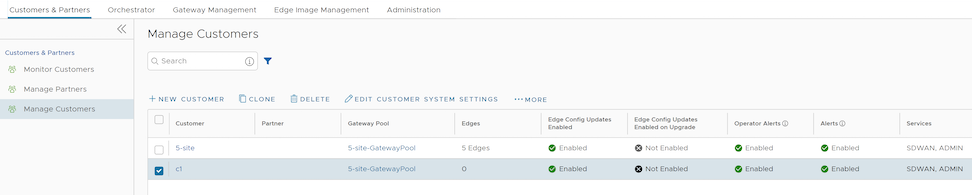
Create New Customer
In the Operator portal, you can create Customers and configure the Customer settings. Only Operator Super Users and Operator Standard Admins can create a new Customer. As an Operator Super User, you can temporarily deactivate creating new Customers, by setting the system property session.options.disableCreateEnterprise to True. You can use this option when Orchestrator exceeds the usage capacity.
- In the Operator portal, go to , and then select New Customer. The New Customer page displays the following sections:
- Configure customer information.
Figure 2. Configuring Customer Information 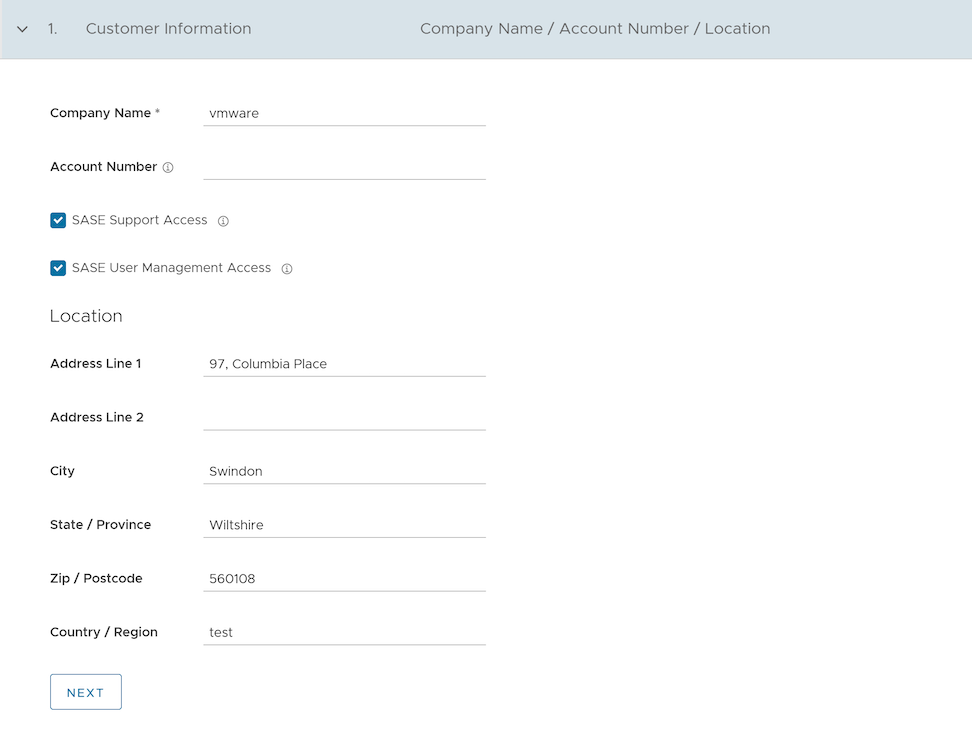 Enter the details in the following fields and select Next.Note: The Next button is activated only when you enter all the mandatory details.
Table 4. Customer Information Field Descriptions Option Description Company Name Enter your company name. Account Number Enter a unique identifier for the Customer. SASE Support Access This check box is selected by default, and grants access to the Arista Support to view, configure, and troubleshoot the Edges connected to the Customer. For security reasons, the Support cannot access or view the user identifiable information.
SASE User Management Access Select the check box to allow the Arista Support to assist in User Management. The User Management includes options to create users, reset password, and configure other settings. In this case, the Support has access to user identifiable information. Location Enter relevant address details in the respective fields. - Configure administrative account details.
Figure 3. Adding an Administrative Account 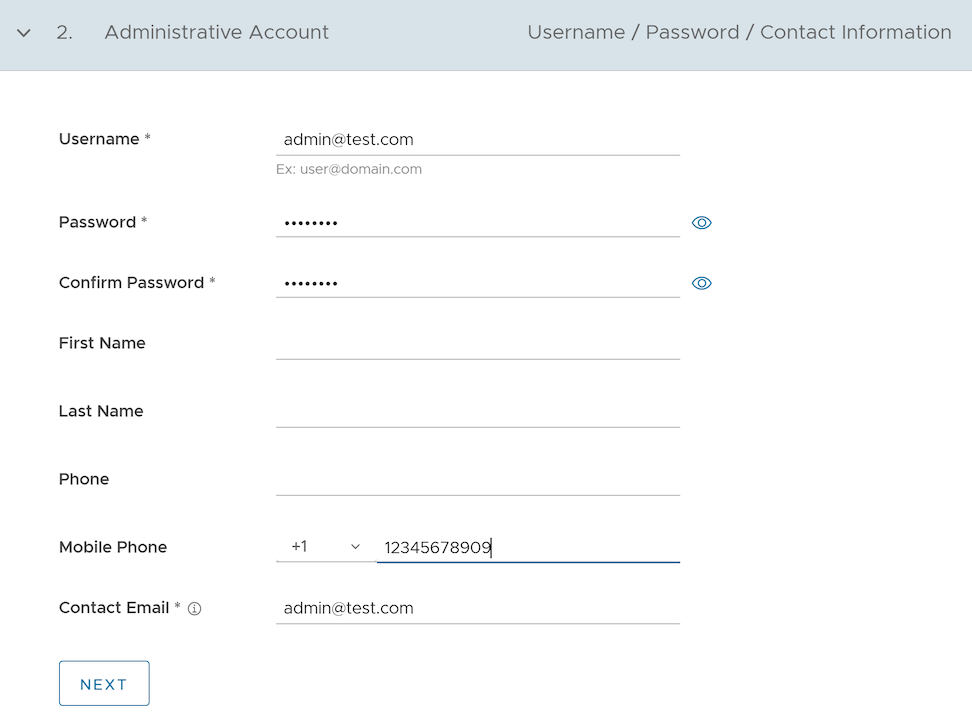 Enter the details in the following fields and select Next.Note: The Next button is activated only when you enter all the mandatory details.
Table 5. Administrative Account Field Descriptions Option Description Username Enter the username in the 该邮件地址已受到反垃圾邮件插件保护。要显示它需要在浏览器中启用 JavaScript。 format. Password Enter a password for the Administrator. Note: Starting from the 4.5 release, the use of the special character "<" in the password is no longer supported. In cases where users have already used "<" in their passwords in previous releases, they must remove it to save any changes on the page.Confirm Password Re-enter the password. First Name Enter the first name. Last Name Enter the last name. Phone Enter a valid phone number. Mobile Phone Enter a valid mobile number. Contact Email Enter the email address. The alerts on service status are sent to this email address. - Configure services as needed.
Figure 4. Adding Services 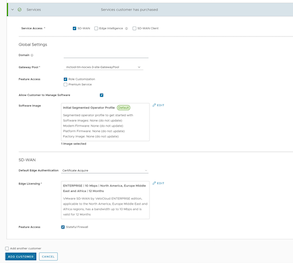 Configure the following global settings:
Table 6. Services Field Descriptions Option Description Domain Enter the domain name to be used to activate Single Sign On (SSO) authentication for the Orchestrator. This field is required when Edge Intelligence is activated for the Customer. Gateway Pool Select an existing Gateway pool from the drop-down list. For additional information, see Manage Gateway Pools.
Feature Access You can select either Role Customization or Premium Service, or both the check boxes. Allow Customer to Manage Software Select the check box if you want to allow an Enterprise Super User to manage the software images available for the Enterprise. Once selected, the Software Image field is displayed. Select Add and in the Select Software/Firmware Images pop-up window, select and assign the software/firmware images from the available list for the Enterprise. Select Done to add the selected images to the Software Image list. Note: You can remove an assigned image from an Enterprise, only if the image is not currently used by any Edge within the Enterprise.For additional information, see Platform and Modem Firmware and Factory Images and Software Images.
Operator Profile Select an Operator profile to be associated with the Customer from the available drop-down list. This field is not available if Allow Customer to Manage Software is selected. For additional information on Operator profiles, see Manage Operator Profiles.
Service Access: This option is available above the Global Settings section. You can choose the services that the Customer can access along with the roles and permissions available for the selected service.Note: This option is available only when the system propertysession.options.enableServiceLicensesis set asTrue.- SD-WAN- When you select this service, the following options are available:
Table 7. SD-WAN Option Descriptions Option Description Default Edge Authentication Choose the default option to authenticate the Edges associated with the Customer, from the drop-down list. - Certificate Deactivated: Edge uses a pre-shared key mode of authentication.
- Certificate Acquire: This option is selected by default and instructs the Edge to acquire a certificate from the certificate authority of the Orchestrator, by generating a key pair and sending a certificate signing request to the Orchestrator. Once acquired, the Edge uses the certificate for authentication to the Orchestrator and for establishment of VCMP tunnels.
Note: After acquiring the certificate, the option can be updated to Certificate Required.
- Certificate Required: Edge uses the PKI certificate. Operators can change the certificate renewal time window for Edges using the system property
edge.certificate.renewal.window.
Edge Licensing Select Add and in the Select Edge Licenses pop-up window, select and assign the Edge licenses from the available list for the Enterprise. Note: The license types can be used on multiple Edges. It is recommended to provide your customers with access to all types of licenses to match their edition and region.For additional information, see Edge Licensing.
Feature Access Select the Stateful Firewall check box to override the Stateful Firewall settings activated on the Enterprise Edge.
- SD-WAN- When you select this service, the following options are available:
- Configure customer information.
Clone a Customer
You can clone the configurations from an existing customer and create a new customer with the cloned settings.
Only Operator Super users and MSP Super users can clone a customer.
- Enterprise configuration profiles
- Enterprise network services and objects like:
- DNS services
- Private network names
- Network Segments
- Customer capabilities
- Edge authentication scheme
- Address groups and Port groups
- Profile with Edge references like hubs, clusters, and so on
- Profile containing Partner Gateway References
- Cloud Security Service enabled
- Non SD-WAN Destinations
- VNF or VNF licenses
- Authentication services
- NetFlow objects like collectors or filters
- In the Customers page, select the customer you want to clone, and then select .
The Clone Customer page appears.
Figure 5. Clone Scale Customer 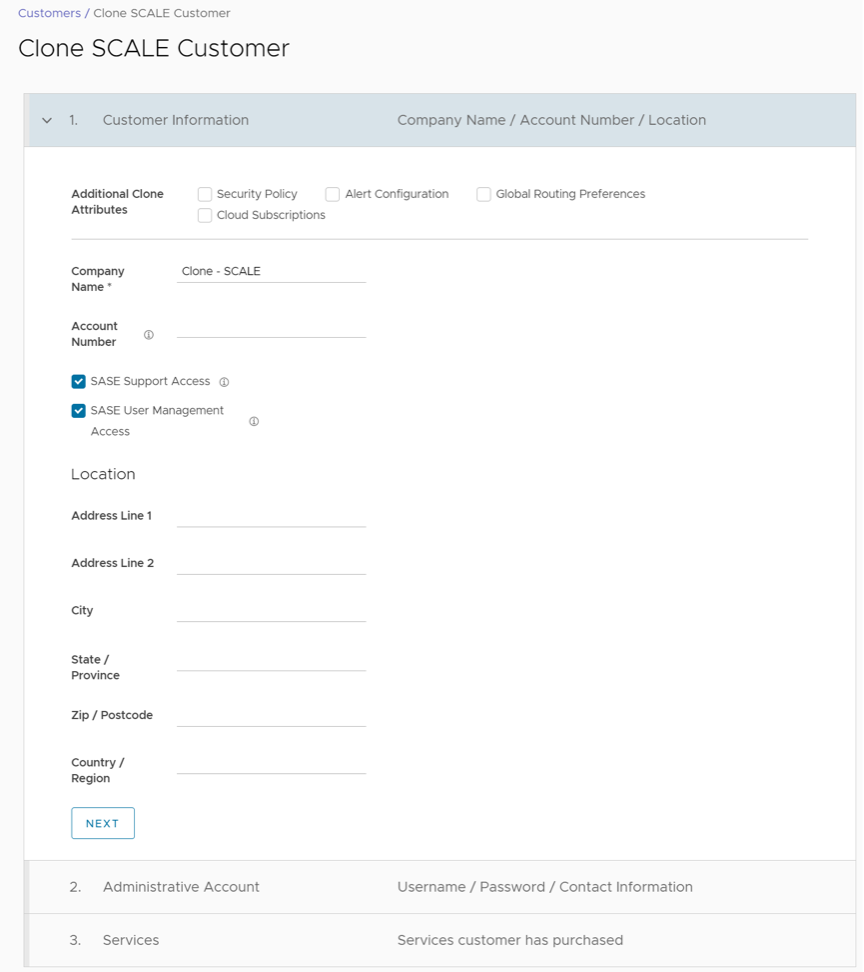
Configure Customers
- From the left menu, select Customer Configuration.
The following page is displayed:
Figure 6. Customer Configuration 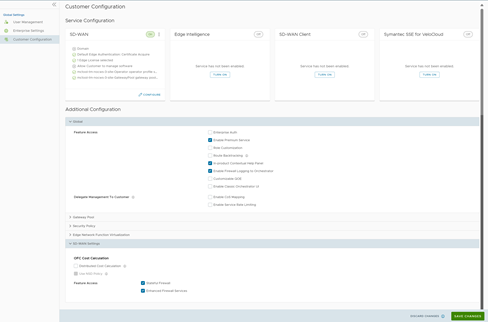
Service Configuration section includes the SD-WAN service:
- Selecting the Configure option displays the following pop-up window. Configure the settings, and then select Update.
Figure 7. SD-WAN Configuration 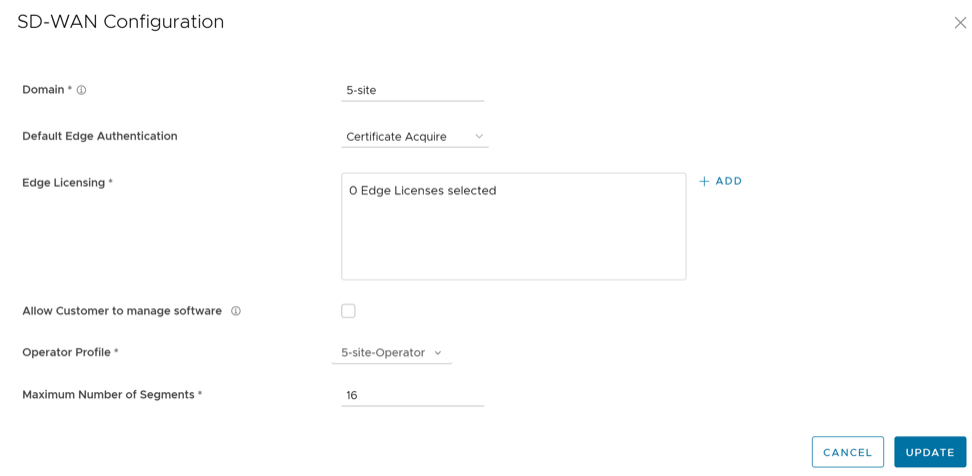
Table 8. SD-WAN Configuration- Options and Descriptions Option Description Domain Enter the domain name to be used to activate Single Sign On (SSO) authentication for the Orchestrator. Default Edge Authentication Choose the default option to authenticate the Edges associated to the Customer, from the drop-down menu. - Certificate Deactivated: Edge uses a pre-shared key mode of authentication.
- Certificate Acquire: This option is selected by default and instructs the Edge to acquire a certificate from the certificate authority of the Orchestrator, by generating a key pair and sending a certificate signing request to the Orchestrator. Once acquired, the Edge uses the certificate for authentication to the Orchestrator and for establishment of VCMP tunnels.
Note: After acquiring the certificate, the option can be updated to Certificate Required.
- Certificate Required: Edge uses the PKI certificate. Operators can change the certificate renewal time window for Edges using the system property
edge.certificate.renewal.window.
Edge Licensing The existing Edge Licenses are displayed. Select Add to add or remove the licenses. Note: The license types can be used on multiple Edges. It is recommended to provide your Customers with access to all types of licenses to match their edition and region. For additional information, see Edge Licensing.Allow Customer to Manage Software Select the check box if you want to allow an Enterprise Superuser to manage the software images available for the Enterprise. For additional information, see the topic Edge Image Management in the VeloCloud SD-WAN Administration Guide. Operator Profile Select an Operator profile to be associated with the Customer from the available drop-down menu. This field is not available if Allow Customer to Manage Software is selected. For additional information on Operator profiles, see Manage Operator Profiles. Maximum Number of Segments Enter the maximum number of segments that can be configured. The valid range is 1 to 16.The default value is 16.
Configure Hand-off Operator
You can configure a Gateway to hand off to Partners. The Gateway acts as a Partner Gateway that enables you to configure the Hand off Interface, Static Routes, BGP, and other settings.
Ensure that the Gateway to be handed off is assigned with Partner Gateway Role. In the Orchestrator portal (Operator or Partner), select Gateways and select the link to an existing Gateway. In the Properties section of the selected Gateway's Overview page, you can enable the Partner Gateway role as shown in the following screenshot.
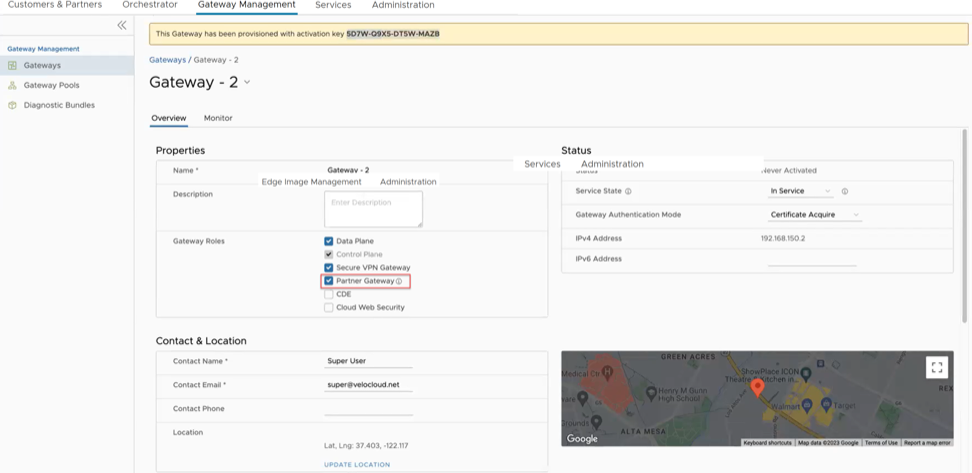
To configure the handoff settings, perform the following steps:
- In the Configure Hand Off area, configure the following fields in the table below:
Figure 9. Configure Hand Off 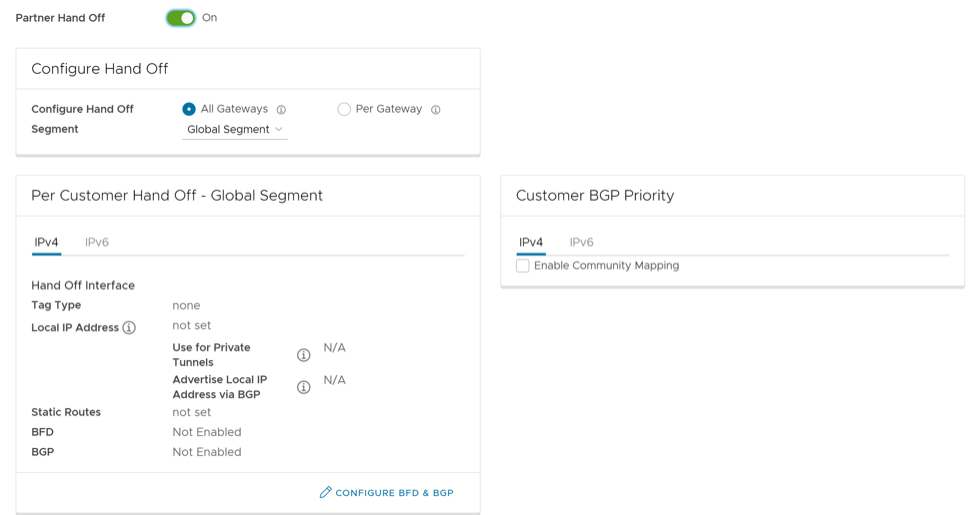
Table 10. Configure Hand Off Option Description Configure Hand Off By default, the hand off configuration is applied to all the Gateways. If you want to configure a specific Gateway, choose Per Gateway, and then select the Gateway from the drop-down list. Segment By default, Global Segment is selected, which means that the hand off configuration is applied to all the segments. If you want to configure a specific segment, select the segment from the drop-down menu. Hand Off Interface This section displays the values that are configured on the Configure BGP and BFD page. Customer BGP Priority Select the check box and configure the Community Mapping details. - At the bottom of the Per Customer Hand Off – Global Segment area, select the Configure BFD & BGP link, as shown in the image below.
Figure 10. Per Customer Hand Off 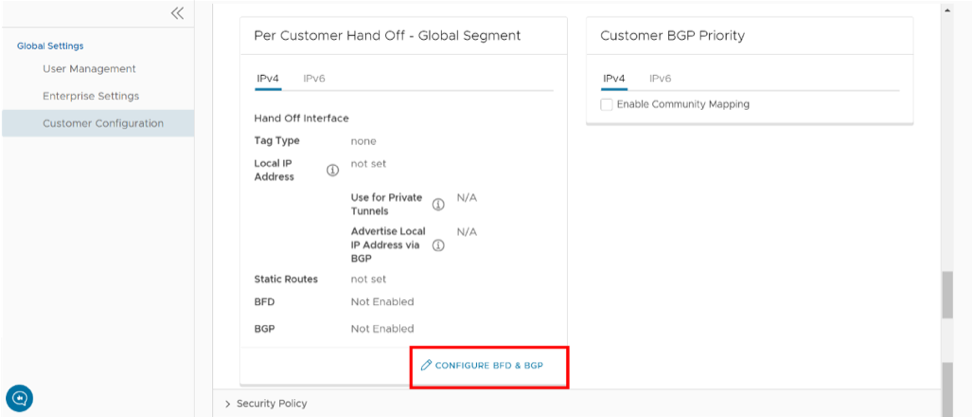 The Configure BGP and BFD screen displays, as shown in the image below.
Figure 11. Configure BGP and BFD 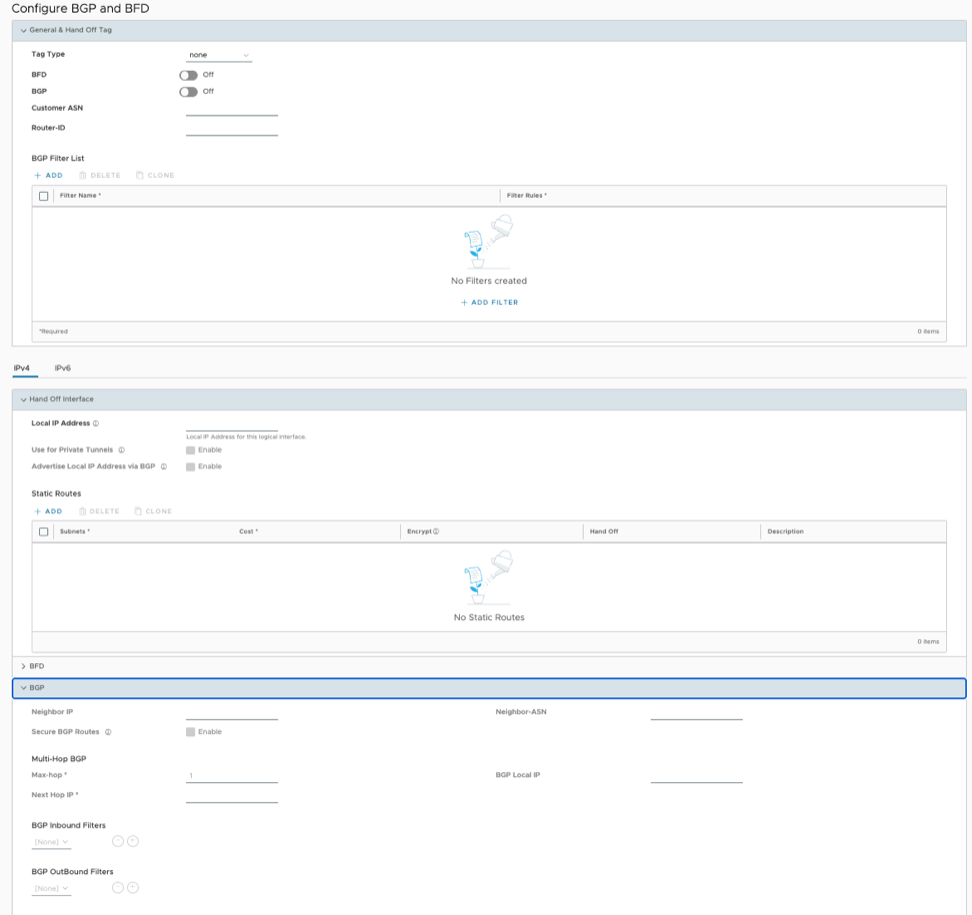
- Open the General & Hand Off Tag section and turn the BGP option to the On position. See figure below.
Figure 12. BGP Activation 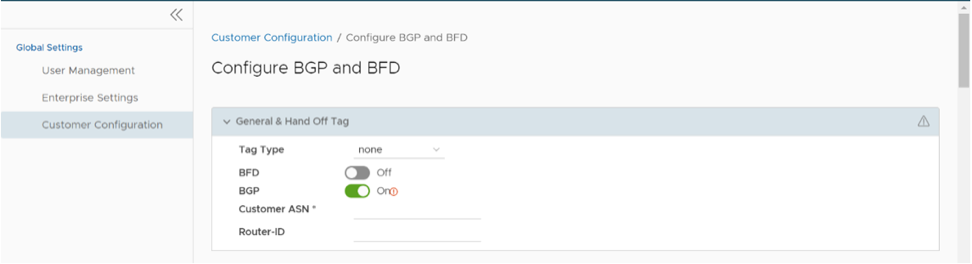
- Configure the fields in the table below.
Table 11. BGP Configuration Option Description Hand Off Tag Tag Type Choose the tag type, which is the encapsulation, in which the Gateway hands off customer traffic to the Router. The following are the types of tags available: - None: Untagged. Choose this during single tenant hand off or a hand off towards shared services VRF.
- 802.1Q: Single VLAN tag
- 802.1ad / QinQ(0x8100) / QinQ(0x9100): Dual VLAN tag
Customer ASN Enter the Customer Autonomous System Number. Hand Off Interface: You can configure the following settings for IPv4 and IPv6. Local IP Address Enter the Local IP address for the logical Hand Off interface. Use for Private Tunnels Select the check box so that private WAN links connect to the private IP address of the Partner Gateway. If private WAN connectivity is activated on a Gateway, the Orchestrator audits to ensure that the local IP address is unique for each Gateway within an Enterprise. Advertise Local IP Address via BGP Select the check box to automatically advertise the private WAN IP of the Partner Gateway through BGP. The connectivity is provided using the existing Local IP address. Static Routes: You can add, delete, or clone a static route. Subnets Enter the IP address of the Static Route Subnet that the Gateway should advertise to the Edge. Cost Enter the cost to apply weightage on the routes. The range is from 0 to 255. Encrypt Select the check box to encrypt the traffic between Edge and Gateway. Hand off Select the hand off type as either VLAN or NAT. Description Enter a descriptive text for the static route. This field is optional. BFD: Turn the toggle button to On to activate this section. Peer Address Enter the IP address of the remote peer to initiate a BFD session. Detect Multiplier Enter the detection time multiplier. The remote transmission interval is multiplied by this value to determine the detection timer for connection loss. The range is from 3 to 50. Receive Interval Enter the minimum time interval, in milliseconds, at which the system can receive the control packets from the BFD peer. The range is from 300 to 60000 milliseconds. Local Address Enter a locally configured IP address for the peer listener. This address is used to send the packets. Transmit Interval Enter the minimum time interval, in milliseconds, at which the system can send the control packets from the BFD peer. The range is from 300 to 60000 milliseconds. BGP: Turn the toggle button to On to activate this section. Neighbor IP Enter the IP address of the configured BGP neighbor network. Secure BGP Routes Select the check box to allow encryption for data-forwarding over BGP routes. Max-hop Enter the number of maximum hops to allow multi-hop for the BGP peers. The range for Max-hop is from 1 to 255, and the default value is 1. Note: This field is available only for eBGP neighbors, when the local ASN and the neighboring ASN are different.Next Hop IP Enter the next-hop IP address to be used by BGP to reach the multi-hop BGP peer. Note: This option is available only for multi-hop eBGP with Max-hop count greater than 1.Neighbor-ASN Enter the Autonomous System Number of the Neighbor network. BGP Local IP Local IP address is the equivalent of a loopback IP address. Enter an IP address that the BGP neighborships can use as the source IP address for the outgoing BGP packets. Note: The BGP Local IP address must be from a different subnet than a handoff IP address.If you do not enter any value, the IP address of the Hand Off Interface is used as the source IP address.
BGP Filter List Configure BGP filters. BGP Inbound Filters Assign filter to inbound. BGP Outbound Filters Assign filter to outbound. BGP Optional Settings BFD Select the check box to subscribe to the BFD session. Router-ID Enter the Router ID to identify the BGP Router. Keep Alive Enter the BGP Keep Alive time in seconds. The default timer is 60 seconds. Hold Timers Enter the BGP Hold time in seconds. The default timer is 180 seconds. Turn off AS-PATH Carry Over Select the check box to turn off AS-PATH carry over, which influences the outbound AS-PATH to make the L3-routers prefer a path towards a PE. If you select this option, ensure to tune your network to avoid routing loops. It is recommended not to select this check box. MD5 Auth Select the check box to activate BGP MD5 authentication. This option is used in a legacy network or federal network, and is used as a security guard for BGP peering. MD5 Password Enter a password for MD5 authentication. Note: Starting from the 4.5 release, the use of the special character "<" in the password is no longer supported. In cases where users have already used "<" in their passwords in previous releases, they must remove it to save any changes on the page.Route Summarization is new for the 5.2 release. For an overview, use case, and black hole routing details for Route Summarization, see the section titled, Route Summarization in the Arista VeloCloud SD-WAN Administration Guide. For Route Summarization configuration details, follow the steps below:
- Scroll down to the Route Summarization area in the BGP section
Figure 13. Route Summarization 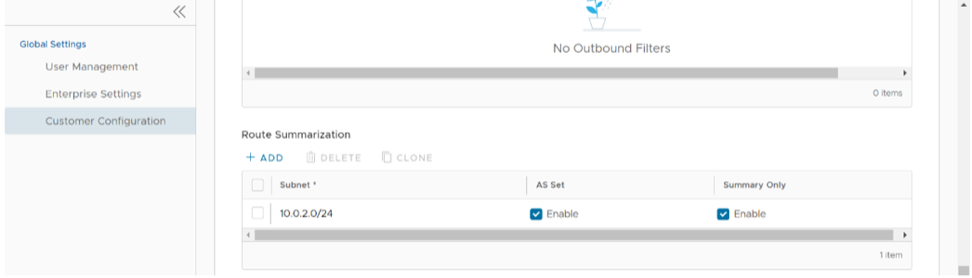
Configure Distributed Cost Calculation
By default, the Orchestrator is actively involved in learning the dynamic routes. Arista SD-WAN Edges and Gateways rely on the Orchestrator to calculate initial route preferences and return them to the Edge and Gateway. The Distributed Cost Calculation feature enables you to distribute the route cost calculation to the Edges and Gateways. Only an Operator user can configure Customer settings, including Distributed Cost Calculation.
- All the Edges and Gateways must use software version 3.4.0 or later.
- The software image associated with the Operator Profile must use version 3.4.0 or later.
Anybody experiencing an issue with Orchestrator based route calculation needs Distributed Cost Calculation enabled.
- If the Orchestrator is under a high load, the route convergence time is significantly high (for example, as much as 40 seconds for 2000+ routes), as the Orchestrator takes that time to calculate the preference for all the synchronized routes and returns those preferences to the Edges and Gateways.
- Using the Orchestrator for route calculation means that new dynamic routes learned while the Orchestrator was unreachable are not advertised until the Orchestrator becomes reachable again.
When a customer enterprise uses Distributed Cost Calculation, the Orchestrator is no longer actively involved in the route preference calculation and instead routes are properly inserted in order by the Edge and Gateway instantly upon learning them and then convey these preferences to the Orchestrator.
- Minimizes the impact on route learning when an Orchestrator is unreachable.
- Route convergence time is reduced from minutes to seconds in large networks with thousands of dynamic routes.
- Network delays are significantly reduced.
- Provides instantaneous Data Plane convergence.
- Supports enhanced re-ordering and pinning of routes on the Overlay Flow Control.
- Provides an option to refresh routes in the Overlay Flow Control page. Whenever there is a change in the Overlay Flow Control policy, the Refresh Routes option applies the changes to the existing routes immediately, without the need to restart the Edge or Gateway.
- All the local dynamic routes are refreshed, and the preference and advertise action of these routes are updated. This updated information is advertised to the Gateway, Orchestrator, and eventually across the Enterprise. The customer's network needs to completely rebuild the route table, which for most customer deployments will take less than 5 seconds. A large scale customer deployment (like 100,000+ routes) may take up to 2 minutes. During the time the route table is being rebuilt, customer traffic for all sites is impacted.
- Any existing flow using these routes can potentially be affected due to the change in the routing entries.
To configure Distributed Cost Calculation for a customer, perform the following steps:
- In the Enterprise portal, go to
Figure 14. Customer Configuration 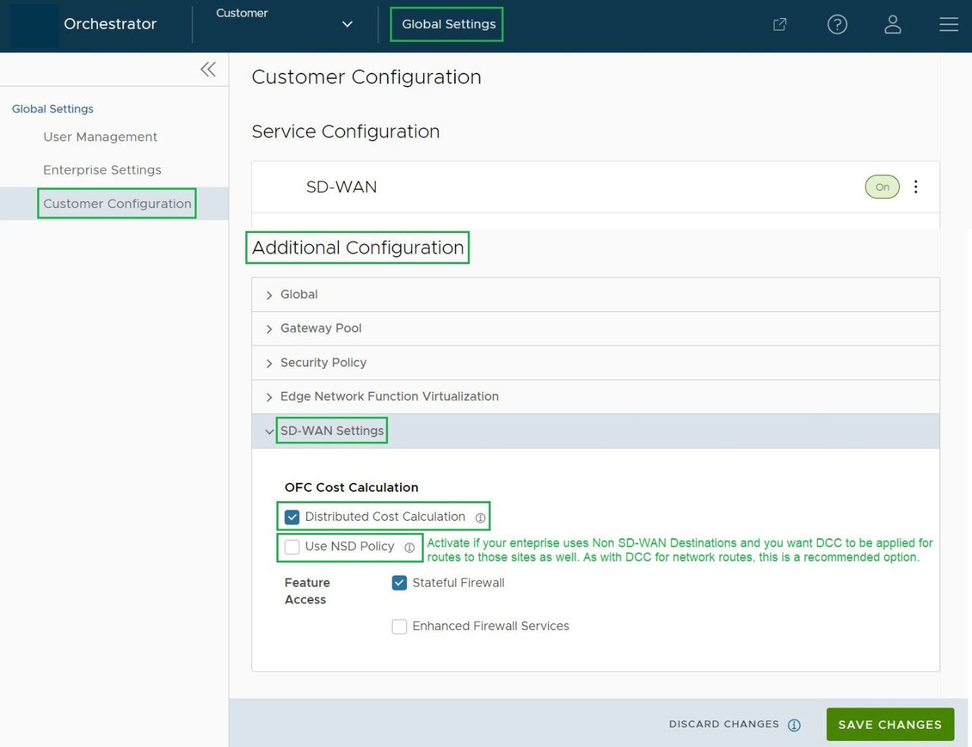
Configure Path Calculation with Multiple DSCP Labels per Flow
An Edge classifies a traffic flow based on the first packets in the flow. You can create business policies with application based on Differentiated Service Code Point (DSCP) and with different DSCP markings to determine the flow treatment.
By default, an Edge classifies a flow based on the first few packets received in the flow. Business Policy and QoS marking determine the flow treatment. Once the flow is classified, an entry with five tuple information of the flow is created in the flow cache table. Subsequent packets in the flow will use the five-tuple lookup against the flow cache table.
For network topologies with Layer 3 network devices doing encapsulation and/or encryption before the traffic arrives at the Edge, this creates a challenge for the Edge to forward traffic based on the Business Policy. The traffic from the end users is multiplexed into single flow with the same source and destination IP addresses, and protocols by the Layer 3 encapsulation/encryption device, as illustrated in the following image.
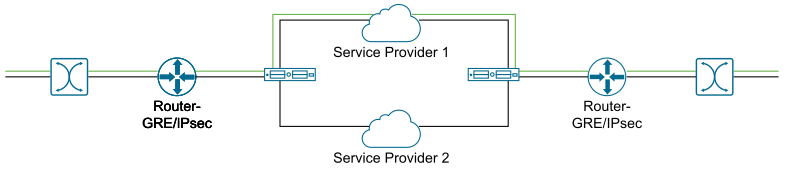
The impact of multiplexing end user flows into a single tunnel creates polarization of flow forwarding using the five tuples of flow cache table, which results in WAN links not being utilized.
The Path Calculation with Multiple DSCP Labels per Flow allows the DSCP value to be included, in addition to the five tuples, as part of the flow cache table lookup. Use the path calculation with multiple DSCP tags when the original user traffic is encapsulated in another tunnel like GRE or IPsec, and DSCP labels are preserved in the new IP header. This option enables path calculation for a single flow with multiple DSCP labels, which consists of same source and destination IP addresses, and offers path differentiations based on the DSCP labels in the flow.
When you enable the Multiple-DSCP tags per Flow Path Calculation, the Edges can differentiate the traffic flows based on the DSCP marked labels.
To enable Multiple-DSCP tags per Flow Path Calculation, perform the following steps: