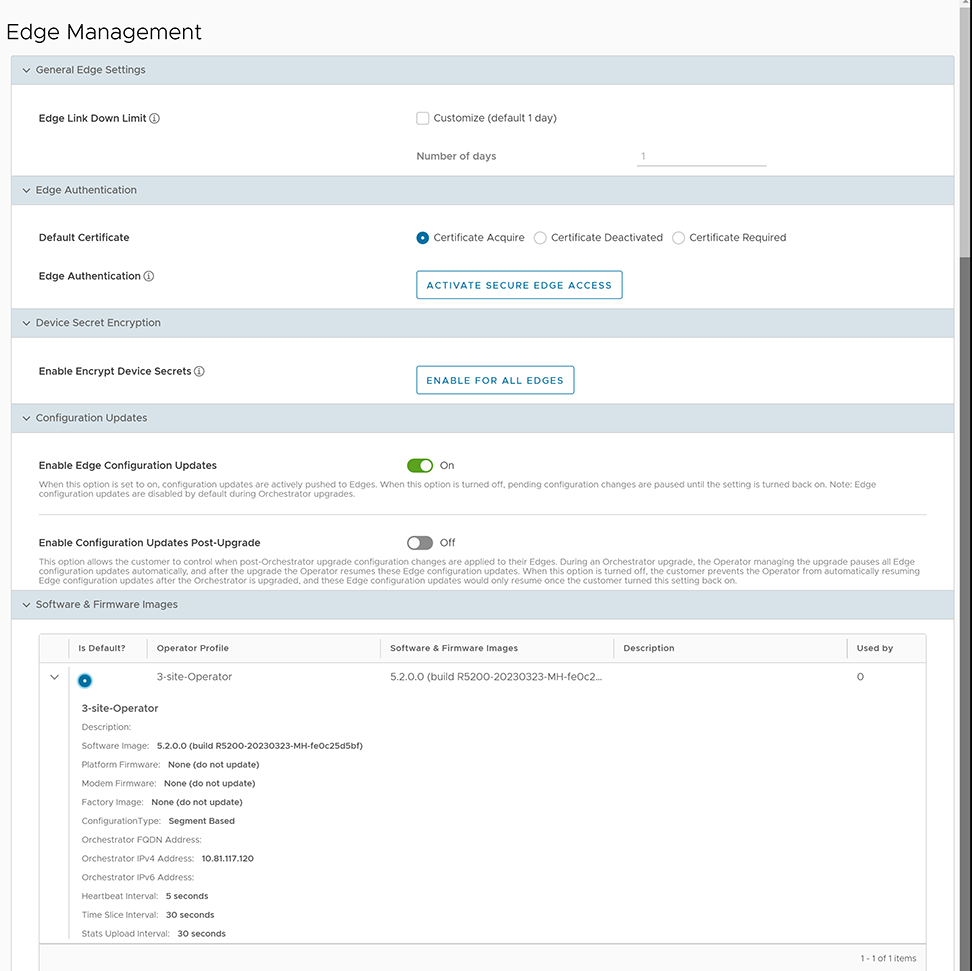
| General Edge Settings |
| Edge Link Down Limit |
You can set this value for each Edge by selecting Customize. This overrides the value set through the system property edge.link.show.limit.sec. |
| Number of days |
Enter a value in the range 1 to 365 with a default value of 1. |
| Edge Authentication |
| Default Certificate |
Select the default option to authenticate the Edges associated to the Customer.
- Certificate Deactivated - This option instructs the Edge to use a pre-shared key mode of authentication.
- Certificate Required - Selected by default, and it instructs the Edge to use the PKI certificate. Operators can change the certificate renewal time window for Edges using system properties. For additional information, contact your Operator.
Note: After selecting Save Changes,confirm if the selected Edge authentication setting applies to all the impacted Edges or only the new Edges. By default, Apply to all Edges is selected.
|
| Edge Authentication |
Select Activate Secure Edge Accessto allow the user to access Edges using Password-based or Key-based authentication. You can activate this option only once. But you can switch to either Password-based or Key-based authentication any number of times. |
| Device Secret Encryption |
| Enable Encrypt Device Secrets |
Select Enable For All Edges to activate device secret encryption for all the Edges in the current Enterprise. This action causes restart of all the Edges. However, it does not affect Edges with this feature activated.
Note: You can activate this option for individual Edges at the time of creating a new Edge. For additional information, see the topic Provision a New Edge in the Arista VeloCloud SD-WAN Administration Guide.
|
| Configuration Updates |
| Disable Edge Configuration Updates |
Activated by default. This option allows you to actively push the configuration updates to Edges. |
| Enable Configuration Updates Post-Upgrade |
Deactivated by default. This option allows you to control when post-Orchestrator upgrade configuration changes apply to their Edges. Enable it by selecting On. |