
Rack Mounting the Switch
Rack Mounting the Switch (2RU)
This section discusses the following topics:
Rack Mounting the Switch (2RU)
After completing the instructions for your rack type, proceed to Cabling the Switch.
Rack Mounting the Switch (2RU)
This section discusses the following topics:
In two-post and four-post racks for 2RU switches.
The rack mounting procedure is identical for all switches covered by this guide. Illustrations in this chapter depict the mounting of a DCS-7050SX-128 switch.
Les procédure de montage du bâti est identique pour tous les commutateurs visés par ce guide. Illustrations dans ce chapitre montrent le montage d'un interrupteur de DCS-7050SX-128.
After completing the instructions for your rack type, proceed to Cabling the Switch.
Two-Post Rack Mount (2RU)
The 2RU switches covered in this guide do not support two-post rack mounting. The accessory kit contains only the four-post RMK components. Contact your local Arista Networks representative for further information if you require two-post rack mounting.
Four-Post Rack Mount (2RU)
The switch is mounted onto a four-post rack by assembling two rails onto the rear posts, sliding the switch onto the rails, and then securing the switch to the front posts.
- Switch brackets
- Rail brackets
Each chassis side has attachment pins that align with bracket holes; the number of pins varies by switch model. Pin orientation is symmetric and equidistant, supporting bracket placement where the flange is either flush with the front and rear panels, or not flush with the panels. Each bracket hole includes a key-opening for placing the bracket flush with the chassis and then locking it into place.
Attachment pins must engage all six bracket holes.
Goupilles de fixation doivent s’engager tous les trous de support six.
Extracting the Brackets and the Rails
The following figure displays a bracket-rail assembly and the component pieces (bracket and rail) that are extracted from the assembly kit. Each assembly must be separated into its component pieces before mounting the switch into a four-post rack. The two assemblies supplied with the switch are identical.
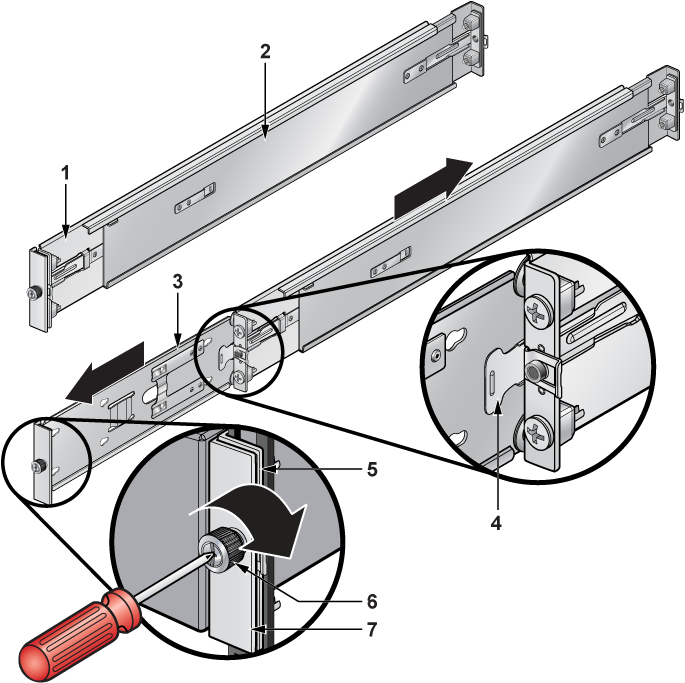
| 1 | Rail bracket (front) | 4 | Locking clip | 7 | Switch mounting ear |
| 2 | Rail bracket (rear) | 5 | Rail mounting ear | ||
| 3 | Switch bracket (for attaching to switch) | 6 | Thumb screw |
This procedure separates a bracket-rail assembly into its component pieces.
Attaching Mounting Brackets to the Chassis
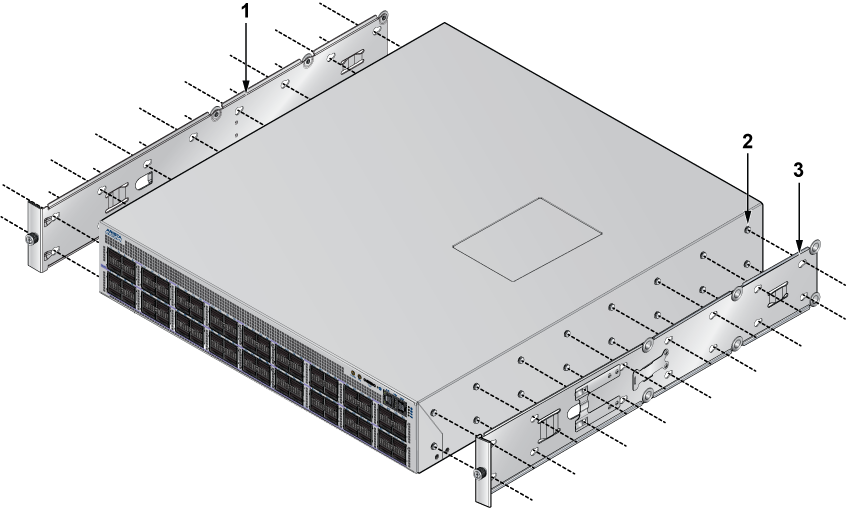
| 1 | Switch bracket | 2 | Attach point | 3 | Matching attachment hole |
This procedure attaches mounting brackets to the switch chassis as depicted by the following figure.
- Slide the bracket toward the front flange until the rail locks with an audible click.
Figure 3. Attaching the Mounting Brackets to the Switch Chassis 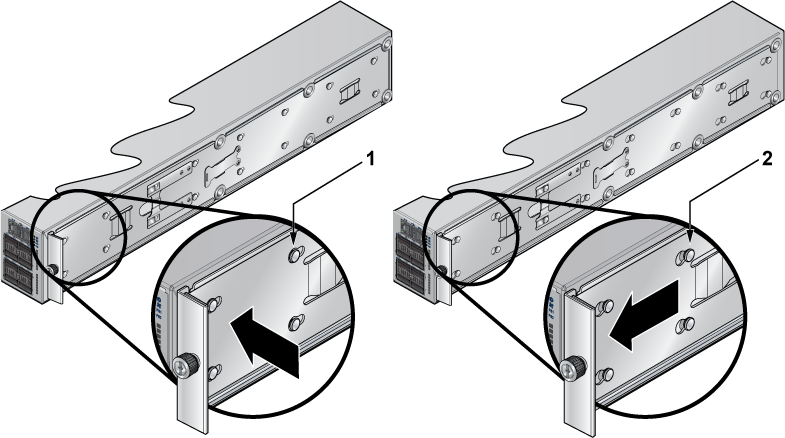
1 Aligned rail 2 Seated rail To remove the mounting bracket from the chassis, lift the front edge of the mounting bracket clip with a flathead screwdriver and slide the bracket away from the front flange (opposite from the installation direction).
Expanding the Rails
The rail is initially contracted and must be expanded to attach to the rack. This procedure expands the rails from their contracted state:
- Grip the slide end with your left hand and the rod end with your right hand.
- Pull the ends apart until the rail-clip makes an audible click.
Assembling the Rails onto the Equipment Rack
- Repeat Steps 1 through2 for the left posts. Ensure the rails are on the same horizontal level.
Figure 4. Attaching the Rails 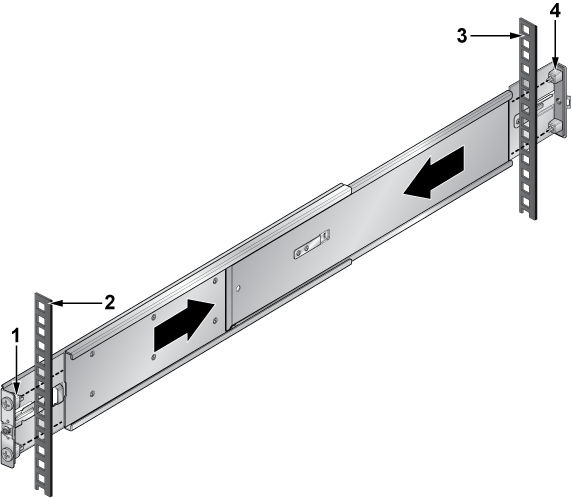
1 Front of right rail 3 Right rack post (rear) 2 Right rack post (front) 4 Rear of right rail
Attaching the Switch to the Rack
- Slide the switch on the rails, toward the rear posts, until the mounting bracket flanges are flush with the rail flanges attached to the rack posts.
Figure 5. Inserting the Switch onto the Rails 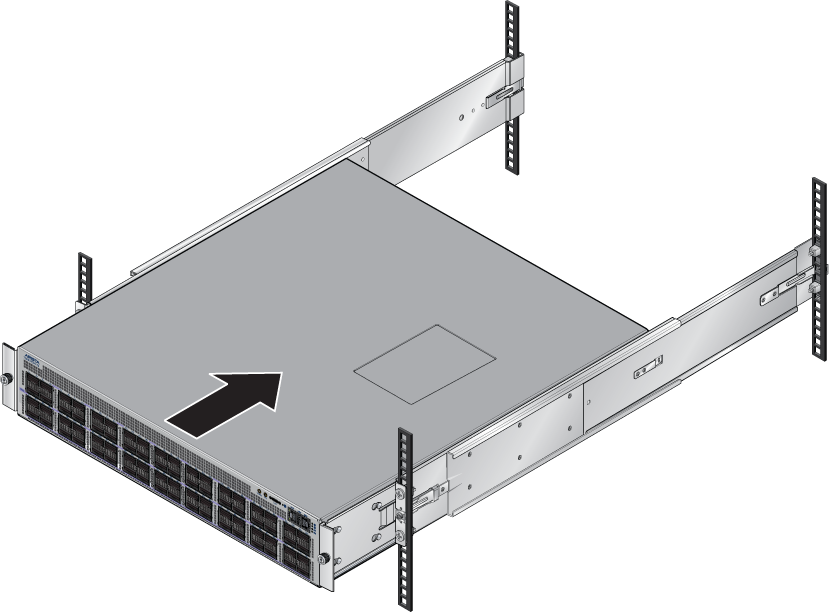
- Attach the bracket flanges to the rack post using the quick-release thumb screws supplied with the brackets.Hand-tighten the thumb screws or use a Phillips #2 screwdriver.
Note: Do not exceed a maximum torque of 20in-lb or use powered impact drivers to secure the thumb screws.
Figure 6. Attaching the Switch to the Rack Posts 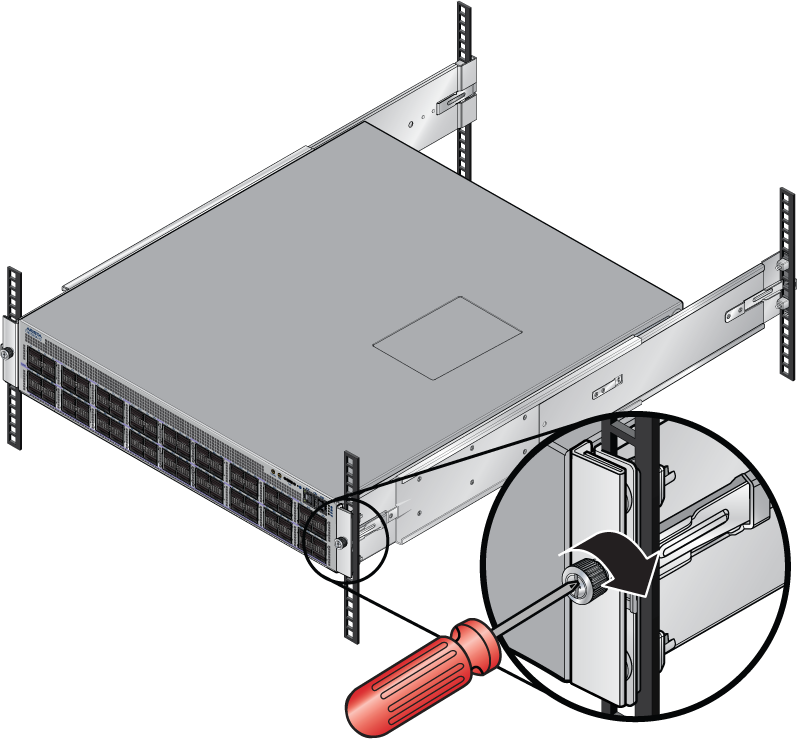
After completing the four-post rack mount, proceed to Cabling the Switch.