
Set up Preparation
Site Selection
Before you begin, read the safety instructions in your Safety, Environmental, and Regulatory Information booklet.
- Before you begin, review the safety instructions located at https://www.arista.com/en/support/product-documentation.
- Begin installing the rails in the allotted space closest to the bottom of the rack enclosure.
- Other Requirements: Select a site where liquids or objects cannot fall onto the equipment and foreign objects are not drawn into the ventilation holes. Verify these guidelines are met:
- Clearance areas to the front and rear panels allow for unrestricted cabling.
- All front and rear panel indicators are visible.
- Power cords can reach from the power outlet to the connector on the rear panel.
Receiving and Inspecting the Equipment
Upon receiving the appliance, inspect the shipping boxes and record any external damage. If you suspect that part of the shipment is damaged, retain packing materials; the carrier may need to inspect them
If the boxes are in pristine condition in transit, unpack them carefully. Do not discard accessories packaged in the same box as the main unit.
Inspect the packing list and confirm that you received all listed items. Compare the packing list with your purchase order. The Appendix provides a list of components included with the appliance.
Electrostatic Discharge (ESD) Precautions
Observe these guidelines to avoid ESD damage when installing or servicing the appliance.
- Assemble or disassemble equipment only in a static-free work area.
- Use a conductive work surface (such as an anti-static mat) to dissipate static charge.
- Wear a conductive wrist strap to dissipate static charge accumulation.
- Minimize handling of assemblies and components.
- Keep replacement parts in their original static-free packaging.
- Remove all plastic, foam, vinyl, paper, and other static-generating materials from the work area.
- Use tools that do not create ESD.
Setting up Your System
Complete the following steps to set up your system:
DMF Service Node Physical Appliance Setup
You may need the following items to perform the procedures in this section:
- Key to the system keylock.
- #1 and #2 Phillips screwdriver.
- Wrist grounding strap connected to ground.
- Rack mount kit instructions are in the shipping box.
Before Working Inside your System
Follow these safety guidelines: Safety Information.
- Turn off the system, including all attached peripherals.
- Disconnect the system from the electrical outlet and disconnect the peripherals.
- Remove the system cover.
Front Bezel
Complete the following tasks to remove the front bezel.
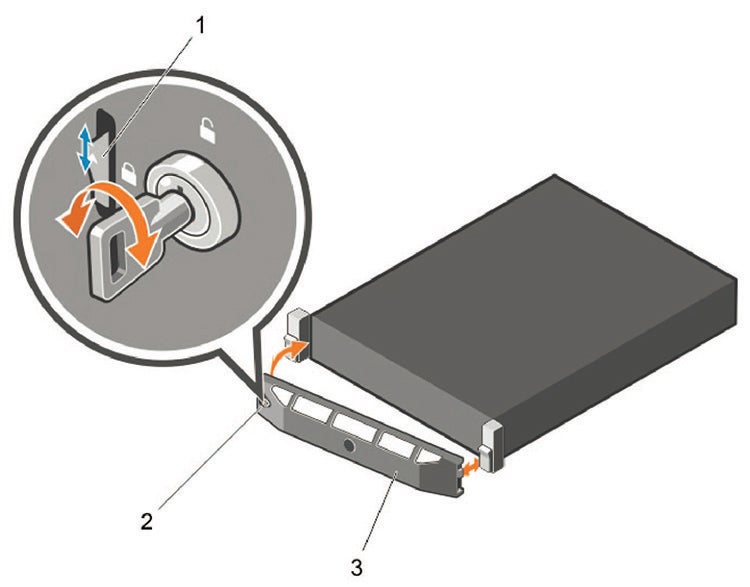
- Unlock the keylock at the left end of the bezel.
- Lift the release latch next to the keylock.
- Rotate the left end of the bezel away from the front panel.
- Unhook the right end of the bezel and pull the bezel away from the system.
Locate the MAC Addresses for the DMF Service Node Appliance
The information tag is a slide-out label that contains system information such as Service Tag, NIC, and MAC address for your reference. Record the MAC addresses in the DMF Service Node Appliance Worksheet.
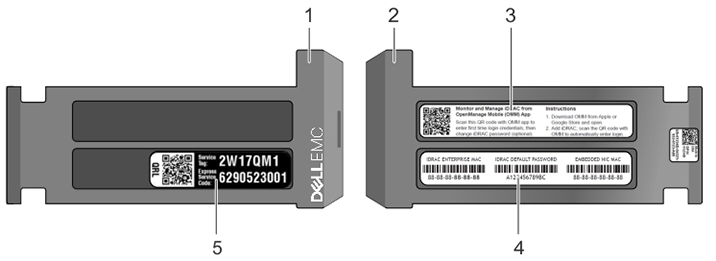
| 1 | Information tag (front view) | 4 | DRAC MAC address and iDRAC secure password label |
| 2 | Information tag (back view) | 5 | Service Tag |
| 3 | OpenManage Mobile (OMM) label |
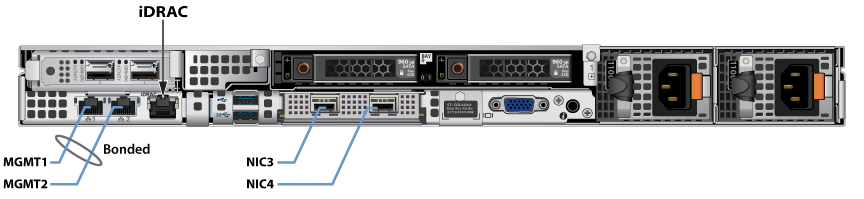
Rear Panel Ethernet Connections
Locate the Ethernet Integrated 10/100/1000 Mbps NIC connectors on the back panel of the DMF Service Node appliance.
DNS Entries
- Each of the DMF Service Node Appliance host machines.
- Each of the DMF Service Node Appliance iDRAC interfaces.
Contact your DNS zone administrator for assistance.
DMF Service Node Appliance IP Configuration
You can allocate the DMF Service Node Appliance Host and iDRAC IP addresses in two ways:
Option 1: Using an available DHCP server
- DHCP-based IP address setup DHCP-Based IP Address Setup.
- Web access into host via iDRAC Web Access into iDRAC (System IPMI).
Option 2: Manual configuration (Requires terminal connected to VGA port)
- Manual IP address setup Manual IP Address Setup.
- Web access into host via iDRAC Web Access into iDRAC (System IPMI).
DHCP-Based IP Address Setup
Using the iDRAC MAC from Locate the MAC Addresses for the DMF Service Node Appliance, input an entry into the DHCP Server for the corresponding iDRAC IP address mapping to that MAC.
Manual IP Address Setup
Direct IP Address Setup requires a terminal connected to the appliance's VGA port. Refer to Setting Up and Using iDRAC in the DMF Deployment Guide.