
CloudVision DMF Integration
This chapter describes integrating CloudVision with the DANZ Monitoring Fabric (DMF).
Overview
In a typical CloudVision-DMF integration deployment, CloudVision Portal (CVP) deploys alongside the DANZ Monitoring Fabric (DMF). The DMF Controller communicates with CVP to retrieve its managed device inventory and configures port mirroring sessions on any CVP-managed production devices that are Arista Extensible Operating System (EOS) switches.
Configuration on the DMF Controller provides the information necessary to communicate with CVP: the CVP hostname or IP address and user credentials.
Policy configuration on the DMF Controller specifies what to monitor in the production network managed by CVP, such as the production switches, the switch interfaces to monitor traffic from, and the direction of mirrored traffic (bidirectional, ingress, or egress). In addition, the configuration on the DMF Controller can define whether to use a Switch Port Analyzer (SPAN) session or a Layer-2 Generic Routing Encapsulation (L2GRE) tunnel session on a CVP-managed device. When using SPAN, the DMF configuration includes the switch interface to monitor traffic. When using L2GRE, the DMF configuration includes monitoring traffic to the Tunnel End Point (TEP).
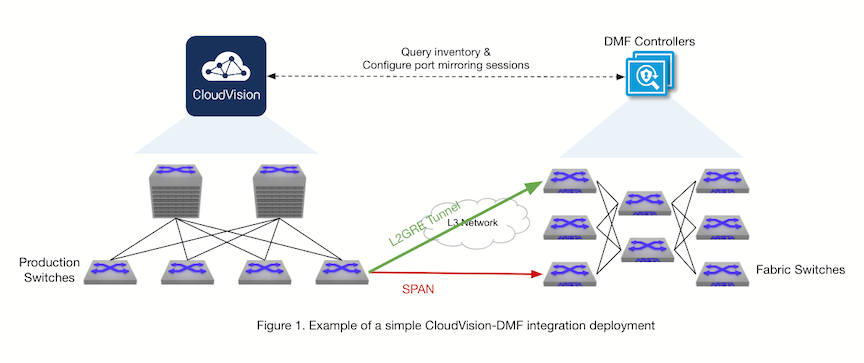
The preceding figure illustrates a simple CloudVision-DMF integration configuration where CloudVision Portal and DMF can communicate with each other. DMF monitors traffic from CVP directly to one of its fabric switches (a filter switch), as indicated by the red arrow labeled “SPAN.” DMF also monitors traffic from CVP to a TEP configured on the fabric using an L2GRE tunnel, as indicated by the green arrow labeled “L2GRE Tunnel". Since DMF initiates monitoring using policy configuration, the policies monitoring CVP will handle the traffic according to their configuration, for example, forwarding it to a delivery interface. This feature enables the automation of the creation, modification, and deletion of filter interfaces and tunnel interfaces in DMF and mirroring sessions on CVP-managed devices.
Compatibility Requirements
- Any platform supporting port mirroring or mirroring to a GRE tunnel specifying the GRE key is supported; refer to EOS Port Mirroring TOI and EOS Mirroring to GRE Tunnel TOI for more details.
- On-premise 2024.2.0 and newer is recommended.
- The user configured in DMF for CloudVision Portal (CVP) integration must have sufficient permissions in CVP. The minimum permissions required are:
- Network: Read access to Inventory Management.
- Provisioning: Read access to Tag Management.
- gNMI: Read and write access to the gNMI Service.
-
In CloudVision, the integration uses an automirroring user for all studio, workspace, and change control actions.Important: For on-prem CV, the user account is
cvpadminand for CVaaS, the default user account isadmin.Mandatory: Configure the automirroring user on any AAA-enforced switches so the change control applies while configuring a policy or during a monitoring session. Perform this configuration on the production switches managed by the CVP.Optional:On CVaaS, configure the automirroring user by navigating to and changing the Automirroring Username in the Cluster Management section; use a user account or a service account, and the minimum required permissions are:- Studios: read and write access to Studios Configuration, Workspace Management and Workspace Submission
- Provisioning: read and write access to Change Control Approve and Change Control Management
- Register the devices that DMF will monitor for use in Studios using the Inventory and Topology Studio , and ensure that the Mirroring Studio has been assigned to All Devices under Device Selection, or to a tag query that includes all devices that DMF monitors.
- For L2GRE mirroring, the switch must have IP routing enabled. For some switch platforms, the GRE payload will not include the terminated headers of mirrored packets by default, requiring additional switch configuration to obtain the full payload. Refer to the GRE payload type section of the EOS Mirroring to GRE Tunnel TOI for further details.
CloudVision DMF Integration
To integrate with CloudVision Portal, configure a CVP instance in the DMF Controller, enabling communication between CVP and DMF. The CVP hostname or IP address must be reachable from the DMF Controller. If CVP is a multi-node system, using a hostname that will resolve to the primary node is recommended to maintain the connection in case of a primary node failure. The user in the CVP integration configuration must have at least the permissions in CloudVision as outlined in CloudVision Requirements.
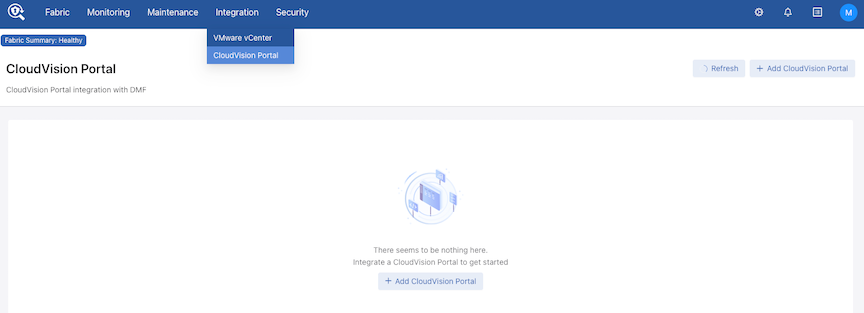
Navigate to .
Select Add CloudVision Portal to create a new CVP integration instance.
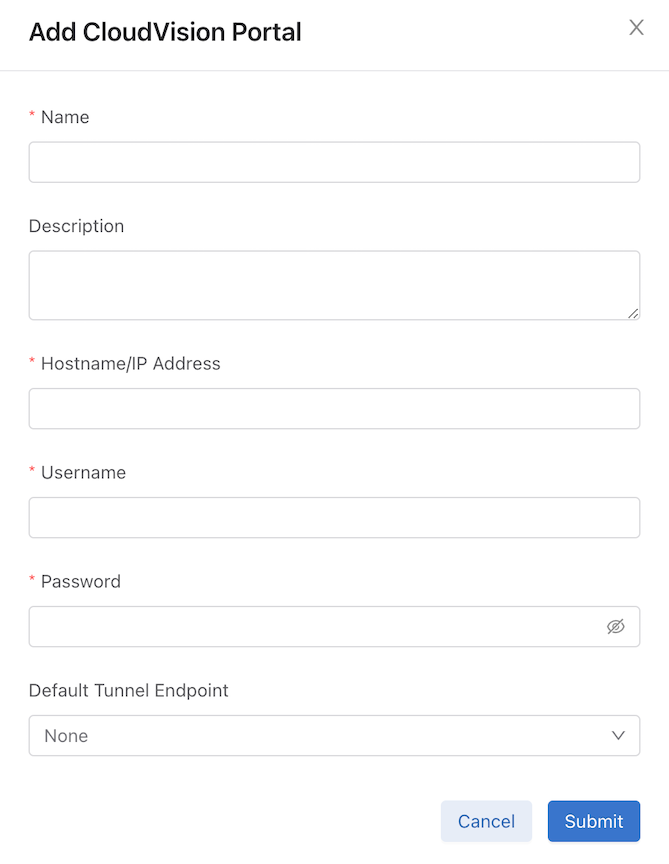
Enter the On Prem CVP integration instance configuration details and select Submit.
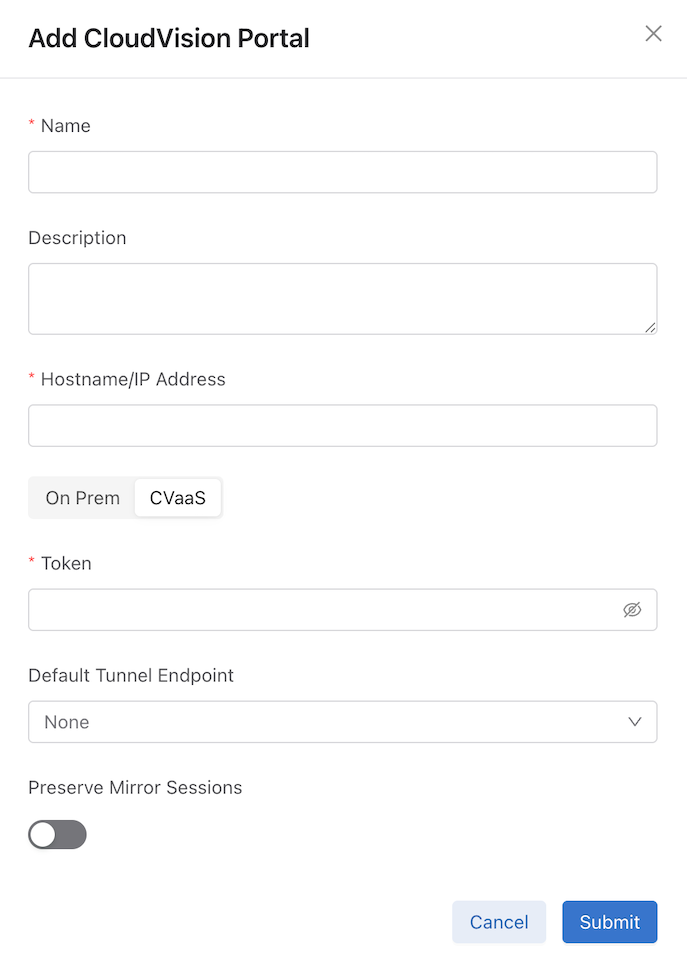
Select CVaaS to add a CVaaS integration instance and enter the configuration detailsand select Submit.
If there are any warnings or errors with the CVP integration instance, use the alarm bell icon to view more details.
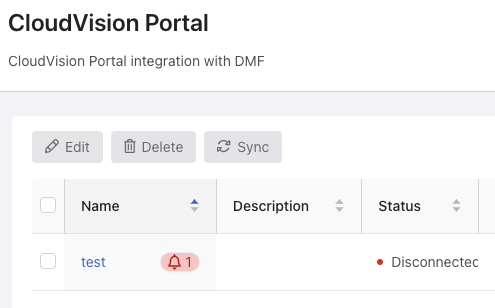
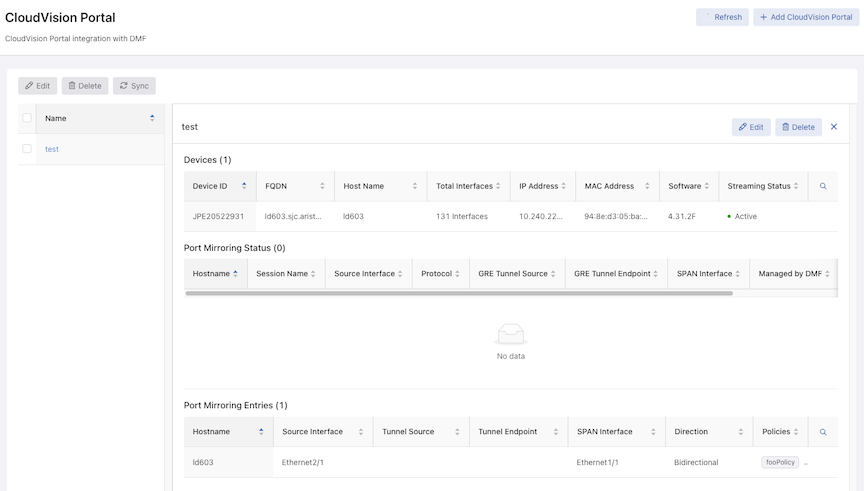
To start monitoring traffic from the production network:
-
Navigate to .
-
Select Create Policy and add CVP instances as traffic sources.
-
Select Add Row to configure monitoring, such as the device interfaces to monitor, the monitor type (e.g., SPAN or L2GRE), the mirrored traffic direction, and the destination.
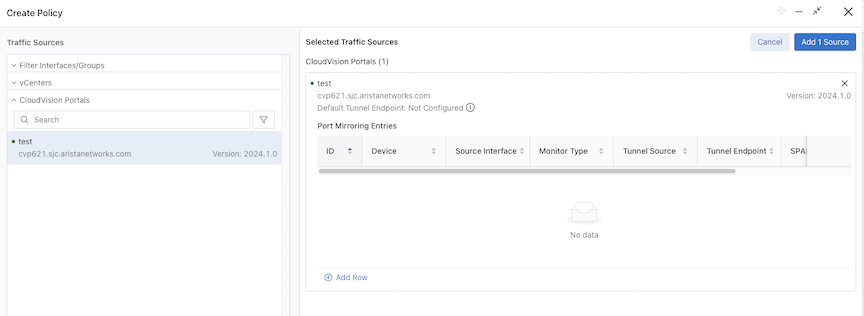
Policy configuration details related to CVP integration appear in the policy’s Configuration Details page.
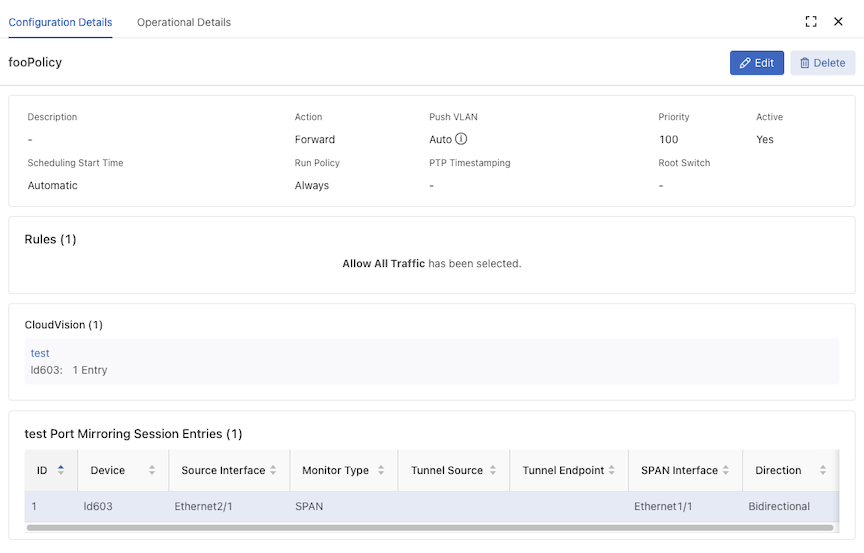
To edit the CVP monitoring configuration in a policy, use Edit and select 1 Entry on the Edit Policy page, make the required changes, and select Save Policy.
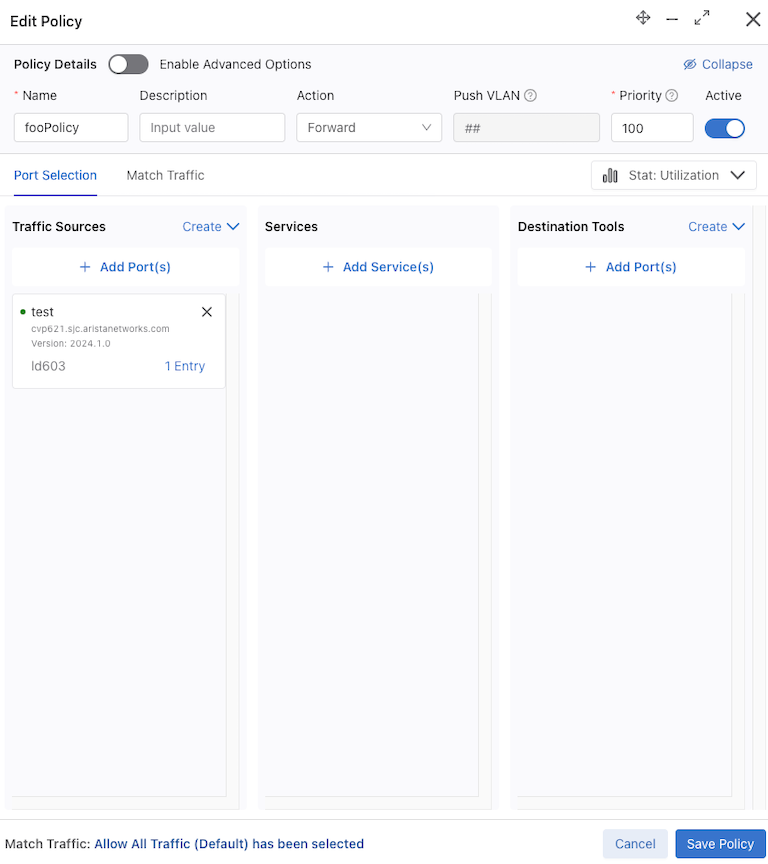
Troubleshooting
- If there are any fabric errors in creating a mirroring session on a CVP-managed device that specify that user action in CVP is required, take the appropriate corrective action in CVP. Next, delete the CVP monitoring config from the policy and reconfigure it, or delete the policy and then recreate it.
- When using username/password authentication, if there is a message in the
show cvp alertcommand output stating a session failed to be updated and an authentication error message in /var/log/vsphere-extension/vsphere-extension.log containing GNMI7001…Status unauthenticated, run thesync cvpcommand, and then deactivate and reactivate the relevant DMF policy. - When using service account token authentication, if there is a token-related error in the
show cvpcommand output or a message in theshow cvp alertcommand output stating a session failed to be updated, ensure that the token has not been deleted from the service account, and that the service account has not had gNMI service read/write permissions revoked. In the former case, configure a new valid token for the CVP instance; in the latter case, update the permissions for the service account and run thesync cvpcommand. Then, delete the DMF policy and recreate it. - When using service account token authentication, if there is a fabric error for a missing mirroring session, check that the CVP instance is connected and that the token has not expired with the
show cvp detailcommand. If the token has expired, configure a new valid token for the CVP instance, then delete the DMF policy and recreate it. - If there is a fabric error containing “
No change controls to approve and
execute
”, a possible cause is that the device had not been registered for use in Studios in CVP using the Inventory and Topology studio. If this is the case, register the device in CVP, and then delete the DMF policy and recreate it.
Considerations
The following limitations apply to the DANZ Monitoring Fabric (DMF) Controller and CloudVision integration.
-
Modifying or deleting auto-generated filter interfaces for CVP integration or adding them manually to non-CloudVision policies will result in unexpected behavior.
-
If two or more DMF policies have overlapping CVP monitoring configurations with the same destination, the configuration should be the same in these policies if unexpected traffic is undesired. For example, if a policy has source interfaces A and B on a device in a CVP instance with a SPAN interface as the destination, and if another policy has one source interface, A, on the same device in the same CVP instance with the same SPAN interface as the former policy, then the latter policy will unexpectedly receive traffic from B as well as the expected source A. This is because the mirroring session in the production switch is reused for both policies.
-
An error state in the CVP deployment may prevent DMF from configuring mirroring sessions on the production switches. If DMF encounters such a failure, a fabric error is displayed, and user action in CVP is required. Examples of such a state include the production switch not being in compliance in CVP, in which case it needs to be brought into compliance, or if there are any pending change controls in CVP, they must be addressed. After taking the appropriate corrective action in CVP, deactivate and reactivate the DMF policy with the error (or delete and recreate it) to retry configuring mirroring.
Resources
Refer to Managing DMF Policies and Tunneling Between Data Centers for further information on policies and tunneling.
Using the Command Line Interface
CloudVision DMF Integration
To integrate with CloudVision Portal, configure a CVP instance in the DMF Controller, enabling communication between CVP and DMF. The CVP hostname or IP address must be reachable from the DMF Controller. If CVP is a multi-node system, using a hostname that will resolve to the primary node is recommended to maintain the connection in case of a primary node failure. The user in the CVP integration configuration must have at least the permissions in CloudVision as outlined in CloudVision Requirements.
Configure using the CLI
dmf-controller(config)# cvp cvp_instance_name
dmf-controller(config-cvp)# host-name cvp_hostname_or_ip
dmf-controller(config-cvp)# username username
dmf-controller(config-cvp)# password password
www.cv-prod-us-central1-b.arista.io).dmf-controller(config-cvp)# token service-account-token
description command, as required.
dmf-controller(config-cvp)# description description_of_cvp_instance
sync command, which sends a request to CVP to re-authenticate the connection and to re-fetch the inventory:
dmf-controller(config)# sync cvp cvp_instance_name
To use L2GRE tunnels in the integration, enable tunneling in the DMF Controller. For SNL switches, set the match mode to one of the following that is compatible with tunneling: full-match or l3-l4-offset-match. For EOS switches, tunneling will work in any match mode. Configure tunnel endpoints to allow monitoring from CVP to DMF using an L2GRE tunnel; add a tunnel endpoint to a policy configuration or to a CVP integration instance's configuration to optionally define a default tunnel endpoint for this instance.
Prior to the DMF 8.5 release, the following command was mandatory:
dmf-controller(config)# tunnel-endpoint tep_name switch fabric_switch fabric_switch_interface ip-address tep_ip mask subnet_mask gateway gateway_ip
However, starting with DMF 8.5.0, the mask and gateway parameters in the tunnel-endpoint command are now optional. Thus, configure a tunnel endpoint using the following command:
dmf-controller(config)# tunnel-endpoint tep_name switch fabric_switch fabric_switch_interface ip-address tep_ip
dmf-controller(config)# cvp cvp_instance_name
dmf-controller(config-cvp)# default-tunnel-endpoint tep_name
dmf-controller(config)# cvp cvp_instance_name
dmf-controller(config-cvp)# no default-tunnel-endpoint tep_name
Starting with the DMF 8.6.0 release, a configuration flag called preserve-mirror-sessions per CVP instance indicates whether mirroring sessions are preserved for the CVP instance when uninstalling DMF policies configured with it. By default, the flag is false, meaning existing mirroring sessions are automatically removed if the relevant DMF policies are uninstalled.
preserve-mirror-sessions command.
dmf-controller(config-cvp)# preserve-mirror-sessions
no preserve-mirror-sessions command.
dmf-controller(config-cvp)# no preserve-mirror-sessions
Monitoring Configuration in Policies
DMF uses policies to create, update, or remove the monitoring of CVP-managed devices. DMF supports monitoring multiple CVP instances, switches, and interfaces as mirroring sources in a single policy or across policies. Configure the mirrored traffic direction to one of the following settings:
- bidirectional (default)
- ingress
- egress
dmf-controller(config)# policy policy_name
dmf-controller(config-policy)# filter-cvp cvp_instance_name
dmf-controller(config-policy-cvp)#
dmf-controller(config-policy-cvp)# device device_hostname
dmf-controller(config-policy-cvp-device)# src-interface source_interface
span-interface span_interface direction ingress | egress | bidirectional
dmf-controller(config-policy-cvp)# device device_hostname
dmf-controller(config-policy-cvp-device)# src-interface-range start start_of_range
end end_of_range span-interface span_interface direction ingress | egress | bidirectional
To monitor traffic using L2GRE tunneling, choose from two options: (1) configure a tunnel endpoint (in DMF) as the destination in a DMF policy along with the source interfaces (on the CVP-managed device) and optionally the direction for each source interface, or (2) omit the destination in a DMF policy along with configuring the source interfaces (on the CVP-managed device) and optionally the direction for each source interface.
A GRE tunnel source IP can be optionally configured on DMF as the tunnel source IP on the CVP-managed device to overcome reachability issues due to possible Reverse Path Forwarding (RPF) checks between the CVP and DMF deployment. By default, the switch’s management IP is used as the tunnel source IP.
dmf-controller(config-policy-cvp)# device device_hostname
dmf-controller(config-policy-cvp-device)# src-interface source_interface gre-tunnel-src src_ip
gre-tunnel-endpoint tep_name direction ingress | egress | bidirectional
Configure switch interfaces on CVP-managed devices individually as source interfaces to the default tunnel endpoint specified in the relevant CVP instance’s configuration, where the direction is optional:
dmf-controller(config-policy-cvp)# device device_hostname
dmf-controller(config-policy-cvp-device)# src-interface source_interface [ direction direction ]
The src-interface-range command is also supported for GRE tunnel configuration in a policy.
testPolicy1 is monitoring traffic from Ethernet1 on the CVP-managed device (production switch) called dev1 in the CVP instance, test, to Ethernet2 on the same device, using SPAN, and forwarding the traffic to the delivery interface called tool1; testPolicy2 is monitoring traffic from Ethernet5 on the CVP-managed device called dev2 in the same CVP instance, test, to the default tunnel endpoint called TEP1 defined in the CVP integration instance configuration, using L2GRE tunneling, and forwarding the traffic to the delivery interface called tool2.
! cvp
cvp test
  default-tunnel-endpoint TEP1
  hashed-password abc123
  host-name test.arista.com
  user-name cvpadmin

! policy
policy testPolicy1
   action forward
   delivery-interface tool1
   1 match any
   filter-cvp test
     !
     device dev1
     src-interface Ethernet1 span-interface Ethernet2

policy testPolicy2
  action forward
  delivery-interface tool2
  1 match any
  filter-cvp test
    !
    device dev2
      src-interface Ethernet5
Suppose you remove the configuration to monitor CVP-managed devices from the DMF Controller. In that case, the system removes the corresponding auto-generated filter interfaces and tunnel interfaces from DMF and deletes the auto-created mirroring sessions on the switch.
dmf-controller(config-policy-cvp-device)# no src-interface source_interface
dmf-controller(config-policy-cvp-device)# no src-interface-range start start_of_range end end_of_range
dmf-controller(config-policy-cvp)# no device device_hostname
dmf-controller(config)# policy policy_name
dmf-controller(config-policy)# no filter-cvp cvp_instance_name
dmf-controller(config)# no cvp cvp_instance_name
dmf-controller(config)# policy policy_name
dmf-controller(config-policy)# no filter-cvp cvp_instance_name
Show Commands
show cvp
cvp_instance_name
command displays the configuration and connection status information.
dmf-controller(config)# show cvp test
# CVP  Hostname        State     Last Update Time               Detail State Version
-|----|---------------|---------|------------------------------|------------|--------|
1 test test.arista.com connected 2023-12-13 05:17:28.512000 UTC connected    2024.1.0
show cvp cvp_instance_name detail command displays detailed status information about the integration.
dmf-controller(config)# show cvp test detail
CVP                      : test
Hostname                 : test.arista.com
State                    : connected
Last Update Time         : 2023-12-13 05:17:54.072000 UTC
Detail State             : connected
Version                  : 2024.1.0
Preserve Mirror Sessions : False
dmf-controller(config)# show cvp test detail
CVP                      : test
Hostname                 : www.cv-prod-us-central1-b.arista.io
State                    : connected
Last Update Time         : 2025-05-30 04:22:39.382000 UTC
Detail State             : connected
Detailed Error Info      :
Version                  : CVaaS
Preserve Mirror Sessions : False
Organization Name        : test-org
Token Expiry Time        : 2025-06-01 06:59:59 UTC
show cvp cvp_instance_name alert and show cvp cvp_instance_name error commands display runtime warnings and alerts, and errors, if any.
dmf-controller(config)# show cvp cvp_instance_name alert
dmf-controller(config)# show cvp cvp_instance_name error
all in the above show cvp commands to see the information for all CVP integration instances on the DMF Controller; for example, show cvp all
alert.show cvp cvp_instance_name device
device_hostname command displays the device inventory in the CVP deployment; only EOS devices are supported. Using all is possible for the CVP instance name and the device hostname in the show cvp cvp_instance_name
device device_hostname command.
dmf-controller(config)# show cvp test device all ~~~~~~~~~~~~~~~~~~~~~~~~~~~~~~~~~~~~~~~~~~~~~~ Device Inventory ~~~~~~~~~~~~~~~~~~~~~~~~~~~~~~~~~~~~~~~~~~~~~~ # CVP Device FQDN Streaming Model Software IP Address MAC Address Device ID -|----|------|-----------------|---------|-------|--------|------------|--------------------------|-----------| 1 test dev123 dev123.arista.com active ABC-123 4.31.2F 10.10.10.10 aa:bb:cc:dd:ee:ff (Arista) DEV123
show cvp cvp_instance_name device
device_hostname interface command includes a list of all the device interfaces.
dmf-controller(config)# show cvp test device all
~~~~~~~~~~~~~~~~~~~~~~~~~~~~~~~~~~~~~~~~~~~~~~ Device Inventory ~~~~~~~~~~~~~~~~~~~~~~~~~~~~~~~~~~~~~~~~~~~~~~
# CVP Device FQDN Streaming Model Software IP Address MAC Address Device ID
-|----|------|-----------------|---------|-------|--------|------------|--------------------------|-----------|
1 test dev123 dev123.arista.com active ABC-123 4.31.2F 10.10.10.10 aa:bb:cc:dd:ee:ff (Arista) DEV123
~~~~ Device Interfaces ~~~~
# CVP Device Interface
--|----|------|-----------|
1 test dev123 Ethernet1
2 test dev123 Ethernet2
3 test dev123 Ethernet3
show fabric errors command displays any errors with the integration relating to monitoring, if any. This command existed before DMF 8.5.0 and has been enhanced for this feature.
dmf-controller(config)# show fabric errors
In addition, the DMF Controller can show the current mirroring sessions configured on a CVP-managed device used to confirm the current state of a mirroring session created by DMF (thus, managed by DMF) or otherwise (non-DMF-managed sessions are only displayed in the detail command). There are three commands to display the mirroring state on a CVP-managed device in varying levels of detail, as follows:
1) The show cvp cvp_instance_name device
device_hostname session command displays only the mirroring sessions managed by DMF.
dmf-controller(config)# show cvp test device dev123 session
~~~~~~~~~~~~~~~~~~~~~~~~~~~~~~~~~~~~~~~~~~~~~~~~ L2-GRE Mirroring Sessions ~~~~~~~~~~~~~~~~~~~~~~~~~~~~~~~~~~~~~~~~~~~~~~~~
# CVP Hostname Tunnel Endpoint Programmed in hardware Tunnel Src Tunnel Dst Src Interface Src Link Status Src Direction
-|----|--------|---------------|----------------------|----------|----------|-------------|---------------|-------------|
1 test dev123 unknown 3.3.3.3 4.4.4.4 Ethernet2 unspecified bidirectional
~~~~~~~~~~~~~~~~~~~~~~~~~~~~~~~~~~~~~ SPAN Mirroring Sessions ~~~~~~~~~~~~~~~~~~~~~~~~~~~~~~~~~~~~~
# CVP Hostname SPAN Interface SPAN Status Programmed Src Interface Src Link Status Src Direction
-|----|--------|--------------|-----------|----------|-------------|---------------|-------------|
1 test dev123 Ethernet5 up true Ethernet4 up bidirectional
show cvp cvp_instance_name device
device_hostname session brief command displays a summary of the state of the mirroring sessions managed by DMF.
dmf-controller(config)# show cvp cvp_instance_name device device_hostname session brief
show cvp cvp_instance_name device
device_hostname session detail command displays all the mirroring sessions on the device, both managed by DMF and otherwise, as well as the name of each session.
dmf-controller(config)# show cvp cvp_instance_name device device_hostname session detail