
Manage Edges
To manage the existing Edges:
- Edges displays the existing Edges with their details.
Figure 1. Edges 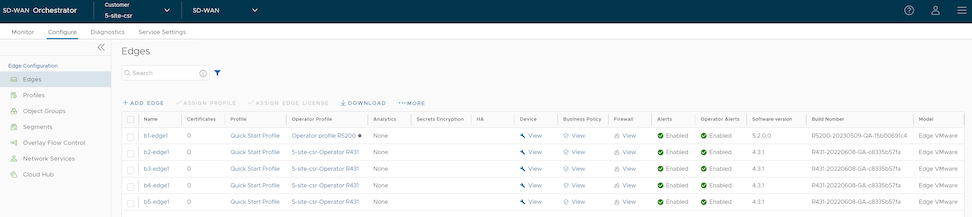
Table 1. Edges - Options and Descriptions Option Description Name Displays the name of the Edge. Click the Edge link to modify Edge configurations. See Configure Edge Overrides. Certificates Displays the current and expired certificates of the Edge. Click View to display Certificate details of the corresponding Edge. The pop-up window allows the user to download, revoke, or renew a certificate. Profile Displays the Profile assigned to the Edge. Click the Profile link to modify the Profile configurations. See Configure Profile Settings. Operator Profile Displays the name of the Operator profile associated with the Edge. This column is available only to Operator users. The Operator Profile is the template assigned to the customer, which includes the software image, application maps, Gateway selection, and Edge management settings. Secrets Encryption Displays secret key encryption details for the Edge. HA Displays whether the user has activated High Availability (HA) for the Edge. Device Click View to modify the Edge's configurations. See Configure Edge Overrides. Business Policy Click View to configure the Business Policy Rules of an Edge. Firewall Click View to configure the Firewall Rules of an Edge. Alerts Displays whether Customer alerts are activated or deactivated for the Edge. Operator Alerts Displays whether Operator alerts are activated or deactivated for the Edge. Software Version Displays the software version of the Edge. Build Number Displays the Edge's build number when the Edge is activated. Model Displays the model type of the Edge.
Configure Edge Settings
To override configuration settings for a specific Edge, perform the following steps:
- Select the link to an Edge or click the View link in the Device column of the Edge. The configuration options for the selected Edge appears on the Device tab.
Figure 2. Configure Edges 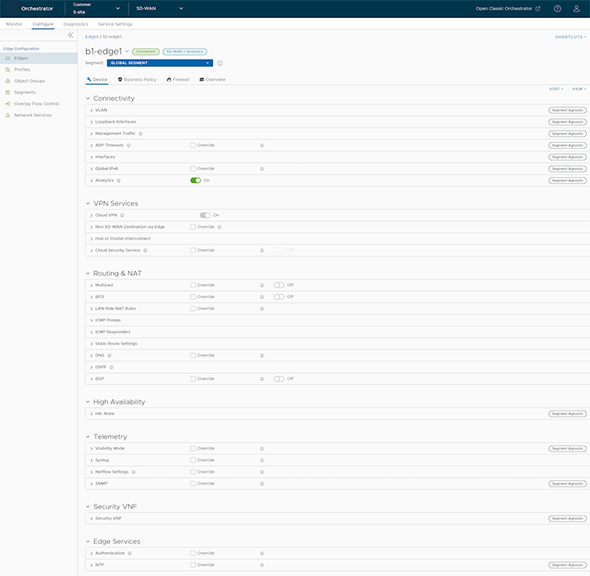
Reset Edges to Factory Settings
Edges may require a reset to factory settings for several reasons:
- When a user repurposes an Edge for a different site, the user must remove the existing configuration to activate the Edge at the new site.
- User's site is experiencing an issue, and VeloCloud SD-WAN Support recommends performing a hard reset to revert the Edge to factory settings and reactivate it at the site to see if that resolves the issue.
- The Edge is inaccessible or unresponsive, and multiple power cycles have not resolved the issue. The VeloCloud SD-WAN Support recommends performing a hard reset to restore the Edge to its factory settings and see if that resolves the issue.
Reset an Edge to factory settings using one of the following methods:
- Soft Reset or Deactivation - When the user performs this action, the system deactivates the Edge and removes all existing configurations. The Edge now uses the original factory configuration. However, the Edge software is not affected and retains the version it had before the soft reset. A soft reset Edge can be reactivated at another site or at the same site.
- Hard Reset - When the user performs this action, the Edge fully resets to its factory settings. This action not only deactivates the device and restores its factory configuration, but it also reverts the Edge software to its original factory version. After this process, the Edge is in the same state as when it was shipped from the factory.
If a user resets an active Edge at a site, the user completely loses client device connectivity at that site until the user either reactivates the same Edge or activates another Edge.
For instructions on how to reset an Edge to factory settings, see How to Factory Reset a VeloCloud SD-WAN Edge.