Configure Segments
Segmentation is the process of dividing the network into logical sub-networks called Segments by using isolation techniques on a forwarding device such as a switch, router, or firewall. Network segmentation is required when traffic from different organizations and data types must be isolated.
In the segment-aware topology, different Virtual Private Network (VPN) profiles can be activated for each segment. For example, Guest traffic can be backhauled to remote data center firewall services, Voice media can flow direct from Branch-to-Branch based on dynamic tunnels, and the PCI segment can backhaul traffic to the data center to exit out of the PCI network.
To activate the segmentation capability for an Enterprise, in the Operator portal, navigate to System Properties, and then set the value of the system property, enterprise.capability.enableSegmentation as True. For additional information about how to configure system properties, refer to the "System Properties" section in the Arista VeloCloud Orchestrator Deployment and Monitoring Guide.
By default, you can configure a maximum of 16 segments per Enterprise. However, you can choose to increase this default value to a maximum of 128 segments per Enterprise. Ensure that you define the maximum number of allowed segments in the enterprise.segments.system.maximum system property. For additional information about the various system properties that you must set up for the segmentation capability, refer to the "Segmentation" table in the "List of System Properties" section in the Arista VeloCloud Orchestrator Deployment and Monitoring Guide.
Limitations
- It is mandatory that you upgrade your SASE Orchestrator and your Edges to version 4.3 or above.
- After you have configured 128 segments for an Enterprise, you cannot downgrade your Edges to a version lower than 4.3. If you need to downgrade your Edges, ensure that you have only 16 segments, which is the default value for any Enterprise and delete the remaining segments before you downgrade the Edges.
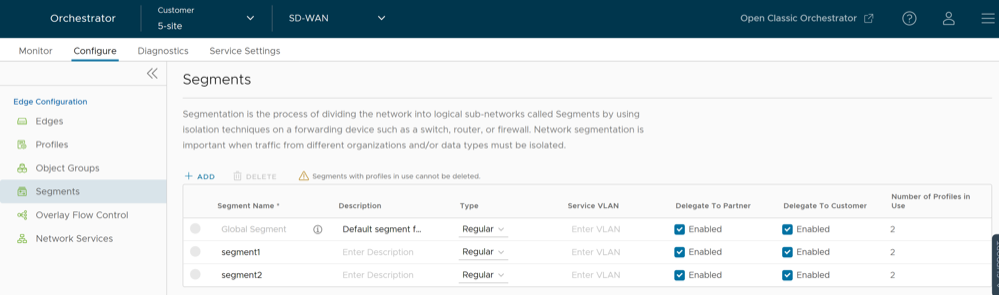
To configure the Segments:
- In the SD-WAN service of the Enterprise Portal, select .
The Segments page displays the existing Segments.
Figure 1. Segments