
DHCP IPv6 Server Discovery by Arista Access Points
Arista APs use DHCP Options 16 and 17 for IPv6 to discover and connect to a specific CV-CUE instance on-premises or in the cloud. For a dual-stack DHCP server, IPv4 is preferred over IPv6.
Introduction
If you use a DHCPv6 server, when a new AP boots up and requests an IP address, it includes an Option 16 message with the AP's Vendor Class Identifier (VCI) in its DHCP Request. The DHCP server examines the VCI and returns the correct vendor options in Option 17.
If Option 17 is absent, the AP falls back to default discovery (using preconfigured servers or DNS). For this arrangement to work, you must configure the DHCP server with the VCI information for each applicable scope (for example, pool or range of IP addresses).
This chapter contains the following topics:
Configuring DHCP for Server Discovery
Each AP includes a Vendor Class Identifier (VCI) string by default in its DHCP Request (Option 16). You must configure the DHCP server to respond to an AP's DHCP request with an appropriate Option 17.
Each AP includes a Vendor Class Identifier (VCI) string by default in its DHCP Request (Option 16). When a factory-default AP sends a DHCP Request, the AP identifies itself to the DHCP server by including its VCI in Option 16. The VCI format is: <Arista-AP-Model>. The following table contains the VCI strings for the supported APs.
| AP Model | VCI String |
|---|---|
| C-100 | <ARISTA-AP-C-100> |
| O-105 | <ARISTA-AP-O-105> |
| O-105E | <ARISTA-AP-O-105-E> |
| C-110 | <ARISTA-AP-C-110> |
| W-118 | <ARISTA-AP-W-118> |
| C-120 | <ARISTA-AP-C-120> |
| C-130 | <ARISTA-AP-C-130> |
| C-130E | <ARISTA-AP-C-130-E> |
| C-200 | <ARISTA-AP-C-200> |
| C-230 | <ARISTA-AP-C-230> |
| C-230E | <ARISTA-AP-C-230-E> |
| O-235 | <ARISTA-AP-O-235> |
| O-235E | <ARISTA-AP-O-235-E> |
| C-250 | <ARISTA-AP-C-250> |
| C-260 | <ARISTA-AP-C-260> |
| C-360 | <ARISTA-AP-C-360> |
| W-318 | <ARISTA-AP-W-318> |
| C-460 | <ARISTA-AP-C-460> |
| C-460E | <ARISTA-AP-C-460-E> |
| O-435 | <ARISTA-AP-O-435> |
| C-430 | <ARISTA-AP-C-430> |
Arista APs have a VCI string predefined for Option 16 use in their DHCP request; no configuration is needed on the AP. However, you must configure the DHCP server to respond to an AP's DHCP request with an appropriate Option 17.
See DHCP Option 17 Format for details on the response format.
Note: The configuration varies between IPv6 and IPv4 DHCP servers.
Configuring DHCP Server IPv6
Configuring a DHCP IPv6 server consists of two steps:
- Create a new Vendor Class – Define a Vendor Class Identifier (VCI) on the DHCP server for each AP model in use. This VCI must match the VCI defined in DHCP Request Option 16 on the AP (in the <ARISTA-AP-Model> format), as listed in the table above.
- Define a new Policy – Assign server values in Option 17 for the newly created vendor class.
Configure an Open Source DHCP Server
For open-source DHCP servers such as ISC-DHCP, use the following configuration for the subnet used by the AP. In the following example, the bold font is the configuration, and the text starting with # is the explanation.
# Vendor-specific options
option dhcp6.vendor-opts
"\x00\x00\x42\x05"
# Vendor ID (example: 16901 Arista Networks)
"\x00\x01\x00\x33fe80::54a4:36ff:fef2:d121,fe80::54a4:36ff:fef2:d122"
# Sub option 1: Primary, Secondary Wi-Fi Server WM FQDN/IP
"\x00\x04\x00\x0bSPECTRATALK"
# Sub option 4: Magic String
Configure a BlueCat DHCP Server
DHCP Option 17 is not available as a regular option in BlueCat, as seen in the following image. You need to add DHCP as a raw option.
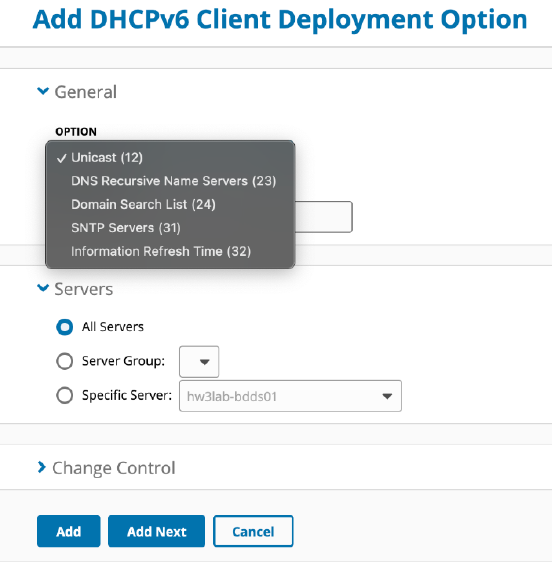
Follow these steps to configure a BlueCat Server for DHCPv6:
- Log in to the BlueCat Server.
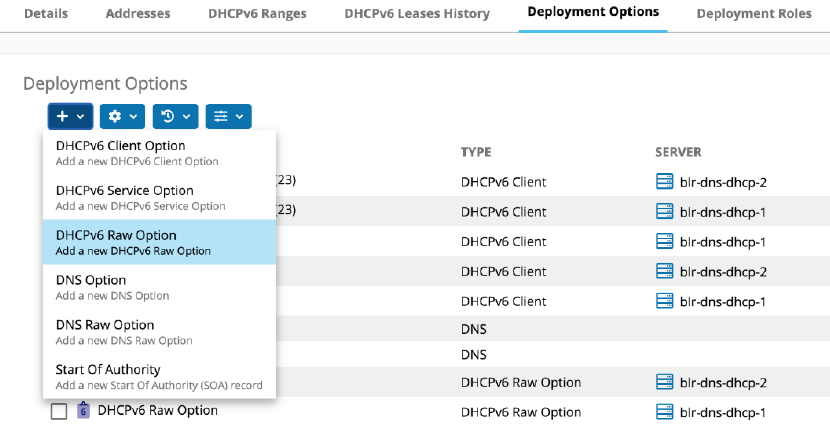
- Select the Deployment Options tab, select the + icon, and select DHCPv6 Raw
Option.
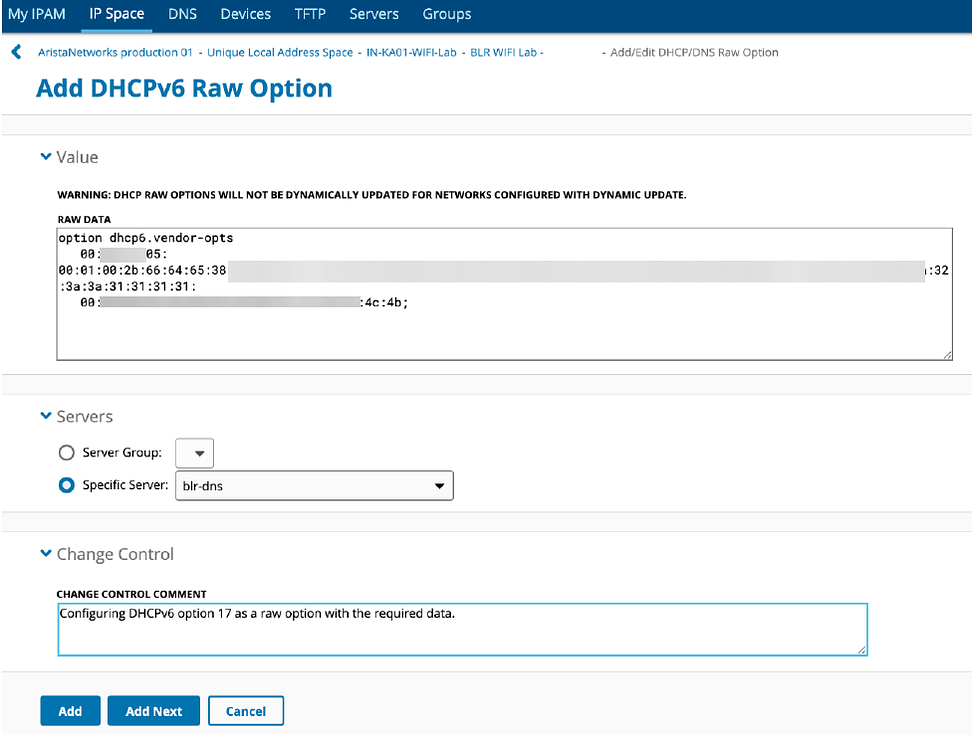
- Add the Option 17 data as shown in the following image. See DHCP Option 17 Format for a detailed explanation of
the Option 17 format that you must follow while configuring the DHCP server.
- Select Add to create the DHCPv6 Option data.
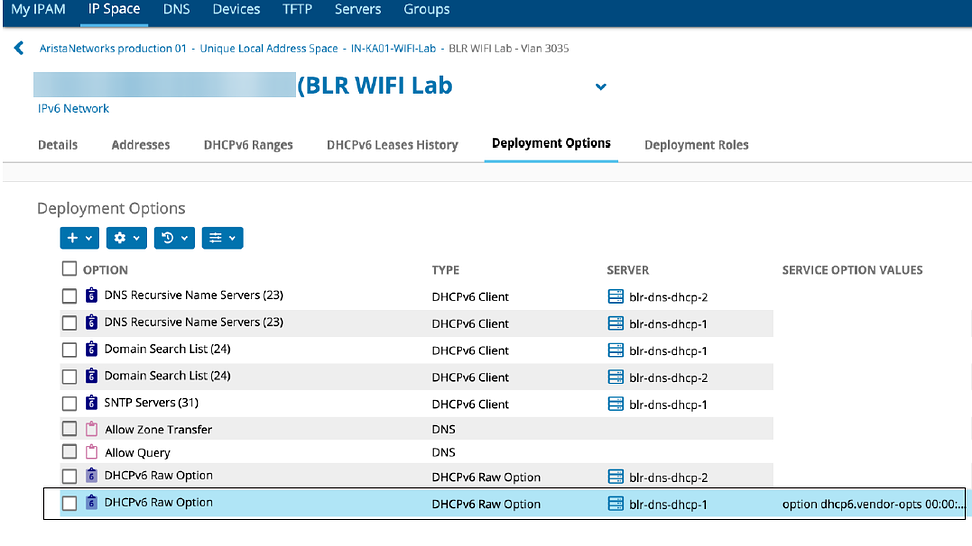
- Verify the newly created DHCPv6 options in Deployment Options.
DHCP Option 17 Format
Use the following format to enter the DHCP Option 17 data.
Use the following format to enter the options:
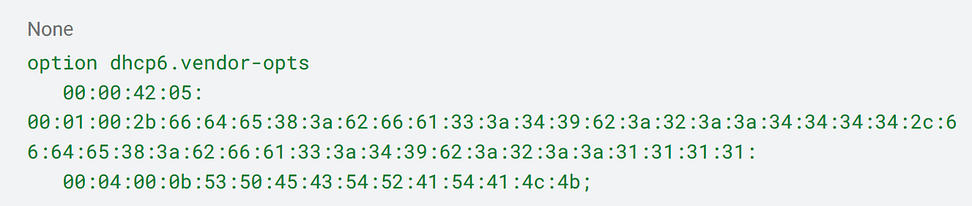
In the previous image, the values are configured in the hexadecimal format.
Enterprise Number: 16901 (Mojo Networks Inc.)
Value: fde8:bfa3:49b:2::4444,fde8:bfa3:49b:2::1111
Hexadecimal Format: 00:00:42:05
Sub-Option Code 1: Primary and Secondary CV-CUE IP/FQDN
Value: fde8:bfa3:49b:2::4444,fde8:bfa3:49b:2::1111
Hexadecimal Format: 00:01:00:2b:66:64:65:38:3a:62:66:61:33:3a:34:39:62:3a:32:3a:3a:34:34:34:34:2c:66:64:65:38:3a:62:66:61:33:3a:34:39:62:3a:32:3a:3a:31:31:31:31:
- Sub-Option Code: 00:01 (2 bytes) indicates the sub-option type, identifying this as the Primary and Secondary CV-CUE configuration.
- Length: 00:2b (2 bytes) specifies the length of the data field in hexadecimal, which is 43 bytes (0x2b = 43 in decimal).
- Data: The remaining bytes (66:64:65:38:...) represent the ASCII encoding of the string fde8:bfa3:49b:2::4444,fde8:bfa3:49b:2::1111.
Sub-Option Code 4: Magic String
Value: SPECTRATALK
Hexadecimal Format: 00:04:00:0b:53:50:45:43:54:52:41:54:41:4c:4b;
- Sub-Option Code: 00:04 (2 bytes) indicates the sub-option type, identifying this as the SPECTRATALK configuration.
- Length: 00:0b (2 bytes) specifies the length of the data field in hexadecimal, which is 11 bytes (0x0b = 11 in decimal).
- Data: The remaining bytes (53:50:45:43:54:52:41:54:41:4c:4b) represent the ASCII encoding of the string SPECTRATALK.
CLI versus DHCP
While you can use DHCP for server discovery, you can also direct an AP to CV-CUE using the AP Command Line Interface (CLI). If you use both CLI and DHCP Option 17, the AP uses specific logic to decide which values to use.
While you can use DHCP for server discovery, you can also direct an AP to a CV-CUE instance (a primary server and a secondary server) using the AP Command Line Interface (CLI). If you use both CLI and DHCP Option 17 to assign CV-CUE server values to an AP, the AP uses the following logic to decide which values to use:
- If you configure non-default server values on the AP using the AP CLI, then these values override the values received from the DHCP server.
- If you configure default server values on the AP using the AP CLI or restore the AP to factory defaults, the AP uses the values it receives from the DHCP server.
- In the absence of any other values, the AP uses default values.